Use this wire and cable weight calculator to find the weight and cost of any electrical wire or cable, layer by layer. It treats the conductor, insulation and outer sheath as separate rings, shows each weight in kg/km, and then gives the total weight and cost for your length and number of drums. Copper, aluminum and other conductors are supported, along with common insulation and sheath materials and 20+ currencies.
Conductor
Insulation & Sheath
Auto-calculated for a single core.
Live Preview
Results
Related Tools
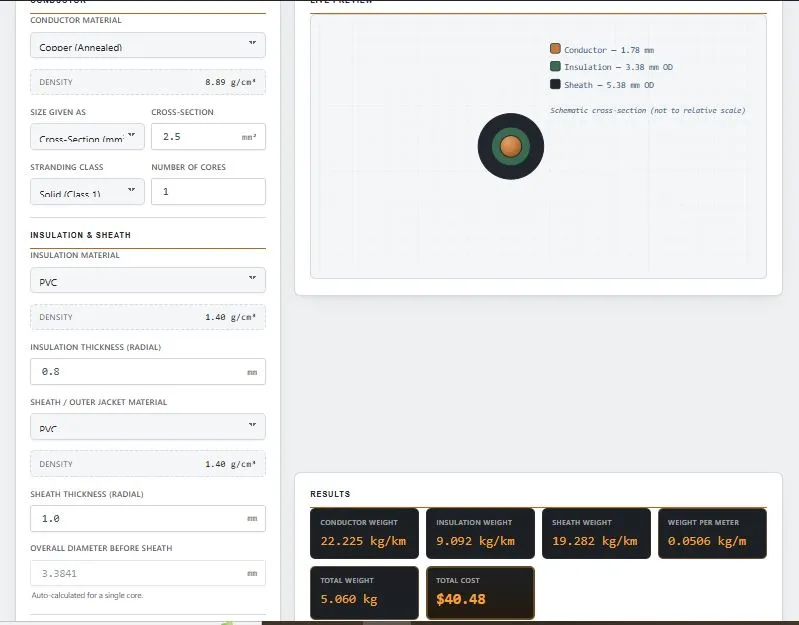
Table of Contents
Worked Example: Where a 2.5 mm² Cable's Weight Comes From
Take a single-core cable with these inputs:
- Conductor: annealed copper, 2.5 mm², solid (8.89 g/cm³)
- Insulation: PVC, 0.8 mm radial thickness (1.40 g/cm³)
- Sheath: PVC, 1.0 mm radial thickness (1.40 g/cm³)
- Length: 100 m, price $8 per kg
| Layer | Weight | Share of Total |
|---|---|---|
| Conductor (1.78 mm diameter) | 22.225 kg/km | 43.9% |
| Insulation (3.38 mm OD) | 9.092 kg/km | 18.0% |
| Sheath (5.38 mm OD) | 19.282 kg/km | 38.1% |
| Total | 50.6 kg/km (0.0506 kg/m) | 100% |
For 100 m, that is 5.06 kg, which costs $40.48 at $8 per kg. The surprise is that on a thin cable the insulation and sheath together weigh more than the copper (56% of the total). That is why guessing from copper weight alone underestimates real cable weight.
Copper vs Aluminum: Same Cross-Section, Lighter Cable
Change only the conductor to aluminum (2.70 g/cm³) and keep everything else the same:
| Conductor | Conductor Weight | Total Weight |
|---|---|---|
| Copper (8.89 g/cm³) | 22.225 kg/km | 50.6 kg/km |
| Aluminum (2.70 g/cm³) | 6.75 kg/km | 35.1 kg/km |
The conductor becomes about 70% lighter, and the whole cable about 31% lighter, because the insulation and sheath weigh the same. Keep in mind that aluminum usually needs a larger cross-section to carry the same current as copper, so compare the two at equal current rather than equal size.
Weight of Bare Copper and Aluminum Wire
To find the weight of bare wire, multiply the cross-section in mm² by the density in g/cm³. The result is in kg per km. For copper, weight (kg/km) = mm² × 8.89, so a 10 mm² copper conductor weighs 88.9 kg/km, or 0.0889 kg per metre. For aluminum, multiply by 2.70 instead.
| Cross-section | Copper (kg/km) | Copper (kg per 100 m) | Aluminum (kg/km) |
|---|---|---|---|
| 1.5 mm² | 13.3 | 1.33 | 4.05 |
| 2.5 mm² | 22.2 | 2.22 | 6.75 |
| 4 mm² | 35.6 | 3.56 | 10.8 |
| 6 mm² | 53.3 | 5.33 | 16.2 |
| 10 mm² | 88.9 | 8.89 | 27.0 |
| 16 mm² | 142.2 | 14.2 | 43.2 |
| 25 mm² | 222.3 | 22.2 | 67.5 |
| 35 mm² | 311.2 | 31.1 | 94.5 |
| 50 mm² | 444.5 | 44.5 | 135.0 |
| 70 mm² | 622.3 | 62.2 | 189.0 |
| 95 mm² | 844.6 | 84.5 | 256.5 |
| 120 mm² | 1066.8 | 106.7 | 324.0 |
If you know the diameter instead, a solid round copper wire of diameter d (mm) weighs about 6.98 × d² kg/km, and aluminum about 2.12 × d² kg/km. A 2 mm copper wire is therefore about 27.9 kg/km.
Weight per foot: 1 kg/km is about 0.672 lb per 1,000 ft, so a 2.5 mm² copper conductor weighs roughly 14.9 lb per 1,000 ft.
These figures are for the conductor only. Insulation and sheath add more, which the calculator above works out layer by layer. Some tables use 8.96 g/cm³ for pure copper; cable calculations commonly use 8.89 g/cm³ for annealed copper, which is about 0.8% lower.
Steel Wire Rope Weight (Approximate)
This calculator is built for insulated wire and cable. Steel wire rope is different because it is made of twisted strands with gaps between them, so it weighs less than a solid steel rod of the same diameter. As a rough guide, a common 6×19 or 6×36 rope weighs about:
- 0.0035 × d² kg/m with a fibre core (d in mm)
- 0.0042 × d² kg/m with a steel core (IWRC)
| Rope diameter | Fibre core (kg/m) | Steel core / IWRC (kg/m) |
|---|---|---|
| 6 mm | 0.13 | 0.15 |
| 8 mm | 0.22 | 0.27 |
| 10 mm | 0.35 | 0.42 |
| 12 mm | 0.50 | 0.60 |
| 16 mm | 0.90 | 1.08 |
| 20 mm | 1.40 | 1.68 |
These are estimates, usually within about 10% of published tables. Weight changes with construction, grade, lubrication and galvanizing, so use the manufacturer's table for lifting or safety work.
Density Reference
| Conductor Material | Density (g/cm³) |
|---|---|
| Copper (Annealed) | 8.89 |
| Tinned Copper | 8.89 |
| Aluminum | 2.70 |
| Aluminum Alloy | 2.70 |
| Copper-Clad Aluminum | 3.00 |
For insulation and sheath, PVC is 1.40 g/cm³, XLPE and LDPE/HDPE are about 0.92–0.95 g/cm³, and EPR/rubber and LSZH are about 1.50 g/cm³. XLPE and polyethylene are lighter and handle higher temperatures, LSZH is chosen for enclosed spaces such as tunnels and ships, and FEP (Teflon) is used for high-temperature or chemical-resistant cables. For a material that is not listed, choose Custom Material and enter the density from your supplier's datasheet. For other metals, see the EngineeringToolbox metals and alloys density table.
Multi-Core Cables and the Diameter Field
For a single core, the tool calculates the diameter before the sheath automatically (3.3841 mm in the example above). For multi-core cables you enter it yourself, because how cores pack together with fillers and binders differs between manufacturers. Take that figure from the cable datasheet rather than estimating it. The calculation covers the conductor, insulation and outer sheath, so fillers, binders and other extras are not part of the result.
Copper Scrap Value: Weigh the Metal, Not the Cable
When selling scrap wire, the buyer pays for the copper, not the plastic. In the 2.5 mm² example above, copper is only 43.9% of the cable's weight, so 100 m of cable (5.06 kg) contains about 2.22 kg of copper. Use the conductor weight from the results panel, then enter it in the Metal Scrap Value Calculator with today's price per kg. Thin, heavily insulated cables hold much less copper per kilogram than thick bare wire.
Ordering Tips
Choose None for insulation or sheath when pricing bare conductors or unsheathed assemblies.
If your datasheet gives a conductor diameter, switch "Size Given As" to Diameter instead of converting to mm² by hand.
Add a manufacturing or wastage allowance if you expect handling loss or cutting waste on your side.
Use Drums / Lengths to scale the total when you order more than one length.
Frequently Asked Questions
How is wire and cable weight calculated?
Each layer — conductor, insulation, and sheath — is treated as a ring with its own cross-sectional area. That area is multiplied by the material's density to get kg/km, and the three layers are added together for the total weight.
What conductor materials does this calculator support?
Copper, tinned copper, aluminum, aluminum alloy, and copper-clad aluminum (CCA) are built in, plus a custom density option for any other conductor material.
Can I enter conductor size as a diameter instead of mm²?
Yes. Switch "Size Given As" to "Diameter" and enter the value in mm — the calculator converts it to cross-sectional area internally before running the weight calculation.
Does the calculator handle cables with no insulation or no sheath?
Yes. Selecting "None" for either layer removes it from the calculation entirely, useful for bare conductors or unsheathed multi-core assemblies.
Can I get the cost in my local currency?
Yes, over 20 currencies are available, including USD, EUR, GBP, INR, and PKR, with a custom currency symbol option if yours isn't listed.
How much does copper wire weigh per metre?
Bare copper weighs 0.00889 kg per metre for every 1 mm² of cross-section. A 2.5 mm² conductor weighs about 0.0222 kg/m (22.2 kg/km) and a 10 mm² conductor about 0.0889 kg/m, before insulation.
How do you calculate the weight of copper wire?
Multiply the cross-section in mm² by 8.89 to get kg/km. For a round wire of diameter d in mm, use 6.98 × d² kg/km. Add the insulation and sheath weights for a finished cable.
How much does steel wire rope weigh?
A 10 mm 6×19 or 6×36 rope weighs roughly 0.35 kg/m with a fibre core and 0.42 kg/m with a steel core. Check the manufacturer's table for exact values.
Does this calculator work for armoured (SWA) cable?
It covers the conductor, insulation and outer sheath. Armour wires and bedding layers are not included, so for SWA cable use the weight on the manufacturer's datasheet.
Wire and Cable Weight Calculator — Quick Summary
This wire and cable weight calculator gives instant, layer-by-layer weight and cost results for any conductor, insulation, and sheath combination — no manual density lookups, no unit conversion errors. Whether you're checking a single wire or pricing a full drum, this wire and cable weight calculator handles the math and currency conversion in one step, saving time on every quote or site estimate.
Disclaimer
This wire and cable weight calculator is provided by BytePriva as a free reference tool to help estimate weight and cost using standard density values and layer-based geometric formulas. Results are intended for general planning, quoting, and educational purposes only.
Actual cable weight can vary due to manufacturing tolerances, filler and binder materials, core lay-up geometry, and alloy composition. For procurement, safety-critical, or high-value orders, always confirm the final figures against certified manufacturer datasheets or test certificates before purchasing or installation.
BytePriva makes no warranty regarding the accuracy of results generated by this tool and is not liable for any loss, cost, or damage arising from decisions made using these estimates. Use of this calculator is entirely at the user's own discretion.