I Beam Weight Calculator

This I beam weight calculator works out the exact weight of an I-beam or H-beam from its section dimensions, length, and material density, then converts that into a total material cost. Enter the beam's overall height, flange width, flange thickness, and web thickness, choose the material — mild/carbon steel, stainless steel 304 or 316, galvanized steel, aluminum, or a copper alloy — and the calculator computes the true cross-sectional area rather than assuming a fixed profile.

Enter the beam length and the number of beams you need, add a wastage percentage for cutting scrap, and the tool returns the cross-sectional area, weight per beam, total weight, and the material you actually need to procure. From there, choose how your supplier prices the steel — per kg, per metric ton, per meter, or per beam — and the calculator adds labor, cutting/fabrication, and shipping costs to give a complete total in any of 25+ world currencies.

Material & Density

Select a material for a reference density.

Beam Section Dimensions

Cost Inputs

Live Preview

Enter density, height, flange width, flange thickness, web thickness & length to see results.

-- --
Beam Length --
Cross-Sectional Area --
Weight per Beam --
Total Weight (raw) --
Material to Procure (with wastage) --
Material Cost --
Labor Cost --
Cutting / Fabrication --
Shipping --
Subtotal --
Tax --
Grand Total --
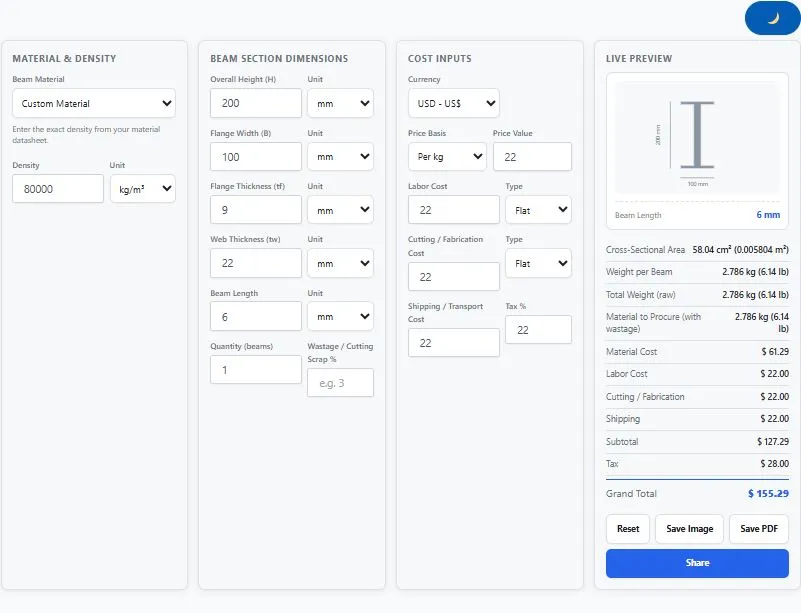
I beam weight calculator showing beam section dimensions, material, and cost inputs with live weight result

How the I Beam Weight Calculator Works

The calculator is built on the standard cross-sectional area method used across structural steel engineering:

Cross-Sectional Area = 2 × (Flange Width × Flange Thickness) + (Height − 2 × Flange Thickness) × Web Thickness

Weight = Cross-Sectional Area × Length × Density

The tool converts every dimension into meters and every density into kilograms per cubic meter behind the scenes.

This means it doesn't matter whether you enter your section dimensions in millimeters, centimeters, meters, or inches — the math stays accurate down to a fraction of a kilogram. The calculator also checks that your flange thickness is physically possible for the given height, since two flanges have to fit within the overall height with room left for the web; if they don't, it shows a warning instead of returning an incorrect weight.

Reference Density Table

The table below shows typical densities for common beam materials. These are industry reference values only — always confirm the exact density from your mill certificate, since alloy composition and grade can shift the number slightly.

MaterialDensity (kg/m³)
Mild / Carbon Steel~7850
Stainless Steel 304~8000
Stainless Steel 316~8000
Galvanized Steel~7850
Aluminum~2700
Copper Alloy (Bronze/Brass)~8900

Worked Example

Take a mild steel H-beam with an overall height of 200 mm, flange width of 200 mm, flange thickness of 12 mm, web thickness of 8 mm, and a density of 7850 kg/m³:

Cross-Sectional Area = 2 × (0.2 m × 0.012 m) + (0.2 m − 0.024 m) × 0.008 m = 0.0048 + 0.001408 = 0.006208 m²
Weight per meter = 0.006208 m² × 7850 kg/m³ = 48.73 kg/m

For a 6-meter beam, that's 48.73 kg/m × 6 m = 292.4 kg per beam. If you're ordering 10 beams with 3% wastage for cutting scrap, the material to procure works out to 292.4 kg × 10 × 1.03 = 3,011.7 kg — and that figure (or the equivalent length or beam count, depending on how your supplier prices) feeds directly into the final cost breakdown.

Why Use This I Beam Weight Calculator

Working out I-beam or H-beam weight by hand means calculating the cross-sectional area from four separate dimensions, converting units, looking up density, and only then getting to cost — and a single unit mix-up (say, entering flange thickness in centimeters instead of millimeters) can throw the final weight off by a factor of ten. This tool removes that risk by handling multiple length and thickness units internally, so the same accurate result comes out regardless of which units your section drawing or mill certificate uses.

It also catches a mistake that manual calculations often miss: an impossible cross-section, where the flange thickness is too large for the given beam height. Instead of silently returning a wrong or negative weight, the calculator flags the input as invalid so you can correct it before it feeds into a quote or a structural estimate.

Beyond weight, the calculator solves a real pricing problem — structural steel isn't always quoted the same way. Some suppliers price per kilogram, others per metric ton, per running meter, or per beam. Instead of forcing one pricing model, this tool lets you pick whichever basis matches your actual quote, then adds labor, cutting/fabrication, and shipping on top, so you get one final number instead of several partial figures to add up yourself.

The live cross-section preview updates as you type, redrawing the actual I-beam shape to scale with your flange width, height, and thickness values — so you can visually confirm your inputs look like the beam you're picturing before committing to an order.

Materials & Densities Guide for This I Beam Weight Calculator

I-beams and H-beams aren't limited to one material — the same section shape gets rolled or fabricated from different metals depending on the application's strength, corrosion, and weight requirements.

Mild / Carbon Steel is the standard structural material, used in building frames, bridges, and general construction where strength-to-cost ratio matters most.

Stainless Steel 304 offers strong general corrosion resistance and is common in food processing, architectural, and marine-adjacent structures that don't face aggressive chloride exposure.

Stainless Steel 316 adds molybdenum for better resistance to chlorides and marine environments, making it the preferred stainless grade for coastal structures and chemical processing plants.

Galvanized Steel is standard structural steel coated in zinc for corrosion protection, widely used in outdoor structures, agricultural buildings, and infrastructure exposed to weather.

Aluminum beams are far lighter than steel for the same volume, chosen where reducing structural dead load matters — transportable structures, marine superstructures, and some architectural applications.

Copper Alloy (Bronze/Brass) sections are less common structurally but appear in architectural, decorative, and specialized corrosion-resistant applications.

For detailed dimensional and structural properties of standard rolled steel sections, the American Institute of Steel Construction maintains the official shapes database used across the structural engineering industry.

Who This I Beam Weight Calculator Is Built For

Structural engineers and detailers checking beam weight for load calculations or foundation design can quickly verify a section's weight per meter without cross-referencing a physical shapes table.

Fabricators and steel workshops estimating raw material for a job can use the quantity and wastage fields to work out exactly how much steel to order for cutting and welding operations, beyond just the finished-part weight.

Procurement and purchasing teams buying structural steel can match the price basis — per kg, per metric ton, per meter, or per beam — to however their supplier actually quotes, instead of converting prices manually before every order.

Logistics and site teams arranging cranes, trucks, or shipping containers can get an accurate total weight figure for handling and transport planning, since beam weight directly affects lifting equipment and vehicle load limits.

International buyers and suppliers benefit from the built-in currency selector, which covers 25+ world currencies plus a custom option, so the total cost is shown in the currency that's actually relevant to the quote.

Tips for Getting Accurate Results From This I Beam Weight Calculator

Use the exact density from your mill certificate, not the reference value shown in this guide. The reference values (like mild steel's ~7850 kg/m³) are close approximations — actual density can shift slightly based on alloy composition and grade, which matters more on large orders where small percentage differences add up.

Double-check your unit selection before reading the result. Since flange thickness and web thickness are often specified in millimeters on a section drawing while beam length is given in meters or feet, it's worth glancing at each unit dropdown before trusting the output.

Watch for the flange thickness warning. If you enter a flange thickness that's too large relative to the overall height, the calculator will flag it instead of returning a number — this usually means a unit was entered wrong (for example, height in centimeters but flange thickness in millimeters).

Remember this uses a simplified area formula. The calculator computes cross-sectional area from height, flange width, flange thickness, and web thickness using the standard structural estimation method — it doesn't account for fillet radius (the small curved area where the web meets the flange). For quick estimation and quoting this is accurate enough, but for certified structural design work, always cross-check against official rolled-section tables like the AISC shapes database.

Set a realistic wastage percentage rather than leaving it at zero. Cutting beams to length for a project almost always produces offcut scrap; if you don't account for it, your "material to procure" figure will undershoot what you actually need to order.

FAQs

How do I calculate the weight of an I-beam or H-beam?

Calculate the cross-sectional area by adding the two flange areas and the web area, then multiply that area by the beam's length and material density. This calculator does that automatically — enter the height, flange width, flange thickness, and web thickness, select the material, and it returns the weight instantly.

What is the density of steel used in I-beams and H-beams?

Mild/carbon steel is approximately 7850 kg/m³, and stainless steel 304 or 316 is approximately 8000 kg/m³. Aluminum is around 2700 kg/m³, and copper alloys around 8900 kg/m³. Always confirm the exact figure from your mill certificate, since alloy grade can shift density slightly.

Why does the calculator show a warning about flange thickness?

The calculator checks that two flange thicknesses can physically fit within the overall beam height with room left for the web. If the flange thickness you entered is too large for the given height, it shows a warning instead of returning an incorrect or negative weight — this usually points to a unit mismatch between two fields.

Does this calculator account for cutting wastage or scrap?

Yes. The Wastage/Cutting Scrap % field increases the total weight, length, and beam count figures to show how much material you actually need to procure, separate from the finished-beam weight.

Can this calculator handle different steel pricing methods, like per ton or per meter?

Yes, this I beam weight calculator supports four pricing methods — per kg, per metric ton, per meter, and per beam — so you can match whichever basis your supplier actually quotes, and it calculates material cost accordingly.

What units can I use for beam dimensions?

Height and flange width support millimeters, centimeters, meters, and inches. Flange thickness and web thickness support millimeters, centimeters, and inches. Beam length additionally supports feet. You can mix units across fields and the calculator converts everything internally.

Can I use this for bulk orders with multiple beams?

Yes. Enter the number of beams in the Quantity field, and the calculator scales the total weight and any per-beam costs (labor, cutting/fabrication) accordingly, while flat costs like shipping stay fixed per order.

Can I save or share my calculation results?

Yes. The tool includes a Save as Image button for a clean summary image, a Save as PDF button for a one-page printable result, and a Share button to send the summary directly via WhatsApp.

Quick Summary

This I beam weight calculator gives you the cross-sectional area and weight of an I-beam or H-beam from height, flange width, flange thickness, web thickness, length, and material density, then converts that into a full cost breakdown — material, labor, cutting/fabrication, and shipping — in your chosen currency. Select your beam material, enter your section dimensions in any unit, add a wastage percentage for cutting scrap, choose how your supplier prices the steel, and this I beam weight calculator shows weight per beam, total order weight, and the grand total cost, with a live cross-section preview and the option to save the result as an image or PDF.

Disclaimer

This I beam weight calculator by BytePriva is provided as a free estimation tool to help with planning, quoting, and material ordering. The formulas and density values used are based on a standard structural steel area-estimation method and general industry reference densities; they are intended for guidance only and do not account for fillet radius, rolling tolerance, or standard-specific section properties found in official rolled-section tables.

Actual beam weight and total pricing may vary depending on the exact grade, manufacturing standard, supplier pricing, and regional cost factors at the time of your order. BytePriva makes no warranty, express or implied, regarding the accuracy of results for any structural, load-bearing, or safety-critical application, and accepts no liability for decisions made based solely on this calculator's output.

For structural design, load-bearing calculations, or formal procurement, always confirm figures against official section tables such as the AISC shapes database and consult a qualified structural engineer before finalizing a design or placing an order.

Scroll to Top