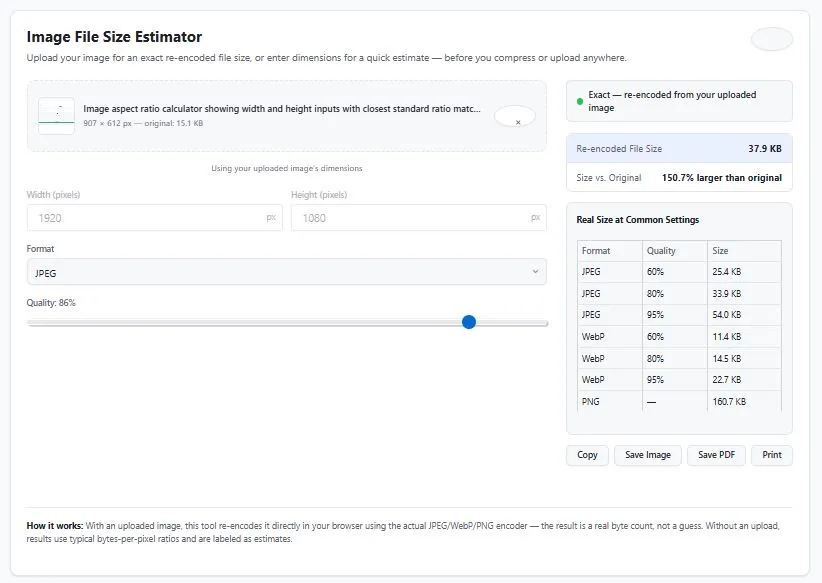
Use this free image file size calculator to know exactly how big your photo will be before you compress or upload it anywhere — for JPEG, PNG, and WebP formats.
Upload your actual image and this tool re-encodes it directly in your browser using the real JPEG/WebP/PNG encoder, giving you an exact byte count instead of a rough guess. No image? Enter your pixel dimensions instead for a quick formula-based estimate.
How it's different: Most file size calculators only estimate using typical compression ratios, which can be off by 20-40% depending on your image's actual content. This one re-encodes your real image when you upload it — the result is exact, not estimated.
Upload your image for an exact re-encoded file size, or enter dimensions for a quick estimate — before you compress or upload anywhere.
Upload for an exact size or drag an image here
Re-encoded entirely in your browser — nothing is uploaded to a server.
— or estimate without uploading —
How it works: With an uploaded image, this tool re-encodes it directly in your browser using the actual JPEG/WebP/PNG encoder — the result is a real byte count, not a guess. Without an upload, results use typical bytes-per-pixel ratios and are labeled as estimates.
How This Image File Size Calculator Works
This calculator works two different ways, depending on whether you upload an image.
With an uploaded image (exact results): Your image is loaded directly into your browser and re-encoded using the same JPEG, WebP, and PNG encoders built into every modern browser. When you move the quality slider or change format, the calculator performs real compression on your actual image and reports the real resulting byte size — not a formula, not a guess. A comparison table also shows real sizes at common quality settings (60%, 80%, 95%) for JPEG and WebP side by side, plus PNG.
Without an upload (formula-based estimate): If you just want a rough number before you even have the image, enter your pixel dimensions and this calculator applies typical bytes-per-pixel compression ratios for JPEG and WebP at your chosen quality. These estimates are clearly labeled as such, because actual results always depend on the image's own content — a photo of a sunset compresses very differently than a screenshot of text.
Why "Estimated" and "Exact" Give Different Numbers
Compression ratio depends heavily on what's actually in the image — a busy, detailed photo compresses less efficiently than a simple graphic with large flat areas of color, even at identical pixel dimensions and quality settings. Formula-based estimates use typical, averaged ratios, so they can be off by 20-40% for any specific image. Uploading your actual image removes that guesswork entirely, since the browser performs the real compression.
JPEG vs PNG vs WebP — Which Format Should You Use?
JPEG — Best for photos and complex images with lots of colors and gradients. Uses lossy compression, meaning some image data is discarded to reduce file size. Widely supported everywhere, making it the safest default for photos.
PNG — Best for graphics, logos, screenshots, and images with text or sharp edges, especially those needing transparency. Uses lossless compression, so no image data is lost — but this makes PNG files significantly larger than JPEG for photographic content.
WebP — Generally the smallest file size for a given visual quality, supporting both lossy and lossless compression plus transparency. Supported by all modern browsers, though older software and some email clients may not display it correctly.
For a deeper technical comparison of these formats, see Google's official WebP compression study, which documents real-world size differences across formats.
Tips for Getting Accurate Results
This image file size calculator shows you the real difference when you test multiple quality levels.
- Always upload your actual image when accuracy matters — formula-based estimates are useful for rough planning, but only a real upload gives you the exact size you'll actually get.
- Test multiple quality levels before deciding — the comparison table shows JPEG and WebP at 60%, 80%, and 95% together, so you can spot the point where size jumps sharply without a real visual quality improvement.
- Don't judge PNG by JPEG standards — PNG will almost always look larger than JPEG for photos; that's expected, since PNG is lossless. PNG makes more sense for graphics, logos, and screenshots than for photographs.
- Remember this measures the image itself, not the final file on disk — some formats add small amounts of metadata (EXIF data, color profiles) on top of the core image data, which isn't reflected in the re-encoded size.
FAQs
How can I check an image's file size before uploading it?
Upload your image to this calculator, and it will re-encode it directly in your browser to show you the exact file size at your chosen format and quality — before you upload it anywhere else.
Why do different file size calculators give different results for the same image?
Most calculators estimate file size using average compression ratios, which can vary 20-40% depending on the actual content of the image. This calculator avoids that problem by re-encoding your real uploaded image, giving an exact result instead of an estimate.
What quality setting should I use for JPEG images?
70-85% quality is typically a good balance between visual quality and file size for most photos, especially for web use. Higher quality settings produce noticeably larger files with diminishing visual improvement.
Can I use this image file size calculator without uploading an image?
Yes. Enter your pixel width and height manually, choose a format and quality, and this calculator will provide a formula-based estimate. This is clearly labeled as an estimate since actual results depend on the specific image's content.
Is this image file size calculator free to use?
Yes, this calculator is completely free, requires no login or signup, and has no usage limits.
Disclaimer
The Image File Size Calculator and all information on this page are provided by BytePriva for general estimation and informational purposes only. While the "exact" mode re-encodes your uploaded image using real browser-based compression, final file sizes on any specific platform or software may vary slightly due to additional metadata, color profiles, or platform-specific compression applied after upload.
BytePriva, its owners, and contributors make no warranties, express or implied, regarding the accuracy, completeness, or reliability of this calculator or its results. To the fullest extent permitted by law, BytePriva shall not be held liable for any direct, indirect, incidental, or consequential loss, damage, or cost arising from the use of, or reliance on, this calculator or the information provided on this page.
By using this calculator, you acknowledge and agree to these terms.
Note: All image processing for this calculator occurs locally within your browser. No images are uploaded, transmitted, or stored on BytePriva's servers.