A JSON formatter is a free online tool that validates, beautifies, and minifies JSON data — helping developers catch syntax errors, explore data structures, and clean up messy JSON in seconds. Paste your JSON to see it validated instantly, browse it in a collapsible tree view, search through keys and values, and copy or download the formatted result.
Table of Contents
How to Use This JSON Formatter
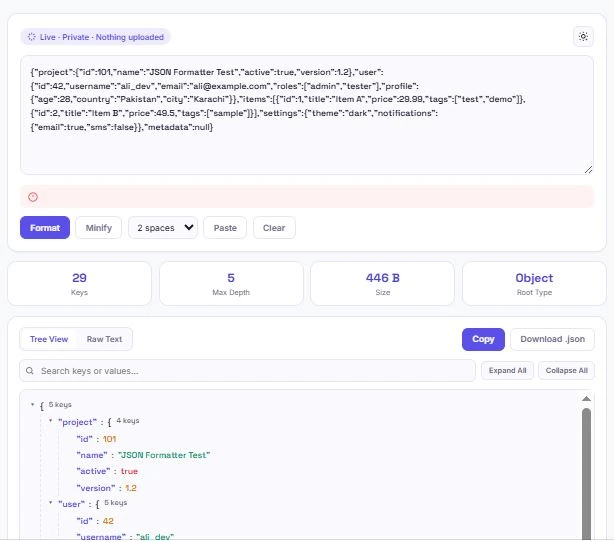
Formatting and validating JSON takes just a few seconds. Paste your JSON into the input box, and it's validated automatically.
- Paste your JSON — validation runs instantly as you type or paste
- Click "Format" to beautify it with proper indentation, or "Minify" to compress it into a single line
- Choose your indent size — 2 spaces, 4 spaces, or a tab
- Switch to Tree View to explore the structure visually, with color-coded types and expandable nested objects
- Use the search bar to find a specific key or value anywhere in the structure
- Expand All or Collapse All to control how much of the tree is visible at once
- Copy or download the formatted result when you're done
Why JSON Validation Matters
JSON is the standard format for exchanging data between servers, APIs, and web applications, which means even a single misplaced comma or missing bracket can break an entire request or response. Running your JSON through this JSON formatter before using it catches these errors immediately — instead of debugging a mysterious failure somewhere downstream, you know exactly where the problem is.
This JSON formatter shows the exact line and column where invalid JSON breaks, rather than just saying "invalid JSON" and leaving you to guess. That's especially useful in larger files, where scanning by eye for a missing quote or extra comma can take far longer than the fix itself.
Tree View vs. Raw Text: When to Use Each
This JSON formatter offers two ways to view your data, and each is better suited to a different task.
Tree View turns your JSON into a collapsible, color-coded structure — objects and arrays can be expanded or collapsed individually, and every value is colored by type (strings, numbers, booleans, and null). It's the better choice for exploring an unfamiliar JSON structure, checking how deeply nested your data is, or searching for a specific key without scrolling through hundreds of lines.
Raw Text shows the formatted JSON as plain, indented text — exactly what you'd copy into a code file or share with a teammate. It's the better choice once you already understand the structure and just need clean, properly formatted text to copy or download.
Common JSON Errors This Tool Catches
Most invalid JSON breaks for one of a handful of predictable reasons. This JSON formatter flags all of them instantly, with the exact line and column:
| Common Error | Example |
|---|---|
| Trailing comma | {"a": 1, "b": 2,} — the comma after the last value isn't allowed |
| Missing quotes on keys | {name: "value"} — keys must be wrapped in double quotes |
| Single quotes instead of double | {'name': 'value'} — JSON requires double quotes, not single |
| Unclosed brackets or braces | Missing a closing } or ] |
| Trailing or leading text | Extra characters before or after the JSON, like a stray comment |
| Unescaped special characters | A raw newline or quote inside a string value |
Catching these with a JSON formatter before using the data downstream is almost always faster than debugging the failure it eventually causes in an API call or application.
JSON-LD, Structured Data, and SEO
JSON is also the format behind JSON-LD, the structured data markup that helps search engines understand a page's content well enough to show rich results — star ratings, FAQ dropdowns, product prices, and more directly in search listings. Since JSON-LD is still just JSON, a single formatting mistake in a site's structured data can cause search engines to ignore it entirely.
Google's own documentation on structured data explains how this markup works and why valid syntax matters for search visibility. Running JSON-LD through this JSON formatter before publishing is a quick way to confirm it's syntactically valid before it goes live on a page.
A Note on Data Privacy
Since JSON often contains sensitive information — API keys, user records, configuration files, or internal data structures — this JSON formatter processes everything entirely in your browser using JavaScript. Nothing you paste is ever sent to a server, logged, or stored. That matters more for a JSON formatter than for most tools, since the data being formatted is frequently the kind you wouldn't want to paste into a random website.
Frequently Asked Questions
Is this JSON formatter free to use?
Yes. There's no sign-up, no limit on how much JSON you can format, and no premium tier. Formatting, validation, tree view, and search are all free.
Does my JSON data get uploaded anywhere?
No. All formatting and validation happens locally in your browser using JavaScript. Your JSON is never sent to a server, logged, or stored.
What's the difference between Format and Minify?
Format adds indentation and line breaks to make JSON easy to read. Minify removes all unnecessary whitespace to compress it into the smallest possible size, which is useful for reducing file size in production.
How do I fix "Unexpected token" errors?
This error usually means there's a syntax problem near the line and column shown in the error message — commonly a trailing comma, a missing quote, or a bracket that doesn't match. Checking that exact location first usually resolves it.
Can I search for a specific value in a large JSON file?
Yes. Switch to Tree View and use the search bar to filter by key or value — matching nodes stay visible and everything else is hidden, and the tree automatically expands to show your results.
Why does my JSON show as invalid even though it looks correct?
JSON has stricter rules than JavaScript object syntax — keys must be in double quotes, trailing commas aren't allowed, and single quotes aren't valid. A structure that works fine as a JavaScript object can still be invalid JSON.
Can I use this to validate JSON-LD structured data?
Yes. Since JSON-LD is just JSON, pasting it into this tool checks the syntax the same way, which is a quick way to catch formatting mistakes before publishing structured data on a live page.
Will this work on my phone?
Yes. The layout adjusts for smaller screens, and formatting, validation, and tree view all work the same way on mobile browsers as they do on desktop.
Quick Summary
This JSON formatter validates, beautifies, and minifies JSON entirely in your browser — with an interactive tree view, exact error line detection, search, and one-click copy or download. Unlike a basic JSON formatter that just says "invalid JSON," this one shows exactly where the problem is, down to the line and column. Nothing you paste is ever uploaded or stored, which matters since JSON often carries sensitive data like API responses or configuration files.
Disclaimer
This JSON formatter is provided as a free utility for validating, formatting, and exploring JSON data. While it follows standard JSON parsing rules to detect syntax errors accurately, it does not verify that your data is semantically correct for your specific application, API, or schema — only that it's valid JSON.
BytePriva and its owner(s) make no guarantees regarding the suitability of this tool for any specific production, security, or compliance use case, and shall not be held liable for any loss, error, or consequence arising from its use. You remain responsible for reviewing formatted or minified output before using it in a live application or publishing it.
This tool is safe to use — there is nothing to install, no account required, and no data is uploaded or stored. This disclaimer simply clarifies that final responsibility for how the output is used rests with you.