A free pdf to speech reader that turns any PDF, TXT file, or pasted text into spoken audio directly inside your browser — no account, no upload, and no waiting for a server to process your file. Unlike most text to speech online tools that send your document to a cloud AI service to generate voices, this pdf voice reader runs entirely on your own device: your file is read locally, and your content never leaves your browser tab. That also means there's no character limit, no monthly quota, and no "upgrade to continue" wall — you can listen to pdf files of any length, for free, forever.
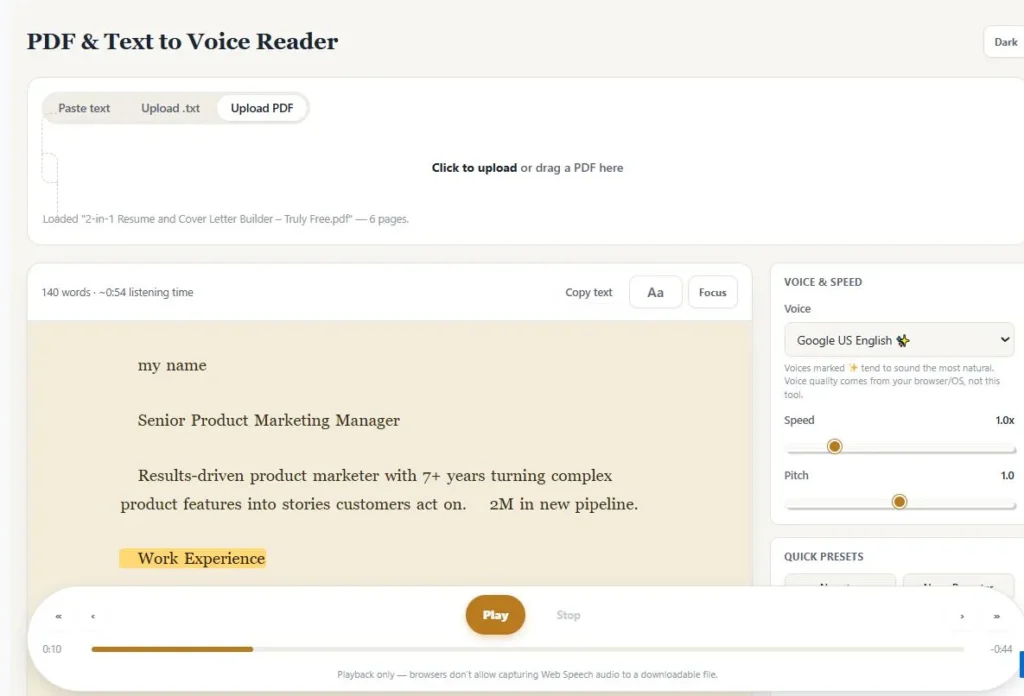
Paste text, or drop in a .txt or PDF file, and it's ready to read pdf aloud in seconds using your browser's own natural-sounding voices. Adjust speed, pitch, and voice, then use sentence and paragraph navigation, bookmarks, and a distraction-free focus mode to make long documents easy to get through — making it a genuinely private pdf audio reader for study, work, or everyday reading.
PDF & Text to Voice Reader
VOICE & SPEED
QUICK PRESETS
BOOKMARKS
Table of Contents
How This PDF to Speech Reader Works
To use this pdf to speech reader, follow these four steps:
- Add your content. Paste text directly into the box, or upload a .txt or PDF file — the tool reads text-based PDFs automatically, no conversion needed.
- Choose a voice and adjust settings. Pick from your browser's available voices, then fine-tune speed, pitch, and pick a quick preset (Narrator, News Reporter, Calm & Slow, or Fast Skim).
- Press play and listen. The current sentence highlights as it's spoken, so you can follow along visually while you listen to pdf or text content — click any word to jump straight to it.
- Navigate and save your place. Use sentence/paragraph skip controls, page navigation for multi-page PDFs, and bookmarks to mark spots you want to return to later.
Everything happens 100% in your browser — nothing is uploaded, so there's no waiting and no file-size fear.
Why Use This PDF to Speech Reader
Most free text-to-speech tools that promise "AI voices" actually send your document to a cloud server first — that's how they generate those polished, human-like voices. This pdf to speech reader works the opposite way: it uses the speech engine already built into your browser and operating system, so your file is read out loud without ever being uploaded anywhere. There's no queue, no processing wait, and no server that could ever see what you're reading.
Because it relies on your browser's native Web Speech API instead of a paid cloud voice service, there's no character limit, no monthly quota, and no account needed to keep listening. You get unlimited, completely free access — whether you're going through a 5-page memo or a 500-page ebook.
Beyond just converting text to audio, this tool is built to be a full reading companion: sentence-level highlighting keeps you visually in sync with the voice, bookmarks let you mark spots to return to, and a distraction-free focus mode strips away everything but the text. It's less of a one-time converter and more of a pdf voice reader you can come back to for daily reading and studying.
Who This PDF to Speech Reader Is Built For
- Students and researchers — turn long PDFs, lecture notes, or research papers into audio you can listen to while commuting, exercising, or reviewing before an exam.
- People with dyslexia or reading fatigue — sentence highlighting and adjustable text size/line spacing make following along easier, without needing any special software.
- Busy professionals — get through reports, contracts, or long emails hands-free while multitasking, with bookmarks to pick up exactly where you left off.
- Writers and proofreaders — hear your own writing read back to you to catch awkward phrasing or errors your eyes tend to skip over.
- Privacy-conscious users — anyone who doesn't want to upload personal documents, contracts, or notes to a third-party server just to have them read aloud.
Tips for Getting the Best Results
- Voice quality depends on your browser and OS — voices labeled with a ✨ in the voice list tend to sound the most natural; if none are marked, try enabling an "Online" or "Natural" voice in your device's system speech settings.
- Scanned PDFs won't work — this tool reads text-based PDFs only. If a PDF is a photo or scan with no selectable text, it can't be converted to speech here.
- Use presets as a starting point — Calm & Slow is easier to follow for dense material, while Fast Skim is better for a quick pass through familiar content; fine-tune speed and pitch from there.
- Bookmark before switching documents — bookmarks and playback position are tied to the currently loaded text, so mark anything important before loading a new file.
- There's no audio download — browsers don't allow capturing this kind of speech output to a file, so this tool is for live listening, not offline MP3 export.
Frequently Asked Questions
Is this PDF to speech reader really free?
Yes. There's no sign-up, no character limit, and no monthly quota, because it uses your browser's own speech engine instead of a paid cloud voice service.
Does this tool upload my PDF or text to a server?
No. Everything runs locally in your browser — your document is never sent anywhere, which is different from most online text-to-speech tools that process files on a remote server.
What file types can I use with this PDF to speech reader?
You can paste text directly, upload a .txt file, or upload a text-based PDF. All three load into the same reading and listening experience.
Can it read scanned PDFs?
No. This tool reads PDFs that have selectable text, not scanned images or photos of pages. If a PDF has no extractable text, it can't be converted to speech here.
Can I download the audio as an MP3?
No. Browsers don't provide a way to capture Web Speech API audio into a downloadable file, so this tool is built for live listening rather than offline audio export.
Does it work with multiple languages?
It automatically detects your document's language and tries to select a matching voice already installed on your device. The languages and voices available depend entirely on your browser and operating system.
Will my bookmarks and progress be saved if I close the tab?
Your reading position, bookmarks, and settings are saved only for as long as the browser tab stays open. Closing the tab clears them, so it's best to finish a session or note your place before closing.
Do I need to create an account to use it?
No account or sign-up is required. Just paste your text or upload a file and start listening right away.
Quick Summary
This free pdf to speech reader turns pasted text, .txt files, or text-based PDFs into spoken audio directly in your browser — with no sign-up, no upload, and no character limits. Instead of relying on a paid cloud voice service, it uses your device's own built-in speech engine, so your documents stay completely private. Sentence highlighting, adjustable speed and pitch, quick presets, bookmarks, page navigation for PDFs, and a distraction-free focus mode make it a genuinely useful pdf voice reader for studying, proofreading, or reading on the go. There's no MP3 download — this tool is built for live listening.
Disclaimer
This PDF to speech reader is free to use, works entirely in your browser, and does not upload, store, or share any text or file you load into it.
Voice quality, available languages, and pronunciation accuracy depend on your browser and operating system, not on this tool itself, so results may vary from device to device. This tool is provided as-is with no warranty, and we're not liable for any issues that arise from its use.
For important documents — legal, medical, or otherwise sensitive content — please review the original text yourself or confirm details with a qualified professional rather than relying solely on the audio reading.