A duplicate line remover is a free online tool that instantly scans a list and removes repeated lines, leaving only the unique entries. It works directly in your browser — paste a list of emails, keywords, URLs, or any line-separated data, choose how duplicates should be handled, and get a clean result in one click, with nothing ever uploaded to a server.
Result
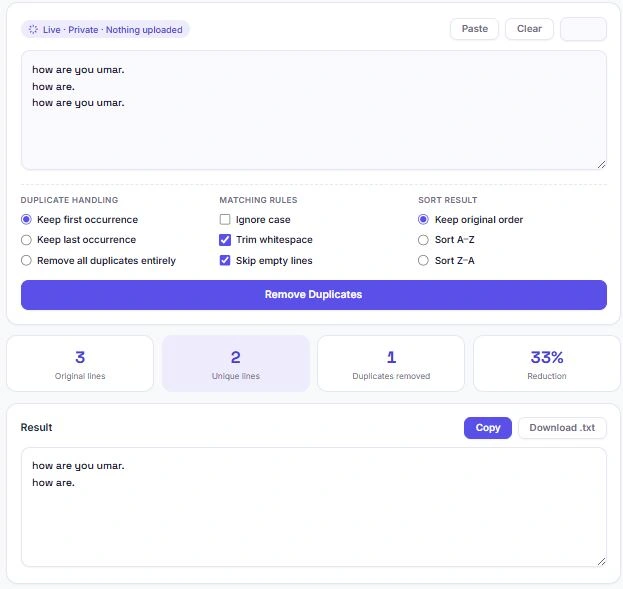
Table of Contents
How to Use This Duplicate Line Remover
Cleaning up a list with this duplicate line remover takes just a few clicks. Paste your list into the box above — one item per line — then choose your settings and hit generate.
- Paste directly using the Paste button to pull your list straight from the clipboard
- Pick a duplicate handling mode — keep the first occurrence, keep the last occurrence, or remove every line that has duplicates entirely
- Set your matching rules — ignore case, trim whitespace, or skip empty lines
- Choose a sort order — keep the original order, or sort A–Z / Z–A
- Click "Remove Duplicates" to generate the cleaned result
- Copy the result with one click, or download it as a .txt file
Understanding the Duplicate Handling Modes
Not every list needs duplicates handled the same way, so this tool gives you three modes to choose from:
- Keep first occurrence — the most common choice. If a line appears multiple times, the first one you see in your list is kept and every repeat after it is removed. This preserves your original order.
- Keep last occurrence — the opposite approach. Useful when your list is a log or export where later entries are more up to date, and you want the most recent version of a repeated line to survive.
- Remove all duplicates entirely — the strictest mode. If a line appears more than once anywhere in the list, every copy of it — including the first one — is removed. What's left is only the lines that were truly unique to begin with.
Most people only ever need "keep first occurrence," but the other two modes matter for specific situations, like reconciling log files or isolating one-off entries from a larger dataset.
When You'll Need a Duplicate Line Remover
Duplicate lines show up in all kinds of everyday tasks, and cleaning them by hand doesn't scale past a handful of entries. Here are the situations this tool is built for:
| Use Case | Why Duplicates Sneak In |
|---|---|
| Keyword lists from SEO tools | Exporting from multiple tools or reports often creates overlap |
| Email lists before a campaign | Combining lists from different signup forms or events |
| Log file analysis | The same error or event repeats every time it's triggered |
| Spreadsheet or CSV exports | Merging data from multiple sheets or database queries |
| Research notes | Copy-pasting from several sources during research |
| URL or link lists | Crawling or scraping tools often return the same URL twice |
In each case, the fix is the same: paste the list, pick your matching rules, and let the tool isolate the duplicates instead of scanning line by line yourself.
How Duplicate Detection Actually Works
Under the hood, this tool doesn't compare every line against every other line one by one — that approach gets painfully slow once a list grows past a few hundred entries. Instead, it uses a hash-based lookup: each line is checked against a running record of lines already seen, which makes the whole process run in close to constant time per line, regardless of how long the list gets.
This is the same underlying idea behind the Set object in JavaScript — MDN's official documentation — which stores only unique values and is a common building block for deduplication logic in web development. It's why this tool stays fast even on lists with several thousand lines: the comparison logic doesn't get slower as the list grows, it just does one lookup per line.
That efficiency matters most for data cleanup tasks — deduplicating a scraped list of URLs, cleaning a keyword export with thousands of rows, or filtering a log file with repeated error messages. A slow, line-by-line comparison would choke on inputs like that; a hash-based lookup handles them without a noticeable delay.
Frequently Asked Questions
Is this duplicate line remover free to use?
Yes. There's no sign-up, no limit on how many times you can use it, and no premium tier. Every mode and option is free.
Does my list get uploaded anywhere?
No. All processing happens locally in your browser using JavaScript. Your list never leaves your device and isn't stored or logged anywhere.
What's the difference between "Ignore case" on and off?
With Ignore case turned on, "Apple" and "apple" are treated as the same line, and one is removed as a duplicate. With it turned off, they're treated as different lines and both are kept.
Will trimming whitespace change my actual text?
Trim whitespace only removes extra spaces at the very start and end of each line before comparing them for duplicates. It doesn't touch spacing in the middle of a line.
Can I use this for very large lists?
Yes. Since everything runs in your browser rather than on a server, there's no upload wait, and it comfortably handles lists with thousands of lines.
What happens to blank lines in my list?
With "Skip empty lines" enabled, blank lines are removed automatically. If you turn that option off, blank lines are treated like any other line and deduplicated the same way.
Can I download the cleaned list instead of copying it?
Yes. Click "Download .txt" after generating your result to save the cleaned list directly as a text file.
Will this work on my phone?
Yes. The tool is fully responsive and works the same way on mobile browsers, tablets, and desktops.
Quick Summary
This duplicate line remover cleans up any list — keywords, emails, URLs, log entries — in one click, with three handling modes (keep first, keep last, or remove all duplicates entirely), case sensitivity and whitespace controls, and flexible sorting. Everything runs locally in your browser using a fast hash-based lookup, so there's no upload, no waiting, and no limit on list size. Copy your result instantly or download it as a .txt file when you're done.
Disclaimer
This tool is provided as a free utility for general list-cleaning and text-processing purposes. Duplicate detection follows the matching rules you select (case sensitivity, whitespace trimming, empty line handling), so results depend entirely on how those options are configured — always review your settings before relying on the output for important data.
BytePriva and its owner(s) make no guarantees regarding the accuracy or completeness of the results for any specific purpose, including professional, academic, or commercial use, and shall not be held liable for any loss, error, or consequence arising from its use. You remain responsible for verifying the cleaned list before using it, especially for critical data like email lists or database records.
This tool is safe to use — there is nothing to install, no account required, and no data is uploaded or stored. This disclaimer simply clarifies that final responsibility for how the results are used rests with you.