This resolution to megapixel calculator converts an image's exact pixel dimensions into a precise megapixel count, instantly, using the same formula camera manufacturers use to advertise sensor resolution: megapixels equal width in pixels multiplied by height in pixels, divided by 1,000,000. Enter your width and height below, or upload the image itself, and you'll see the exact MP count along with how it compares to common camera and screen resolutions, from 720p video up to 61MP full-frame cameras.
Enter pixel width & height, or upload an image to auto-fill them.
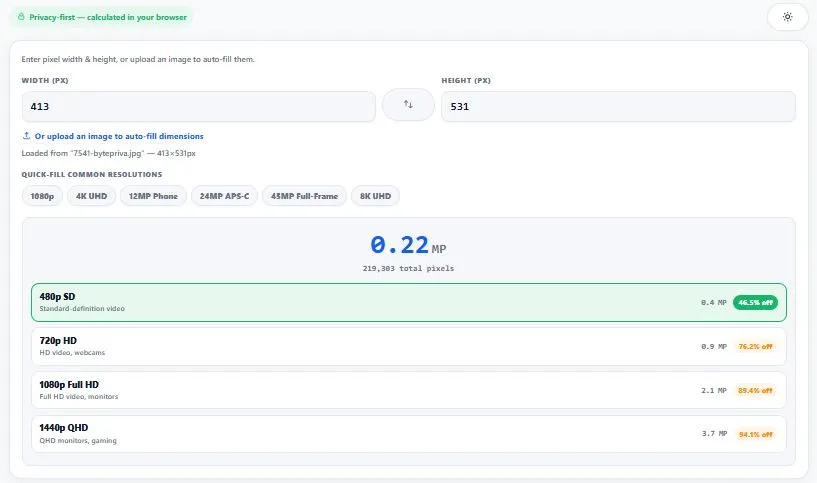
Table of Contents
How This Resolution to Megapixel Calculator Works (The Formula)
Let's walk through a real example manually: say your camera outputs images at 5472×3648 pixels. Multiply them together — 5472 × 3648 = 19,963,136 total pixels — then divide by 1,000,000, giving 19.96 MP, which most manufacturers would simply round up and market as "20MP." This is exactly the calculation this resolution to megapixel calculator performs the instant you type in your dimensions, without any rounding.
A megapixel (MP) is exactly one million pixels — no more, no less. To find it, multiply an image's width by its height to get the total pixel count, then divide by 1,000,000. For a 6000×4000 image (a common APS-C camera resolution): 6000 × 4000 = 24,000,000 pixels ÷ 1,000,000 = 24 MP. This is the same math every camera manufacturer uses to advertise sensor resolution, and it's exactly what the calculator above does the instant you enter your dimensions.
Table:
| Resolution | Total Pixels | Megapixels |
|---|---|---|
| 1280×720 (720p HD) | 921,600 | 0.92 MP |
| 1920×1080 (1080p Full HD) | 2,073,600 | 2.07 MP |
| 2560×1440 (1440p QHD) | 3,686,400 | 3.69 MP |
| 3840×2160 (4K UHD) | 8,294,400 | 8.29 MP |
| 4032×3024 (typical smartphone) | 12,192,768 | 12.19 MP |
| 6000×4000 (24MP APS-C camera) | 24,000,000 | 24.00 MP |
| 7680×4320 (8K UHD) | 33,177,600 | 33.18 MP |
This same calculation is the industry standard used to advertise camera and sensor resolution — for example, a camera capturing images at 6000×4000 pixels is marketed as a 24-megapixel camera, using the exact width × height ÷ 1,000,000 formula explained above. For a deeper technical breakdown of how megapixels are defined and used across cameras and sensors, see this megapixel explainer.
Why Use This Calculator
Every feature below is something the tool above actually does, right now, in your browser:
Live results, no button to click — type your width and height and the megapixel count updates instantly.
Upload an image to auto-fill dimensions — pick a file and its exact pixel width and height are read directly from the image.
Quick-fill common resolutions — one-click chips for 1080p, 4K UHD, 12MP smartphone, 24MP APS-C, 45MP full-frame, and 8K UHD, so you don't need to look up exact numbers.
Ranked closest-match list — instead of just a number, you get the four nearest common camera/screen resolutions, each with the precise percentage difference, so you know exactly where your image stands.
Exact pixel count shown alongside MP — see the full total (e.g. "24,000,000 total pixels"), not just the rounded megapixel figure.
Everything runs in your browser — your image is read locally to measure its dimensions and is never uploaded to any server.
Works smoothly on any device — no heavy libraries, no canvas processing, just simple math, so it's fast even on older phones and slow connections.
Light and dark mode — toggle to match your screen preference, saved for your next visit.
Common Megapixel Counts by Camera & Device Type
Megapixel counts vary hugely depending on what captured the image, and knowing typical ranges helps you sanity-check a result from this resolution to megapixel calculator against what's realistic for the source device.
Older smartphones (2015-2018): typically 8-16 MP — most budget and mid-range phones from this era shipped with 8MP or 12MP main sensors.
Modern smartphones (2020-present): typically 12-108 MP — flagship phones commonly advertise 48MP, 50MP, or 108MP sensors, though many use pixel-binning to output smaller 12MP files by default.
Entry-level DSLR/mirrorless cameras: typically 20-26 MP — this range covers most APS-C sensor cameras used by hobbyist and semi-professional photographers.
Professional full-frame cameras: typically 24-61 MP — higher-end bodies built for studio, landscape, or commercial photography push into the 45-61 MP range for maximum detail and cropping flexibility.
Webcams and video calls: typically 1-5 MP — most webcams capture at 1080p (2.07 MP) or lower, since video streaming doesn't require photo-level detail.
Drone cameras: typically 12-48 MP — consumer drones commonly use 12-20 MP sensors, while professional mapping and cinema drones can exceed 48 MP.
Scanned documents and old photographs: typically 1-10 MP — depends entirely on scanner DPI settings and the physical size of the original print or page.
Who This Calculator Is Built For
This resolution to megapixel calculator is built for anyone who needs to know an image's exact megapixel count without doing the math by hand. Photographers check a camera's real output resolution or compare it against a client's minimum MP requirement before delivering files. Graphic designers and print professionals confirm an image has enough resolution for a specific print size before sending it to production.
Video editors verify whether footage matches the megapixel demands of 4K or 8K delivery formats. Smartphone buyers and camera shoppers compare advertised megapixel specs against real-world resolutions like 1080p or 4K to understand what they're actually getting. In every case, the goal is the same — know the exact number before you commit to a decision based on it.
Tips for Accurate Results
Use the image's real pixel dimensions, not its file size in KB/MB. Megapixels are about pixel count, not storage size — a heavily compressed 500 KB file can still be a 24MP image.
Upload the image instead of typing dimensions from memory. Camera specs are sometimes rounded for marketing (a "12MP" phone camera might actually output 4032×3024, which is 12.19 MP) — the upload option reads the exact number.
More megapixels doesn't automatically mean better quality. Megapixel count measures resolution only — actual image quality also depends on the sensor, lens, lighting, and compression, none of which this or any megapixel calculator can measure.
Check the closest-match list before assuming a "round" spec. A camera marketed as "24MP" is often 23.9 or 24.1 MP in reality — the percentage difference shown tells you exactly how close it is to the advertised figure.
Remember megapixels and aspect ratio are independent. The same 24 MP total can come from many different width/height combinations (6000×4000, 4899×4899, 5333×4500) — megapixel count alone doesn't tell you the shape of the image.
Frequently Asked Questions
How do you calculate megapixels from resolution?
Multiply the width in pixels by the height in pixels, then divide by 1,000,000. For example, a 4000×3000 image has 4000 × 3000 = 12,000,000 pixels, which equals 12 megapixels. This calculator does that math automatically the moment you enter your dimensions.
What does "megapixel" actually mean?
A megapixel (MP) is a unit equal to exactly one million pixels. It's simply a compact way to describe the total number of individual pixels in an image, camera sensor, or screen, without having to write out the full pixel count every time.
Does more megapixels always mean better image quality?
Not necessarily. Megapixels measure resolution — the amount of detail an image can hold — but overall quality also depends on the sensor size, lens quality, lighting conditions, focus, and compression. A well-made 12MP photo can look sharper than a poorly shot 48MP one.
How many megapixels is 4K resolution?
4K UHD (3840×2160) works out to 3840 × 2160 = 8,294,400 pixels, which is 8.29 megapixels. This is lower than most modern smartphone cameras, which is why photos are usually much higher resolution than video frames.
How many megapixels do I need for printing?
It depends on the print size and viewing distance, but as a general reference point, an 8×10 inch print at standard photo-quality density needs roughly 7-8 megapixels, while a 16×20 inch print needs closer to 24-29 megapixels. Enter your image's dimensions above to see its exact megapixel count before deciding.
Why does my camera say 12MP but this calculator shows 12.19 MP?
Camera manufacturers usually round the advertised megapixel figure for marketing. A "12MP" smartphone camera commonly outputs images at 4032×3024 pixels, which is 12,192,768 pixels — 12.19 MP exactly. The advertised number is a rounded approximation, not the literal pixel count.
What's the difference between megapixels and resolution?
Resolution refers to the specific width and height in pixels (like 4000×3000), while megapixels is the total pixel count from multiplying those two numbers together, expressed in millions. Resolution describes the shape and exact dimensions; megapixels summarizes the total amount of detail in a single figure.
Is this resolution to megapixel calculator free, and does it upload my images anywhere?
Yes, it's completely free with no sign-up required. When you upload an image to auto-fill the dimensions, the file is only read locally in your browser to measure its width and height — it is never uploaded to any server.
Quick Summary
This resolution to megapixel calculator converts an image's width and height in pixels into a single megapixel figure, using the formula width × height ÷ 1,000,000. This calculator does that instantly, either from numbers you type in or dimensions read directly from an uploaded image, and ranks how close your result is to common camera and screen resolutions, from 720p video up to 61MP full-frame cameras. Whether you're checking a camera's real output, confirming print-readiness, or comparing specs before a purchase, the goal is always the same: know the exact megapixel count before you rely on it.
Disclaimer
BytePriva strives for accuracy, but calculations can occasionally contain errors — please double-check important results yourself before relying on them for professional, commercial, or print work. The megapixel math above (width × height ÷ 1,000,000) is standard and has been manually verified, but by using this tool, you agree that you're responsible for confirming your own numbers before final use — BytePriva and its team cannot be held liable for any loss or issue arising from reliance on these results. Images uploaded to auto-fill dimensions are processed entirely in your browser and are never stored or sent anywhere.