Use this free EXIF remover to see every piece of hidden data in your photo — camera model, date and time, and GPS coordinates showing exactly where it was taken — then remove all of it with one click.
How cleaning works: The image is re-encoded using your browser's built-in JPEG encoder, which never carries metadata forward. This means removal is guaranteed complete — not a "best effort" partial removal like some tools offer.
See every piece of hidden data in your photo — camera, date, GPS location — then remove it all with one click. 100% free, nothing uploaded.
Upload a JPEG photo or drag it here
Read and cleaned entirely in your browser — nothing is ever uploaded to a server.
How This EXIF Remover Works
This tool works in two steps, both happening entirely inside your browser.
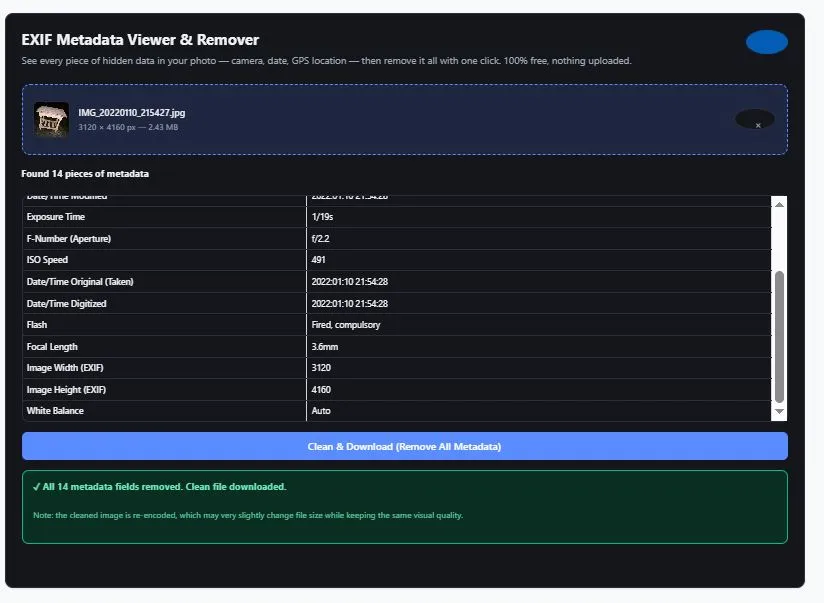
Step 1 — Reading the metadata: When you upload a JPEG photo, this tool reads the file's binary structure directly to find its EXIF data block — the hidden section where cameras and phones store information like camera make and model, the exact date and time the photo was taken, camera settings, and GPS coordinates if location services were on. Every piece of data found is shown to you — nothing is filtered out or hidden.
Step 2 — Cleaning: When you click "Clean & Download," your photo is redrawn onto a blank canvas using your browser's built-in image processing, then re-exported as a new JPEG file. This re-encoding process never carries metadata forward — it's not selectively deleting fields, it's generating a fresh file that never had the metadata to begin with. That's what guarantees complete removal.
Why This Approach Is More Reliable Than Selective Removal
Many metadata removal tools work by selectively deleting specific EXIF fields from the existing file, which can sometimes miss data hidden in less common metadata blocks (like manufacturer-specific tags or embedded thumbnails). Because this tool regenerates the image entirely through canvas re-encoding, there's no existing metadata structure left to miss — the output file simply never had any metadata in the first place.
What Metadata Is Actually Hiding in Your Photos?
Most people are surprised by how much information a single photo can reveal. Here's what's commonly found:
GPS Coordinates — the exact latitude and longitude of where the photo was taken, accurate enough to pinpoint a home address, workplace, or specific location down to a few meters.
Camera Make & Model — which phone or camera took the photo, which can sometimes be cross-referenced with other photos to link them to the same device or person.
Date & Time — precisely when the photo was captured, which combined with GPS data can reveal patterns like daily routines or travel history.
Camera Settings — exposure time, aperture, ISO, and focal length, generally harmless but useful for photographers wanting to preserve technical details.
Software & Editing Info — what software last modified the image, which can sometimes reveal editing history.
When This Actually Matters
Sharing photos on private, trusted platforms rarely poses a risk. But posting images publicly — on marketplaces, forums, dating profiles, or social media that doesn't already strip metadata — can unintentionally expose your location or identity. Real estate listings, photos of children, and images shared during safety-sensitive situations are common cases where removing this data first is worth the extra step.
For a deeper guide on protecting your digital privacy, including metadata, see the Electronic Frontier Foundation's official Surveillance Self-Defense guide, a trusted resource from a leading digital rights nonprofit.
Tips for Using This Tool Effectively
- Check every photo before sharing publicly, not just ones you suspect — GPS location is often added automatically by phones without you noticing, especially if location services are on by default.
- Download and verify the cleaned file — after clicking "Clean & Download," you can re-upload the cleaned version back into this tool to confirm the metadata is gone.
- Screenshots typically don't need cleaning — screenshots rarely contain camera or GPS metadata, since they're not captured by a camera sensor. This tool is most useful for actual photos taken with a phone or camera.
- Turn off location tagging at the source when possible — most phone camera apps let you disable location tagging in settings, preventing the data from being added in the first place.
FAQs
How do I remove EXIF data from a photo?
Upload your JPEG photo to this tool, review the metadata it finds, then click "Clean & Download." The tool re-encodes your image using your browser's built-in image processor, which produces a new file with no metadata at all.
How do I check if my photo has GPS location data?
Upload your photo to this tool. If GPS coordinates are found, a clear warning banner will display the exact location, along with the full metadata table showing everything else in the file.
Does removing EXIF data reduce image quality?
The cleaning process re-encodes the image, which can result in a very slight, generally unnoticeable change in visual quality and file size — similar to saving a JPEG again. The core image content remains visually the same.
Can I trust that all metadata was actually removed?
Yes. Because the cleaning process re-encodes the image from scratch rather than selectively deleting fields, there is no existing metadata structure left in the output file — removal is complete by design, not a best-effort attempt.
Quick Summary
This free EXIF remover shows you every piece of hidden metadata in your JPEG photos — camera details, timestamps, and GPS location — with nothing filtered or hidden, then lets you remove all of it with one click. Cleaning works by re-encoding your image through your browser's built-in image processor, which guarantees complete removal rather than a best-effort selective deletion. Everything happens locally in your browser; your photos are never uploaded to a server. Whether you're protecting your location before posting online, checking client photos for hidden data, or simply curious what your camera is recording, this tool gives you full visibility and control — completely free, with no limits.
Disclaimer
The EXIF Remover and Viewer tool and all information on this page are provided by BytePriva for general informational and privacy-assistance purposes only. While this tool reads and displays common EXIF metadata fields and removes metadata through image re-encoding, users are solely responsible for verifying that their specific privacy or security needs are met before sharing images publicly, especially in safety-critical situations.
This tool is not a substitute for comprehensive digital security practices or professional guidance in high-risk situations (such as domestic safety concerns, journalism in hostile environments, or legal matters). If your safety depends on complete anonymity, consult additional security resources beyond this single tool.
BytePriva, its owners, and contributors make no warranties, express or implied, regarding the accuracy, completeness, or reliability of this tool or its results. To the fullest extent permitted by law, BytePriva shall not be held liable for any direct, indirect, incidental, or consequential loss, damage, or harm arising from the use of, or reliance on, this tool or the information provided on this page.
By using this tool, you acknowledge and agree to these terms.
Note: All metadata reading and image cleaning for this tool occurs locally within your browser. No images are uploaded, transmitted, or stored on BytePriva's servers.