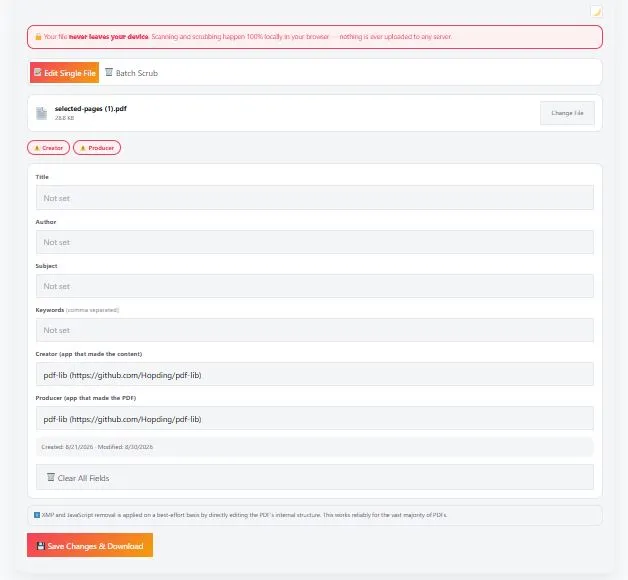
Remove metadata from PDF files instantly with BytePriva's free, browser-based tool — no software to install and no file ever leaves your device. Upload your PDF and it scans for 9 types of hidden information: Title, Author, Subject, Keywords, Creator, Producer, XMP metadata, embedded JavaScript, and embedded files, showing you exactly what's found.
Choose "Edit Single File" to correct or clear each field individually, or switch to "Batch Scrub" to strip metadata from multiple PDFs at once and download them as a ZIP. Advanced fields like XMP metadata and JavaScript are also detected and removed on a best-effort basis. Because everything runs locally in your browser, your documents — and whatever private information they contain — never touch a server.
Tap to choose a PDF or drag & drop it here
One file at a time
ℹ️ XMP and JavaScript removal is applied on a best-effort basis by directly editing the PDF's internal structure. This works reliably for the vast majority of PDFs.
Done!
Tap to choose PDFs or drag & drop them here
Select multiple files at once
Done!
Table of Contents
How to Remove Metadata from PDF Files
- Choose your mode — Pick "Edit Single File" if you want to review and correct each field individually, or "Batch Scrub" if you just want to strip metadata from multiple PDFs at once.
- Upload your PDF — Tap the upload box or drag and drop your file. The tool automatically scans it and displays every piece of metadata it finds, from basic fields like Author and Title to advanced ones like XMP data and embedded JavaScript.
- Edit or clear the fields — In Edit mode, update any field with correct information, or use "Clear All Fields" to blank everything at once. In Batch mode, every file is scrubbed automatically with one click.
- Choose advanced removal options — Toggle whether to also remove XMP metadata and embedded JavaScript, both of which are checked by default when detected.
- Save and download — Click "Save Changes & Download" for a single file, or "Scrub All Metadata" for a batch, and your cleaned PDF (or ZIP of PDFs) downloads immediately.
Why Use This PDF Metadata Removal Tool
Most online tools that remove metadata from PDF files require uploading your document to a remote server first. This creates an odd contradiction: you're trying to protect your privacy by stripping hidden PDF information, but in the process you're handing the entire file — metadata and all — to a company you don't know.
This concern isn't theoretical. According to redaction guidance published by the U.S. Court of Appeals for the Seventh Circuit, hidden metadata in Word and PDF documents has repeatedly led to real-world exposure of sensitive information that authors believed was already removed. This tool avoids adding to that risk by scanning and editing your PDF's metadata entirely inside your browser — nothing is ever transmitted anywhere.
Most competing tools only offer a single "delete everything" button. This one also lets you edit metadata instead of just clearing it — useful if a field simply has the wrong name or an outdated company listed, rather than something you need removed entirely.
Who This Metadata Removal Tool Is Built For
- Journalists and researchers — stripping author names, editing software, and revision history from PDFs before publishing sensitive reports or leaked documents.
- Legal and government professionals — cleaning PDF metadata from filings, memos, or public records where hidden author or organization details shouldn't be disclosed.
- Freelancers and consultants — removing a previous client's name or company information left behind in a PDF's Producer or Creator field before reusing a template.
- Businesses handling sensitive documents — batch-scrubbing metadata from multiple contracts, invoices, or reports at once before sharing them externally.
- Anyone curious what's hidden in their files — simply scanning a PDF to see what information it's been quietly carrying since it was created.
Tips for Getting Accurate Results
- Check the scan summary badges first — before editing anything, the tool shows exactly which of the 9 metadata types were found, so you know what you're dealing with.
- Use Edit mode when metadata needs correcting, not just removing — if a field has the wrong author or an outdated title, typing the correct value is often more useful than clearing it entirely.
- Leave XMP and JavaScript removal checked unless you have a specific reason not to — these are the most commonly overlooked sources of hidden PDF information, and removing them is enabled by default when detected.
- Use Batch Scrub for volume, Edit mode for precision — batch mode is faster for many files at once, but it clears every field uniformly rather than letting you review each one.
- Remember this tool doesn't touch visible page content — it only removes metadata to protect PDF privacy; for redacting visible text itself, a separate redaction tool is needed.
FAQs
Is this PDF metadata removal tool free to use?
Yes, this tool is completely free to use with no limit on the number of files processed.
Does this tool upload my PDF to a server?
No. All scanning and metadata removal happens locally in your browser using JavaScript. Your file is never uploaded to any server at any point.
What kinds of metadata does this tool detect?
It detects 9 types: Title, Author, Subject, Keywords, Creator, Producer, XMP metadata, embedded JavaScript, and embedded files, displaying each one it finds before you make any changes.
Can I edit metadata instead of just deleting it?
Yes. Edit mode lets you view and change each field individually, so you can correct inaccurate information rather than only clearing it.
Can I remove metadata from multiple PDFs at once?
Yes. Batch Scrub mode processes multiple PDF files in one click and packages the cleaned files into a single ZIP download.
Will removing XMP metadata or JavaScript always work?
XMP and JavaScript removal is applied on a best-effort basis by directly editing the PDF's internal structure. This works reliably for the vast majority of PDF files, though extremely unusual or malformed files may not be fully cleaned.
Does this tool redact or remove visible text from my PDF?
No. This tool only removes hidden metadata, not visible page content. For blacking out or redacting visible text, a separate redaction tool would be needed.
Does this tool work on mobile phones?
Yes. The tool is fully optimized for phones and tablets, not just desktop computers, and works the same way across all device sizes.
Quick Summary
This free tool lets you remove metadata from PDF files entirely inside your browser, with no software installation and no file upload to any server. It scans for 9 types of hidden information — including Title, Author, Producer, XMP metadata, and embedded JavaScript — and lets you either edit fields individually in Edit mode or strip everything at once in Batch mode across multiple files. Because scanning and scrubbing both happen locally using your browser's own processing, sensitive PDF metadata never leaves your device, making this a fast and transparent way to protect your privacy before sharing any document.
Disclaimer
This PDF metadata removal tool is provided free of charge. It scans and edits metadata directly in your browser, and no file or data is ever uploaded to our servers.
Advanced metadata removal, including XMP data and embedded JavaScript, is applied on a best-effort basis and may not be fully effective on every PDF file. This tool does not redact or remove visible page content. It is provided "as is" without any warranty, and we are not liable for any loss, damage, or issue arising from its use.
For documents involving legal, government, or highly sensitive material, we recommend verifying the final file with a dedicated redaction tool or professional before publishing or sharing it.