A certificate maker lets you design a professional certificate or award badge without opening design software or hiring a designer — filling in a few fields like a name, a reason, and a date, then downloading the finished result. This free certificate maker offers two modes: a full Certificate of Achievement layout with five color themes, three fonts, and three border styles, and a separate Award Badge mode with circle, star, and shield shapes. Every certificate and badge is rendered entirely in your browser using Canvas, so no logo, name, or detail you enter is ever uploaded anywhere.
Everything is drawn and rendered directly in your browser using Canvas — your logo and details are never uploaded anywhere.
Table of Contents
What You Can Create
| Mode | Includes | Export Options |
|---|---|---|
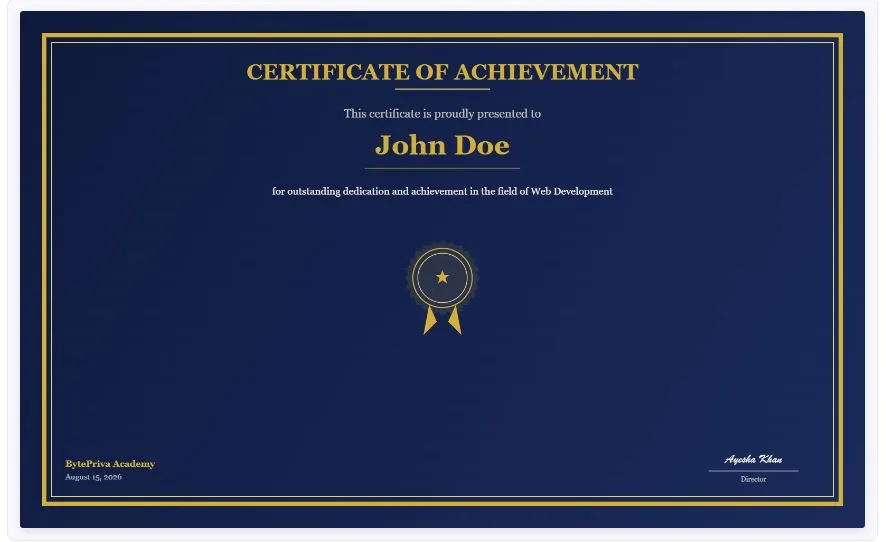
| Certificate | Heading, recipient name, description, issuer, date, up to 2 signatures, optional logo | PNG (high resolution) or Print / Save as PDF |
| Award Badge | Main text, subtitle, optional recipient name and date, 3 shapes, optional ribbon | PNG (high resolution) or Print / Save as PDF |
Certificate Styles Available
| Style Theme | Best For |
|---|---|
| Classic Gold | Traditional academic or formal achievement certificates |
| Modern Blue | Corporate training and professional development |
| Elegant Navy | Premium awards, executive recognition |
| Minimal Green | Clean, understated completion certificates |
| Bold Red | High-energy events, sports, competitions |
The Watermark Problem With Most Free Certificate Makers
"Free" doesn't always mean finished. A review of Google Workspace certificate tools notes that one popular free certificate add-on adds a watermark to every certificate unless you upgrade to a paid plan, and several other certificate makers restrict logo uploads or high-resolution downloads to a paid tier as well. This tool has no paid tier to upgrade to in the first place — every template, every export option, and every feature described on this page is available with no watermark, no account, and no limit on how many certificates or badges you create.
How This Tool Prevents Text From Overflowing
A long recipient name or a lengthy award title can easily run past the edge of a certificate or spill outside a badge shape — a common visual bug in template-based tools that assume every name will be short. This tool checks the width of the heading, the recipient name, and the badge text against the available space every time you type, and automatically reduces the font size until it fits cleanly, rather than letting text overflow the border or get cut off.
Certificate vs Badge — When to Use Which
| Certificate | Award Badge | |
|---|---|---|
| Format | Landscape, full-page document | Compact, shaped graphic |
| Best for | Course completion, formal recognition, printed awards | Social media posts, digital rewards, compact visuals |
| Includes signatures | Yes, up to 2 | No |
| Shapes available | Rectangular with border styles | Circle, Star, Shield |
How to Use This Tool
- Choose Certificate or Award Badge at the top.
- Pick a color theme, font, and border style (or shape, for badges).
- Fill in the recipient's name, description, issuer, and date.
- Optionally upload a logo — it's added with a circular frame automatically.
- Check the live preview, then download as a high-resolution PNG or print it directly as a PDF.
Who Uses a Certificate Maker?
- Teachers and trainers — recognizing course completion or classroom achievement without needing design software.
- Small businesses and managers — creating employee recognition awards or training certifications on the spot.
- Event organizers — printing awards for sports days, competitions, or community events.
- Online course creators — issuing a completion certificate for students without a paid certificate platform.
- Parents and hobby groups — making certificates for kids' activities, clubs, or milestones.
Printing Your Certificate the Right Way
When printing a certificate directly through the Print or Save as PDF button, a few browser print settings make a real difference in how the final result looks. Since a certificate is designed in landscape orientation, selecting Landscape rather than Portrait in the print dialog is essential, or the layout will print sideways or get awkwardly cropped. Setting margins to None or Minimum also matters, since browsers often add their own default page margins on top of the certificate's own border, which can push the design off-center or shrink it more than expected. For the cleanest result, disable headers and footers in the print dialog too, since browsers sometimes add the page URL or a date stamp at the top and bottom of a printed page by default. If a physical copy is the end goal, printing on cardstock rather than standard paper gives a noticeably more professional, presentation-ready feel than a plain printer sheet.
Logo Requirements for the Best Results
The logo is placed inside a circular frame using a center-crop technique, similar to how a profile picture is cropped on most social platforms. This means a rectangular or non-square logo will have its edges trimmed to fit the circle, with the center of the image kept fully visible. A square logo with the main design centered will always look the cleanest, since nothing important gets cropped off. Logos with a transparent background, saved as PNG, tend to blend into the certificate more naturally than a logo with a solid white or colored background, which will show as a visible square patch behind the circular crop. There is no file size limit built into the tool itself, but a smaller image, under two or three megabytes, will load into the preview noticeably faster, especially on a slower mobile connection.
FAQs
Is this certificate maker really free, with no watermark?
Yes. There's no paid tier, no account, and no watermark added to any certificate or badge you create.
Can I upload my own logo?
Yes. Upload a PNG, JPG, or WebP image, and it's automatically placed in a circular frame at the top of the certificate or badge.
What's the difference between the Certificate and Award Badge modes?
Certificate mode creates a full landscape document with signatures, ideal for formal recognition. Award Badge mode creates a compact, shaped graphic — circle, star, or shield — better suited for digital sharing.
Will a long name or title get cut off?
No. The text automatically shrinks to fit the available space, so long names and titles stay fully visible instead of overflowing the border or shape.
Can I add two signatures to a certificate?
Yes. Enabling the second signature option adds a name and title field alongside the first signature.
Is my information uploaded or stored anywhere?
No. The certificate or badge is rendered entirely in your browser using Canvas. Nothing you type or upload is sent to a server.
Can I print the certificate directly instead of downloading an image?
Yes. The Print / Save as PDF button opens a print-ready version you can print directly or save as a PDF from your browser's print dialog.
Does this work on mobile devices?
Yes. All fields, style options, and the live preview adjust for smaller screens.
Quick Summary:
This free certificate maker creates certificates (5 themes, 3 fonts, 3 borders, up to 2 signatures) or award badges (3 shapes, optional ribbon) with no watermark and no account required. Long text automatically shrinks to fit instead of overflowing, and everything renders locally in your browser — nothing is ever uploaded.
Disclaimer:
BytePriva's Certificate Maker is a free browser-based tool provided for general and creative use. All rendering happens locally in your browser — no information you enter or upload is ever transmitted or stored. This tool does not provide official accreditation, verification, or legal certification of any kind; it is a design tool only. Use of this tool is at your own discretion.
A certificate shouldn't require a paid subscription or leave a watermark stamped across someone's achievement — this tool skips both, rendering a clean, print-ready certificate or badge directly in your browser in the time it takes to fill in a few fields.