A fancy text generator is a free online tool that converts your normal text into 110+ stylish fonts and themed combos — including bold, script, gaming, attitude, and love styles with emoji. Type your text once, filter by category or search by name, and every style updates instantly, ready to copy and paste into Instagram, LinkedIn, Discord, or your gaming username.
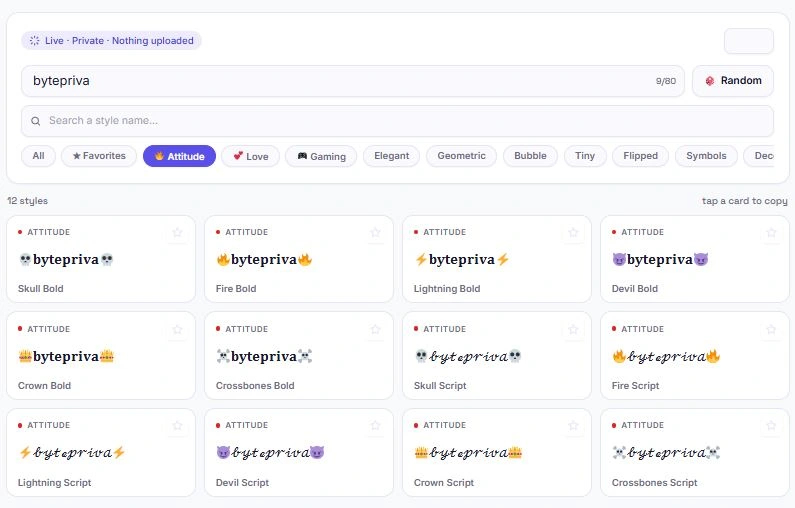
Table of Contents
How to Use This Fancy Text Generator
Getting your text into a fancy style takes just a few seconds. Type your text into the input box, and every style below updates instantly.
- Type or paste your text — up to 80 characters, updates live as you type
- Use the search bar to find a specific style by name
- Filter by category using the chips — Attitude, Love, Gaming, Elegant, Geometric, Bubble, Tiny, Flipped, Symbols, or Decorative
- Tap the 🎲 Random button to try a sample text if you're not sure what to type
- Click any card to copy that style instantly — no separate copy button needed
- Star your favorites ⭐ to pin them to the top and find them again next time
Explore Styles by Category
With 110+ styles on offer, categories make it easy to find exactly what you're looking for instead of scrolling through everything:
| Category | What You'll Find |
|---|---|
| 🔥 Attitude | Bold and script text wrapped in skulls, fire, lightning, and crowns |
| 💕 Love | Romantic styles wrapped in hearts, roses, and butterflies |
| 🎮 Gaming | Text wrapped in controllers, swords, targets, and trophies — great for usernames |
| Elegant | Bold, Italic, Script, and Fraktur-style fonts |
| Geometric | Sans, Monospace, Double-Struck, and Fullwidth fonts |
| Bubble | Circled letters and numbers |
| Tiny | Superscript and Small Caps text |
| Flipped | Upside Down and Mirrored text |
| Symbols | Strikethrough, Underline, Wide Spacing, and Glitch text |
| Decorative | Classic styles wrapped in stars, sparkles, hearts, and more |
Switching categories doesn't change your typed text — it just narrows down which styles are shown, so you can browse a themed set without losing your place.
Where You Can Use Fancy Text
Since these styles are made from standard Unicode characters — not images or special fonts — they paste correctly almost anywhere text is accepted:
- Instagram & TikTok bios — stand out with a styled name or tagline
- LinkedIn posts — LinkedIn doesn't support native bold or italic formatting in posts, so people use Unicode Bold and Italic styles to make key phrases stand out
- Discord & gaming usernames — Gaming and Attitude styles are popular for profile names and server nicknames
- WhatsApp & Facebook statuses — Love and Decorative styles work well for status updates
- X (Twitter) posts — a styled headline or name can help a post stand out in a feed
Since it's just text, not an image, it's also fully copyable and searchable wherever you paste it — unlike a screenshot or a custom font that only works inside one app.
Tips for Getting the Best Results
- A few small habits make this fancy text generator more useful, especially if you're picking a style for something permanent like a username or bio.
- Preview before you commit. Not every fancy text generator style looks the same on every platform — always paste your styled text into the actual app (Instagram, Discord, LinkedIn) and check how it renders before finalizing a username or bio, since font support can vary slightly between apps.
- Keep it readable. Heavily decorated styles like Glitch or dense symbol wraps look eye-catching in small doses, but using them for long sentences can make text hard to read. They tend to work best for short names, titles, or single words rather than full paragraphs.
- Star your go-to styles. If you find yourself using this fancy text generator regularly for the same handful of styles — say, Bold for LinkedIn and a Gaming wrap for Discord — starring them means you don't have to search or scroll for them again.
- Match the platform's tone. A Love-themed style fits a personal bio, while an Attitude or Gaming style suits a gamertag — picking a style that matches where you're posting tends to land better than defaulting to whatever looks flashiest.
The Technology Behind These Styles
These fancy fonts aren't actual typefaces — they're built from separate Unicode code points that were originally designed for mathematical notation, phonetic transcription, and other technical uses, but happen to visually resemble bold, italic, or script letters. Because they're just characters, they behave like any other text: they can be copied, pasted, and searched anywhere Unicode is supported.
The full technical specification for these character blocks is maintained by the Unicode Consortium, the nonprofit organization responsible for standardizing text encoding across every device and platform. This is also why support can vary slightly between apps — a platform's font rendering engine has to include glyphs for these specific code points, and while most modern systems do, a handful of older or minimal fonts may not.
Frequently Asked Questions
Is this fancy text generator free to use?
Yes. There's no sign-up, no limit on how many times you can use it, and no premium tier. All 110+ styles are free.
Does my text get uploaded anywhere?
No. Every style is generated locally in your browser using JavaScript. What you type never leaves your device.
Why do some fancy fonts not show up correctly on certain devices?
These styles use special Unicode characters rather than actual font files. Most modern phones and computers display them correctly, but very old devices or apps with limited font support may show some characters as boxes or blank spaces.
Can I use these fonts to make my LinkedIn post stand out?
Yes. Since LinkedIn doesn't support native bold or italic formatting in posts, copying Bold or Italic styled text from this tool is a common way to make key phrases stand out in a post.
What's the difference between the Decorative and themed (Attitude/Love/Gaming) categories?
Both wrap a base font style with symbols on either side. Decorative uses general symbols like stars and sparkles, while Attitude, Love, and Gaming use themed emoji — like fire and crowns, hearts and roses, or controllers and swords — to match a specific mood or use case.
How do favorites work?
Tap the star icon on any style card to save it. Your favorites are stored in your browser and will still be there the next time you visit, so you can quickly find the styles you use most.
Can I search for a specific style instead of scrolling?
Yes. Use the search bar to filter styles by name — for example, searching "bold" will show every style with "Bold" in its name, including themed combos like "Fire Bold."
Will this work on my phone?
Yes. The style grid adjusts to fit smaller screens, and tapping a card copies the text the same way it does on desktop.
Quick Summary
This fancy text generator turns your text into 110+ styles — from classic Bold and Script fonts to themed Attitude, Love, and Gaming combos with emoji — all generated instantly using standard Unicode characters. Search by name, filter by category, star your favorites, and tap any card to copy. Everything runs locally in your browser, so there's no upload, no account, and no limit on how often you use it.
Disclaimer
This tool is provided as a free utility for general text styling purposes. Fancy text styles are generated using standard Unicode characters, and while most modern devices and platforms display them correctly, rendering can occasionally vary depending on the app, operating system, or font support on the receiving end.
BytePriva and its owner(s) make no guarantees that every style will display correctly on every platform, and shall not be held liable for any formatting issues, rejected posts, or other consequences arising from the use of styled text on third-party platforms. Some platforms may also have their own rules regarding usernames or content formatting — you remain responsible for checking those before use.
This tool is safe to use — there is nothing to install, no account required, and no data is uploaded or stored. This disclaimer simply clarifies that final responsibility for how the results are used rests with you.