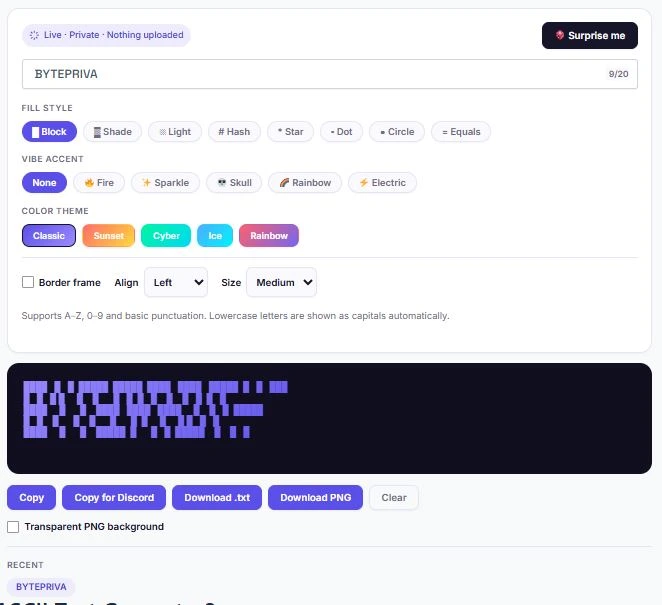
An ASCII text generator turns any word or phrase into large, stylized letters built entirely from keyboard characters — no image, no font file, just plain text that lines up perfectly wherever monospace formatting is supported. This free ASCII text generator runs completely in your browser: type something, pick a fill style and color theme, and your banner updates instantly.
It's built for developers who want a clean header for a README or terminal script, Discord users who need a banner that survives being pasted into a chat, and anyone who wants eye-catching text for a bio or forum post. Nothing you type is ever uploaded or stored — the entire tool works offline once the page loads, which also makes it fast on any device, from a laptop to a budget Android phone.
Supports A–Z, 0–9 and basic punctuation. Lowercase letters are shown as capitals automatically.
Table of Contents
What Is an ASCII Text Generator?
ASCII text art has existed since the earliest days of computer terminals, long before graphics cards could render images. Instead of pixels, artists and programmers built pictures and lettering out of the 95 printable characters on a standard keyboard — the same character set defined in the ASCII standard.
An ASCII text generator automates that process: it takes whatever you type, maps each letter to a pre-built pattern of characters, and arranges those patterns into large block letters. The result is still plain text, which is exactly why it has survived for decades — it works in a terminal from 1985 just as well as it works in a Discord message today.
How to Use the ASCII Text Generator
No downloads, no account, and nothing you type ever leaves your browser. The whole process takes under ten seconds:
- Type your word or short phrase into the input box — up to 20 characters.
- Pick a fill style (Block, Shade, Hash, Star and more) to change the texture of the letters.
- Choose a color theme, or turn on a border frame and alignment for a more finished look.
- Copy the banner as plain text, copy a Discord-ready version, or download it as a .txt file or a transparent PNG image.
- Paste it wherever you need it — a README file, a terminal script, a Discord announcement, or a social media bio.
Where People Actually Use ASCII Text Art
- Discord servers — pinned announcements, welcome messages, and channel headers that stand out in a code block.
- GitHub and GitLab READMEs — a project name rendered as a banner at the top of the documentation.
- Terminal and CLI tools — a startup banner that appears when a command-line program launches.
- Code comments — a visual divider between major sections of a source file.
- Social media bios and posts — Instagram, X (Twitter), and Reddit posts that need to stand out in a feed of plain text.
- Forum signatures and gaming clan tags — a stylized name that looks different from everyone else's plain username.
ASCII Text Generator Features at a Glance
Most free ASCII generators stop at a single font and a plain copy button. This one was built with a few gaps filled in on purpose:
| Feature | What It Does | Why It Matters |
|---|---|---|
| 8 fill styles | Switch the letter texture between block, shade, hash, star, dot, circle and more | One tool covers looks that usually need separate generators |
| 5 color themes | Apply a gradient (Classic, Sunset, Cyber, Ice, Rainbow) to the on-screen banner | Useful for previewing before exporting as an image |
| PNG export | Renders the banner as an image, with an optional transparent background | The only way to use ASCII art somewhere that doesn't support monospace text, like an Instagram story |
| Discord-ready copy | Wraps the banner in a code block automatically | Prevents the spacing from breaking when pasted into Discord chat |
| Border frame & alignment | Adds a box around the banner and controls left/center/right position | Gives the output a more finished, deliberate look |
| No sign-up, no upload | Runs entirely in the browser using JavaScript | Nothing typed is stored or sent anywhere |
Tips for ASCII Banners That Actually Work
The single most common reason an ASCII banner looks broken is font mismatch. ASCII art only lines up correctly in a monospace font — one where every character takes up exactly the same width. Most chat apps and text editors use a proportional font by default, where a letter like "i" is narrower than "m", which shifts every row out of alignment.
Discord automatically switches to a monospace font inside a code block, which is why wrapping the banner in triple backticks matters — it is not just a copy shortcut, it is what keeps the letters aligned once it is pasted. If you are placing a banner inside a README or a script, wrap it in a preformatted or code block for the same reason. Keeping the text under 20 characters also helps — longer banners can become wider than the screen on mobile devices, forcing a horizontal scroll that most people simply skip past.
Frequently Asked Questions
Is this ASCII text generator really free?
Yes. There is no account, no watermark, and no limit on how many banners you can generate. It runs entirely in your browser, so there is no server cost tied to how often you use it.
Does it work on mobile phones?
Yes. The layout, buttons, and banner preview all adjust for smaller screens, and the output box scrolls horizontally if a banner is wider than the screen.
Why does my ASCII art look broken when I paste it somewhere?
The destination is most likely using a proportional font instead of a monospace one. Paste the banner inside a code block, a terminal, or a preformatted text area to keep the spacing intact.
Can I use lowercase letters?
You can type in lowercase, but the generator automatically converts everything to uppercase before building the banner, since block letters are designed around capital-letter shapes.
Is my typed text stored or uploaded anywhere?
No. Every banner is generated locally in your browser using JavaScript. Nothing you type is sent to a server, logged, or stored — closing the tab clears it completely.
Can I download the banner as an image instead of text?
Yes. The Download PNG option renders the banner as an image file, with an optional transparent background, which is useful for platforms that don't support monospace text formatting.
Whether you're adding a header to a GitHub README, decorating a Discord announcement, or just want a bio that looks different from everyone else's, this ASCII text generator turns any short phrase into a clean, ready-to-paste banner in seconds — no downloads, no sign-up, and nothing ever leaves your browser.
Quick Summary
This free ASCII text generator turns any word into large banner-style text using keyboard characters — no image, no signup, nothing uploaded. Pick a fill style, add a color theme, and copy or download your banner in seconds. Works great for Discord, GitHub READMEs, and social bios.
Disclaimer
BytePriva's ASCII Text Generator is a free browser-based tool provided for creative and personal use. All text you enter is processed locally in your browser and is never uploaded, stored, or shared. BytePriva does not guarantee that generated banners will display identically across every platform, app, or font — formatting may vary depending on where you paste it. Use of this tool is at your own discretion, and BytePriva is not responsible for how generated content is used elsewhere.