A Markdown to HTML converter is a free online tool that instantly turns Markdown syntax — headings, bold text, lists, tables, code blocks, and more — into clean, ready-to-use HTML. Type or paste your Markdown on one side and watch a live preview render on the other, then copy the generated HTML code or download it as a file, all directly in your browser with nothing ever uploaded.
Table of Contents
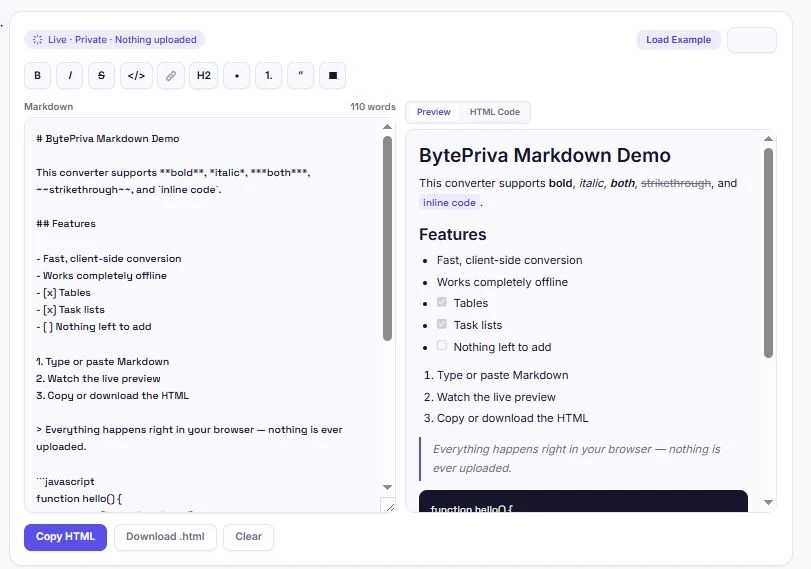
How to Use This Markdown to HTML Converter
Converting Markdown with this tool takes just a few seconds. Start typing, and the preview updates as you go — no button to click.
- Type or paste Markdown into the left panel — the HTML preview updates live on the right
- Use the formatting toolbar to quickly insert bold, italic, links, headings, lists, and tables without memorizing the syntax
- Switch between Preview and HTML Code to see either the rendered result or the raw HTML markup
- Click "Load Example" to see a full demo document showcasing every supported feature
- Copy the HTML with one click, or download it as a ready-to-use
.htmlfile
What This Markdown to HTML Converter Supports
This Markdown to HTML converter covers the full range of everyday Markdown syntax, including GitHub-Flavored extras that many basic converters skip:
| Markdown Feature | Example Syntax | Output |
|---|---|---|
| Headings | # Heading | <h1> through <h6> |
| Bold / Italic | **bold** / *italic* | <strong> / <em> |
| Strikethrough | ~~text~~ | <del> |
| Inline code | `code` | <code> |
| Code blocks | ```language | <pre><code> with language tag |
| Links & images | [text](url) /  | <a> / <img> |
| Lists | - item / 1. item | <ul> / <ol> |
| Task lists | - [x] done | Checkboxes |
| Tables | | col | col | | Full <table> markup |
| Blockquotes | > quote | <blockquote> |
| Horizontal rules | --- | <hr> |
Bare URLs are also automatically converted into clickable links, even without the [text](url) syntax.
Why Use a Markdown to HTML Converter?
Markdown has become the default way developers, writers, and documentation teams draft content — it's readable as plain text, easy to write without touching a mouse, and works natively in places like GitHub, Notion, and static site generators. But the moment that content needs to live somewhere that only understands HTML — a CMS, an email template, a custom web page — it needs converting first.
This Markdown to HTML converter handles that conversion instantly, which is useful for a range of everyday tasks: turning a GitHub README into a webpage, converting Markdown notes into an HTML email, prepping blog content written in Markdown for a CMS that doesn't support it natively, or simply previewing how a Markdown document will actually render before publishing it anywhere.
Security: Why Raw Input Is Escaped
Pasting raw HTML or script tags into a Markdown to HTML converter can be risky if that converter blindly outputs whatever it's given — a stray <script> tag could end up executing unexpectedly wherever the output gets used. This Markdown to HTML converter escapes special characters in your input before rendering, so any HTML tags typed into your Markdown show up as visible text in the output rather than being executed as code.
This follows the same escaping principle described in OWASP's documentation on Cross-Site Scripting (XSS), a well-known web security reference. It's a small detail, but it means the HTML this tool generates is safer to copy directly into a live webpage without a separate sanitization step.
Split-View Preview vs. Reading Raw Markdown
Reading unrendered Markdown — with its asterisks, pound signs, and pipe characters — makes it hard to judge how a document will actually look once published. This Markdown to HTML converter's live split-view solves that by rendering the preview in real time, right next to what you're typing, so formatting mistakes (a missing closing bracket on a link, a table column that doesn't line up, a heading that's the wrong level) are obvious immediately instead of after publishing.
Switching to the HTML Code view shows exactly what will be copied — useful for a final check before pasting the output into a CMS, email template, or static site, especially when the destination expects clean, specific markup rather than extra formatting.
Handling Code Blocks Correctly
Code blocks need special handling that a lot of simpler converters get wrong — Markdown syntax like asterisks or underscores inside a code sample shouldn't be turned into bold or italic text, since that would corrupt the actual code. This Markdown to HTML converter treats anything inside triple backticks as literal content, leaving it untouched by the rest of the formatting rules, and automatically escapes any HTML-sensitive characters so a code sample containing something like <div> displays correctly instead of being interpreted as an actual tag.
Adding a language name right after the opening triple backticks (like ```javascript) also tags the resulting <code> element with a matching class, which integrates cleanly with syntax highlighters if you're pasting the output into a site that uses one.
Frequently Asked Questions
Is this Markdown to HTML converter free to use?
Yes. There's no sign-up, no limit on how much you can convert, and no premium tier. Every feature, including the formatting toolbar and live preview, is free.
Does my Markdown get uploaded anywhere?
No. This Markdown to HTML converter runs entirely in your browser using JavaScript. Nothing you type is ever sent to a server, logged, or stored.
Does this support GitHub-Flavored Markdown features like tables and task lists?
Yes. Tables, task lists (checkboxes), and strikethrough text — all GitHub-Flavored Markdown extensions — are fully supported alongside standard Markdown syntax.
Why isn't my text inside a code block getting bold or italic formatting?
That's intentional. Content inside triple backticks is treated as literal code and left untouched by formatting rules, so asterisks or underscores in a code sample display exactly as written instead of being converted.
Can I paste raw HTML into my Markdown?
Raw HTML tags will be escaped and shown as visible text rather than rendered, for security reasons. This prevents scripts or unexpected markup from being accidentally executed in the output.
Can I download the converted HTML as a file?
Yes. Click "Download .html" after converting to save the result as a ready-to-use HTML file.
What does the "Load Example" button do?
It fills the editor with a sample document that demonstrates every supported feature — headings, formatting, lists, tables, task lists, and code blocks — so you can see exactly how each one converts.
Will this work on my phone?
Yes. On smaller screens, the Markdown editor and preview stack vertically instead of side by side, and the formatting toolbar remains fully usable.
Quick Summary
This Markdown to HTML converter turns Markdown — including GitHub-Flavored features like tables and task lists — into clean HTML, with a live split-view preview, a formatting toolbar, and support for headings, links, images, code blocks, and more. Unlike a basic Markdown to HTML converter, this one escapes HTML input for safety and correctly protects code block content from unwanted formatting. Everything runs locally in your browser, converting a 200KB document in about 100 milliseconds — with nothing ever uploaded or stored.
Disclaimer
This Markdown to HTML converter is provided as a free utility for converting Markdown syntax into HTML markup. While it covers standard and GitHub-Flavored Markdown syntax and escapes input for basic safety, it does not guarantee pixel-perfect rendering across every possible CMS, email client, or platform that the output might be pasted into.
BytePriva and its owner(s) make no guarantees regarding the suitability of the generated HTML for any specific platform, production system, or publishing context, and shall not be held liable for any formatting issue, error, or consequence arising from its use. You remain responsible for reviewing the output before publishing it anywhere.
This tool is safe to use — there is nothing to install, no account required, and no data is uploaded or stored. This disclaimer simply clarifies that final responsibility for how the converted HTML is used rests with you.