This channel weight calculator works out the weight of a C-channel or C-beam from its depth, flange width, flange thickness, web thickness, length and material, then converts it into a total cost. It calculates the true cross-section area, adds a wastage percentage, and lets you price the steel per kg, per metric ton, per meter or per piece in any of 25+ currencies.
Related Tools
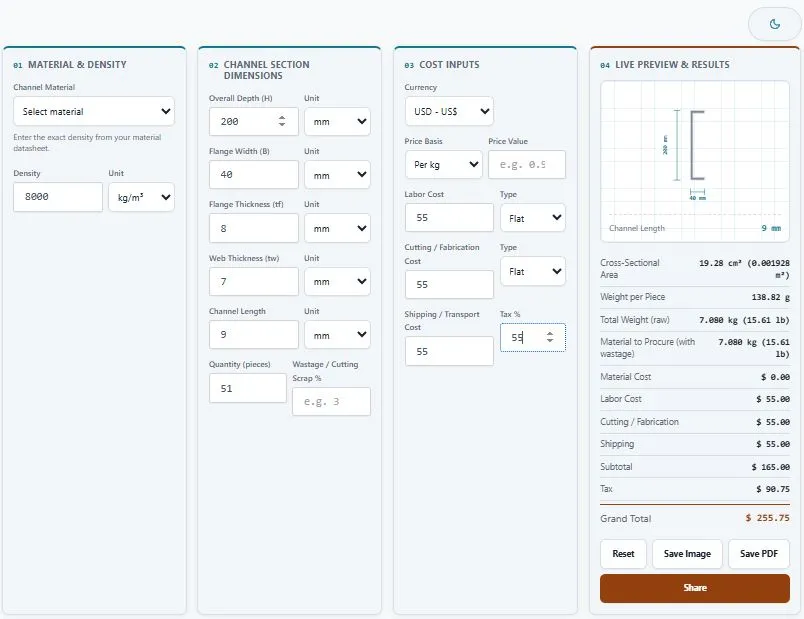
Table of Contents
Weight of Example Channel Sections
The tool uses Area = 2 × (B × tf) + (H − 2 × tf) × tw with mild steel at 7850 kg/m³. Here is how a few sections compare (H × B × tf × tw, in mm):
| Section | Area | Weight per Meter | 6 m Piece |
|---|---|---|---|
| 50 × 25 × 4 × 3 | 326 mm² | 2.56 kg | 15.35 kg |
| 75 × 40 × 5 × 4 | 660 mm² | 5.18 kg | 31.09 kg |
| 100 × 50 × 5 × 5 | 950 mm² | 7.46 kg | 44.75 kg |
| 150 × 75 × 8 × 6 | 2,004 mm² | 15.73 kg | 94.39 kg |
| 200 × 75 × 9 × 6 | 2,442 mm² | 19.17 kg | 115.02 kg |
Worked Example: 10 Pieces of 100 × 50 × 5 × 5
- Area = 2 × (0.05 × 0.005) + (0.1 − 0.01) × 0.005 = 0.0005 + 0.00045 = 0.00095 m²
- Weight per meter = 0.00095 × 7850 = 7.46 kg/m
- One 6 m piece = 44.75 kg
- Ten pieces with 3% wastage = 44.745 × 10 × 1.03 = 460.87 kg to procure
The same steel priced three ways: at $0.90 per kg it is about $6.71 per meter, $40.27 per 6 m piece, or $900 per metric ton. The 10-piece order costs about $414.79 in material. Pick the Price Basis your supplier quotes and enter the number as it appears on the quote.
Weight per Meter of Common Channel Sizes
For mild steel, channel weight per meter (kg/m) = cross-sectional area in mm² × 0.00785. The area is 2 × (flange width × flange thickness) + (depth − 2 × flange thickness) × web thickness. For stainless steel 304 or 316 use 0.0080 instead of 0.00785, and for aluminum use 0.0027.
The table below assumes the flange and web have the same thickness, which matches how sizes such as "100×50×5" are often written (depth × flange width × thickness), using mild steel at 7850 kg/m³:
| Size (mm) | Area | Weight per meter | 6 m length |
|---|---|---|---|
| 100 × 50 × 4 | 768 mm² | 6.03 kg | 36.17 kg |
| 100 × 50 × 5 | 950 mm² | 7.46 kg | 44.75 kg |
| 100 × 50 × 6 | 1,128 mm² | 8.85 kg | 53.13 kg |
| 100 × 50 × 8 | 1,472 mm² | 11.56 kg | 69.33 kg |
| 150 × 75 × 6 | 1,728 mm² | 13.56 kg | 81.39 kg |
| 150 × 75 × 8 | 2,272 mm² | 17.84 kg | 107.01 kg |
| 200 × 75 × 6 | 2,028 mm² | 15.92 kg | 95.52 kg |
| 200 × 75 × 8 | 2,672 mm² | 20.98 kg | 125.85 kg |
These are estimates from the simplified area method, which ignores fillets and tapered flanges. Use the calculator above to enter separate flange and web thicknesses, wastage and cost.
Sanity Check Against Catalog Tables
The calculator uses a simplified rectangular method that ignores the curved fillets and tapered flanges of rolled channels. A common Indian standard channel, ISMC 100 (100 × 50 mm, 5 mm web, 7.5 mm flange), is listed at about 9.56 kg/m, while the formula gives about 9.22 kg/m, roughly 3.5% lower. That is fine for quoting and estimating. For design work, check the exact section in the AISC Shapes Database, which lists dimensions and properties for channels (C and MC shapes), or in your local standard.
Geometry Warnings and Units
The tool warns you if two flange thicknesses do not fit inside the depth, or if the web thickness is larger than the flange width. Both usually mean a unit was entered wrongly, such as depth in cm and flange thickness in mm. Depth and flange width accept mm, cm, m and in. Flange and web thickness accept mm, cm and in. Channel length also accepts feet.
Density Reference
| Material | Density (kg/m³) |
|---|---|
| Mild / carbon steel and galvanized steel | ~7850 |
| Stainless steel 304 / 316 | ~8000 |
| Aluminum | ~2700 |
| Copper alloy (bronze/brass) | ~8900 |
Use the density from your mill certificate when you have it.
FAQs
How do I calculate the weight of a C-channel?
Calculate the cross-sectional area by adding the two flange areas and the web area, then multiply that area by the channel's length and material density. This calculator does that automatically — enter the depth, flange width, flange thickness, and web thickness, select the material, and it returns the weight instantly.
What is the density of steel used in C-channels?
Mild/carbon steel is approximately 7850 kg/m³, and stainless steel 304 or 316 is approximately 8000 kg/m³. Aluminum is around 2700 kg/m³, and copper alloys around 8900 kg/m³. Always confirm the exact figure from your mill certificate, since alloy grade can shift density slightly.
Why does the calculator show a geometry warning?
The calculator checks that two flange thicknesses fit within the overall depth with room left for the web, and that the web thickness doesn't exceed the flange width — since a C-channel's flanges only extend from one side. If either check fails, it shows a warning instead of returning an incorrect or negative weight, which usually points to a unit mismatch between fields.
Can this calculator handle different steel pricing methods, like per ton or per meter?
Yes, this channel weight calculator supports four pricing methods — per kg, per metric ton, per meter, and per piece — so you can match whichever basis your supplier actually quotes, and it calculates material cost accordingly.
What units can I use for channel dimensions?
Depth and flange width support millimeters, centimeters, meters, and inches. Flange thickness and web thickness support millimeters, centimeters, and inches. Channel length additionally supports feet. You can mix units across fields and the calculator converts everything internally.
Can I use this for bulk orders with multiple pieces?
Yes. Enter the number of pieces in the Quantity field, and the calculator scales the total weight and any per-piece costs (labor, cutting/fabrication) accordingly, while flat costs like shipping stay fixed per order.
Can I save or share my calculation results?
Yes. The tool includes a Save as Image button for a clean summary image, a Save as PDF button for a one-page printable result, and a Share button to send the summary directly via WhatsApp.
How much does a 100x50 channel weigh per meter?
In mild steel with equal flange and web thickness, a 100 × 50 mm channel weighs about 6.03 kg/m at 4 mm, 7.46 kg/m at 5 mm and 8.85 kg/m at 6 mm. A 6 m length at 5 mm weighs about 44.75 kg. These are estimates, and real rolled sections differ slightly.
What is the formula for C channel weight per meter?
Multiply the cross-sectional area in mm² by 0.00785 for mild steel to get kg per meter. The area is 2 × (flange width × flange thickness) + (depth − 2 × flange thickness) × web thickness.
What do ISMC and PFC mean?
ISMC stands for Indian Standard Medium Channel and PFC for parallel flange channel. Both are standard channel types. This calculator gives a simplified estimate for any channel size, so for standard sections compare the result with your supplier's catalog weight.
Quick Summary
This channel weight calculator gives you the cross-sectional area and weight of a C-channel from depth, flange width, flange thickness, web thickness, length, and material density, then converts that into a full cost breakdown — material, labor, cutting/fabrication, and shipping — in your chosen currency. Select your channel material, enter your section dimensions in any unit, add a wastage percentage for cutting scrap, choose how your supplier prices the steel, and this channel weight calculator shows weight per piece, total order weight, and the grand total cost, with a live cross-section preview and the option to save the result as an image or PDF.
Disclaimer
This channel weight calculator by BytePriva is provided as a free estimation tool to help with planning, quoting, and material ordering. The formulas and density values used are based on a standard structural steel area-estimation method and general industry reference densities; they are intended for guidance only and do not account for fillet radius, rolling tolerance, or standard-specific section properties found in official rolled-section tables such as IS 808 or ASTM A6/A6M.
Actual channel weight and total pricing may vary depending on the exact grade, manufacturing standard, supplier pricing, and regional cost factors at the time of your order. BytePriva makes no warranty, express or implied, regarding the accuracy of results for any structural, load-bearing, or safety-critical application, and accepts no liability for decisions made based solely on this calculator's output.
For structural design, load-bearing calculations, or formal procurement, always confirm figures against official section tables and consult a qualified structural engineer before finalizing a design or placing an order.