Compress image to KB instantly with this free tool — no signups, no waiting, no server involved. Upload your photo, type the exact file size you need (like 50 KB or 100 KB), and click Compress & Export — the tool automatically finds the highest possible quality that still fits under your target, so you lose as little quality as the size limit allows.
It's a pure compressor, not a converter — a JPG stays a JPG, a PNG stays a PNG, a WebP stays a WebP, nothing gets changed to a different format. Drop in multiple images at once, compress them all together to the same target size, and download everything as a single ZIP. Nothing is ever uploaded to a server — the entire process runs inside your own browser using your device's built-in image engine (the same canvas.toBlob() technology browsers use natively), so it works even on a slow connection and your photos never leave your control.
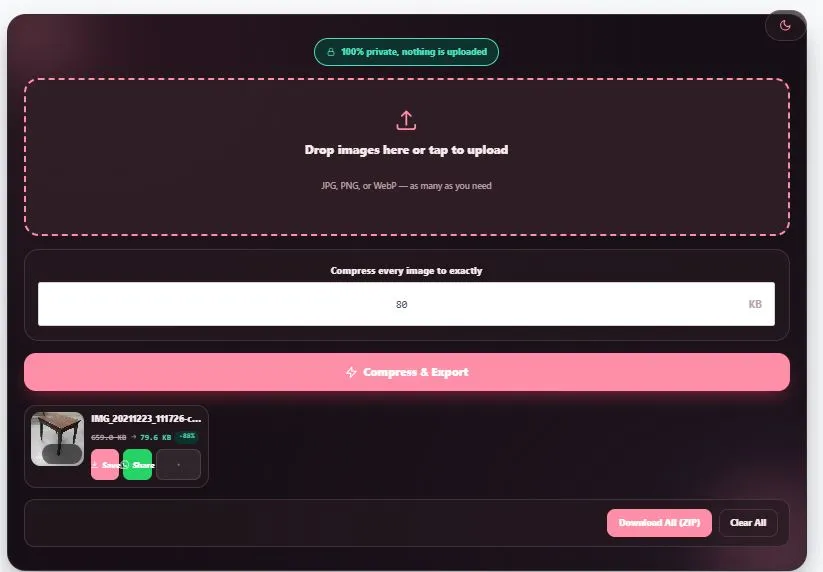
Drop images here or tap to upload
JPG, PNG, or WebP — as many as you need
How to Compress Image to KB
- Upload your image — click the upload area or drag and drop your JPG, PNG, or WebP file directly onto it.
- Type your target file size — enter the exact KB your form, portal, or website requires (common targets are 20 KB, 50 KB, 100 KB, and 200 KB).
- Click "Compress & Export" — the tool works entirely inside your browser, finding the highest quality setting that still fits your target size.
- Download or share — save the compressed image directly, or share it straight to WhatsApp on mobile.
If you're uploading several images at once, each one is compressed to the same target size individually, and you can download them all together as a single ZIP file when you're done.
This works using the same underlying browser technology — canvas.toBlob() — that all modern browsers support natively.
Who This Image Compressor Is Built For
Whether you need to compress image to KB for a form, a website, or just to save space, here's who finds this tool most useful:
- Job and college applicants filling out online forms that reject photos over a specific KB limit — set the exact number the form asks for and get it right on the first try.
- People uploading to government or exam portals where the upload system is strict about file size and gives no useful error message when you're over the limit.
- Website owners and bloggers who need smaller image files to keep their pages loading fast, without wanting to change the image format.
- Anyone sending photos over email or messaging apps with attachment size limits, who needs a quick way to shrink a file without losing more quality than necessary.
- People compressing many photos at once — drop in a batch, set one target size, and export everything together as a ZIP instead of doing it one by one.
Tips for Getting Accurate Results From This Image Compressor
Here are a few things to know before you compress image to KB targets, especially very small ones:
- Set a realistic target for the image type. A detailed, high-resolution photo asked to hit a very small KB target (like 10 KB) will lose more visible quality than the same target applied to a simpler image — the tool always finds the best quality it can within your number, but very aggressive targets have physical limits.
- PNG behaves differently than JPG. PNG is a lossless format, so it can't be "quality-reduced" the way a JPG can — to hit a small target KB, the tool adjusts PNG files more conservatively than JPG or WebP files of the same size.
- The same target applies to every image in a batch. If you upload several photos together, each one is compressed to your one target KB individually — if you need different sizes for different images, run them in separate batches.
- Check the result before using it for something official. The compressed file will be at or under your target size, but always open and review it before submitting it to a form, portal, or application.
FAQs
How do I compress an image to an exact KB size?
To compress image to KB, upload your image, type your target file size in KB into the input box, and click "Compress & Export." This tool automatically finds the highest quality setting that still fits under your target — you don't need to guess or try multiple times.
Does this tool upload my photos anywhere?
No. The entire compression process runs inside your own browser using your device's built-in image engine. Your photos are never sent to a server, which also means it works even on a slow internet connection.
Will my image change format, like JPG to PNG?
No — this is a pure compressor, not a converter. Whatever format you upload (JPG, PNG, or WebP) is the same format you get back, just smaller in file size.
Can I compress multiple images at once?
A: Yes. Upload as many images as you need, set one target KB, and click Compress & Export — this lets you compress image to KB in bulk, and you can download them all together as a ZIP file.
Is there a limit to how many images I can compress?
No fixed limit — you can upload and compress a large batch of images in one go, and the tool processes them one at a time so your browser doesn't freeze or slow down.
Quick Summary
This tool lets you compress image to KB with an exact target — just upload, type your target file size, and click Compress & Export. It always finds the highest quality setting that fits your target, keeps the original format (no JPG-to-PNG conversion), and works entirely inside your browser so nothing is ever uploaded. Compress one image or a large batch at once, and download everything together as a ZIP when you're done.
Disclaimer
This tool to compress image to KB by BytePriva is provided free to help reduce photo file sizes for forms, portals, websites, and everyday sharing. The tool works entirely within your browser and does not upload, store, or have any access to the images you process — compression happens locally on your own device.
Actual results can vary depending on the content, resolution, and format of the original image, especially when a very small target size is requested on a large or detailed photo. BytePriva makes no warranty regarding suitability for any specific official, legal, or application purpose, and accepts no liability for issues arising from using a compressed image for a form, portal, or submission that has its own specific requirements.
Always review the compressed result and confirm it meets the exact requirements of whatever form, portal, or platform you're submitting it to before relying on it.