This resume and cover letter builder runs entirely in your browser, so nothing you type — your name, your work history, your contact details — is ever uploaded or stored on a server. Pick from 14 professional templates, and your cover letter automatically matches your resume's design, colors, and font, so you never end up with two documents that look like they came from different tools.
A built-in ATS checker flags formatting issues before you apply, and a resume strength meter shows you where your content is thin as you write. There's no sign up required, no AI writing your experience for you, and no watermark on your download. When you're ready, export as a PDF or a DOCX file, completely free, with nothing held back behind a paywall at the last step.
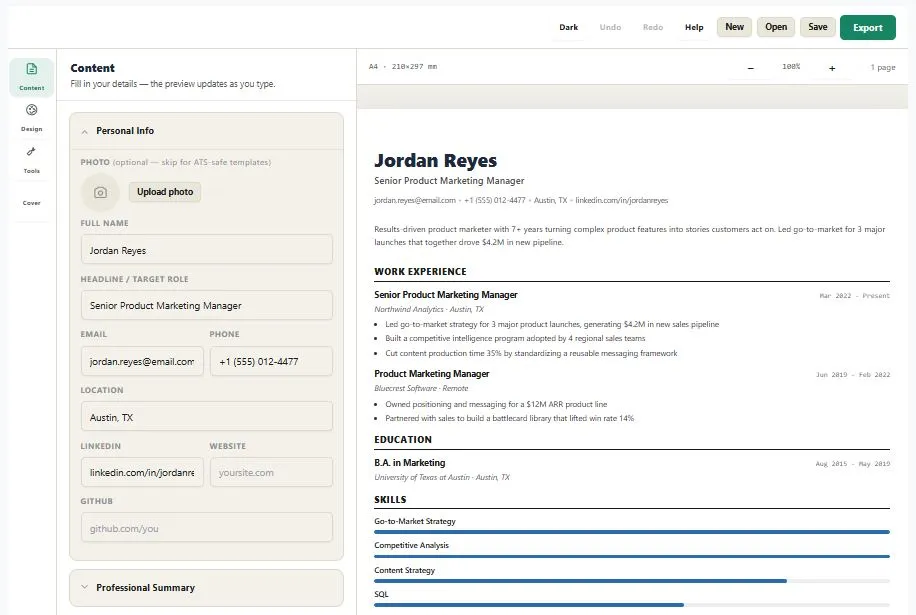
Content
Fill in your details — the preview updates as you type.
Design
Pick a template, then fine-tune colors, fonts and spacing.
Tools
Strengthen your resume before you send it.
Cover Letter
Matches your resume's template and colors automatically.
Table of Contents
How to Use This Resume and Cover Letter Builder
Getting a finished resume takes four steps. First, fill in your details section by section — personal info, work experience, education, and skills — using the panel on the left, no blank page staring back at you. Second, pick a template from the Design panel; your cover letter automatically updates to match the same colors and fonts, so both documents look like a set.
Third, check your score — the built-in ATS checker flags formatting issues that could trip up an applicant tracking system, and the resume strength meter points out sections that are still thin. Finally, export your finished resume and cover letter as a PDF or DOCX file, ready to attach to an application. There's no sign up at any point, and nothing you type is ever uploaded — this resume and cover letter builder runs the same way whether it's your first resume or your fifteenth.
Why Use This Resume and Cover Letter Builder
Formatting matters more than most job seekers realize. In a 2025 audit of Fortune 500 career pages, 97.8% had a detectable applicant tracking system scanning resumes before a human ever opens them — which means a resume with broken formatting, tables, or unusual fonts can get misread before your experience is even considered. That's why this resume and cover letter builder includes a built-in ATS checker that flags formatting issues as you build, instead of leaving you to guess.
There's also no catch behind the word "free." Plenty of builders let you design for free, then charge you the moment you try to download — or ask for your email first. This tool never does either. No sign up, no fee at export, and no watermark stamped across your finished document, whether you download once or fifty times.
It's also not another tool putting AI words in your mouth. There's no AI writing your bullet points or guessing your experience for you — you write it, in your own words, and the resume strength meter simply shows you where a section is thin. Pick any of the 14 professional templates and your cover letter builder automatically matches its design, colors, and font, so both documents leave looking like they belong together, then export either one as a PDF or DOCX file, whichever the job posting asks for.
Who This Resume and Cover Letter Builder Is Built For
- First-time job seekers — who need a clean, professional resume fast without paying for a template or learning a design tool.
- Career changers — who want a resume strength meter to show them where their story needs more detail before they apply.
- International applicants — who need an ATS-friendly format that reads correctly no matter which country's applicant tracking system it lands in.
- Anyone applying to multiple roles — who needs a matching resume and cover letter, in either PDF or DOCX, without rebuilding both from scratch for each one.
- Anyone who's been burned by a "free" resume builder before — free tools that lock the download behind a sign-up or a fee belong to other sites, not this one.
Tips for Getting Accurate Results
- Quantify your bullet points — add a number, percentage, or dollar amount wherever you can. The strength meter specifically rewards bullets backed by real numbers over vague descriptions.
- Avoid starting bullets with "Responsible for" or "I" — lead with a strong action verb instead. Both the strength meter and the ATS checker flag this exact pattern as weak phrasing.
- Skip the photo for most applications — many US and UK employers, and some ATS systems, prefer resumes without one. The checker will flag a photo as a caution, not an error, since a few regions still expect it.
- Switch to a single-column template for strict ATS portals — sidebar-style templates look great to a human, but a few older applicant tracking systems can jumble two-column layouts. The ATS checker will tell you when it's worth switching.
- Upload the actual PDF or DOCX file, never a screenshot — an image of your resume can't be read by an applicant tracking system at all, no matter how good the formatting looks.
Frequently Asked Questions
Is this resume and cover letter builder really free, with no sign up?
Yes. There's no account, no email, and nothing to pay at any point — including when you export. You can build and download as many resumes and cover letters as you want.
Does my resume data ever get uploaded to a server?
No. Everything runs directly in your browser, so your name, contact details, and work history never leave your device or get stored anywhere.
Does the cover letter really match my resume automatically?
Yes. Whichever template you pick in the Design panel applies the same colors, fonts, and layout style to both your resume and your cover letter, so they stay visually consistent without any extra setup.
Does this tool use AI to write my resume for me?
No. There's no AI generating your experience or bullet points — you write your own content, and the resume strength meter simply highlights sections that could use more detail.
What does the ATS checker actually look at?
It checks things like whether you've included a photo, whether your layout is single- or two-column, whether your skills are listed as plain text or visual bars, and whether key sections like your summary and contact details are complete — all factors that can affect how cleanly an applicant tracking system reads your resume.
What file formats can I download?
You can export your resume and cover letter as a PDF or a DOCX (Word) file, whichever format the job posting asks for.
Can I save my resume and come back to it later?
Yes. Use Save to download your resume as a file, then use Open to load it back in later with every section and edit intact.
Is there a limit to how many resumes I can create?
No. There's no cap, no credit system, and no paywall — you can build and export as many versions as you need.
Quick Summary
This resume and cover letter builder runs entirely in your browser, so nothing you write ever touches a server. Fill in your details, pick from 14 templates, and your cover letter automatically matches your resume's design. A built-in ATS checker and resume strength meter guide you as you go, with no AI writing your experience for you. Export as a PDF or DOCX, completely free, with no sign up and no fee hiding behind the download button — which is exactly what makes this a resume and cover letter builder worth trusting over one that charges you at the last step.
Disclaimer
This resume and cover letter builder is provided free to use, and it runs entirely inside your browser — your personal details and work history are never uploaded to a server or stored anywhere outside your own device. The built-in ATS checker and resume strength meter are meant as general guidance, not a guarantee; different employers and applicant tracking systems evaluate resumes differently, so we can't promise a specific outcome like an interview or job offer. This tool is offered as-is, with no warranty, and we're not liable for how a finished resume or cover letter performs once submitted. For anything role-specific, it's always worth double-checking the exact requirements listed in the job posting before you apply.