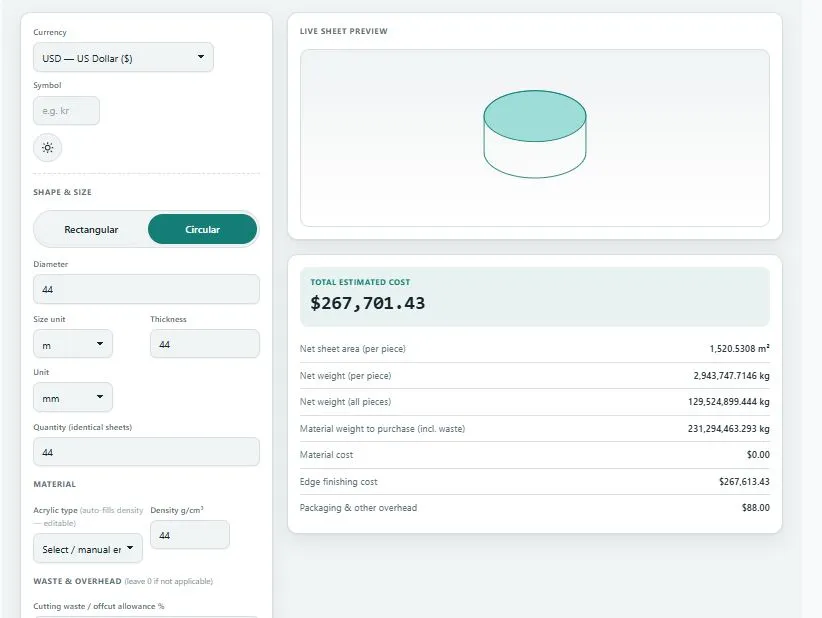
An acrylic sheet weight calculator works out exactly how much a sheet of acrylic (Perspex) actually weighs — and what it costs — based on its real dimensions, thickness, and density, instead of a rough per-sheet estimate. Choose a rectangular or circular sheet, enter its size and thickness, pick a material density or type your own, and get the net weight, the material you'll need to purchase after cutting waste, and the total cost instantly.
Most weight calculators stop at a single number. This one shows the difference between the finished piece's weight and the material you actually have to buy once waste is accounted for, adds real fabrication costs like edge finishing, and lets you price by weight or by area — whichever way your supplier quotes.
Shape & size
Material
Waste & overhead (leave 0 if not applicable)
Pricing
Live sheet preview
Related Tools
How the Acrylic Sheet Weight Calculator Works
The calculator works through four stages, using your exact dimensions throughout.
Step 1 — Area and volume. For a rectangular sheet, area comes from length × width. For a circular sheet, it's calculated from the diameter using the actual circle area formula. Either way, multiplying by thickness gives the sheet's real volume.
Step 2 — Weight. Volume is multiplied by the density you enter — either typed directly or auto-filled from a cast or extruded acrylic reference, and always editable — to get the actual weight of one sheet, then multiplied by quantity for the total.
Step 3 — Purchase weight. Cutting a shape from stock material always creates some offcut or kerf loss. Entering a waste percentage shows you the material weight you'll actually need to buy, separately from the finished piece's net weight.
Step 4 — Cost. Material cost is calculated by weight or by area, whichever pricing mode you choose. Edge finishing cost is calculated from the sheet's actual perimeter — length and width for a rectangle, or π × diameter for a circle — multiplied by your edge finishing rate. Packaging and any other overhead are added on top for the total estimated cost.
Acrylic Density Reference
For detailed material property data across cast and extruded acrylic grades from multiple manufacturers, MatWeb's materials database is a widely used, neutral engineering reference for plastics properties including density.
Table:
| Acrylic Type | Density (g/cm³) |
|---|---|
| Cast Acrylic (PMMA) | 1.19 |
| Extruded Acrylic (PMMA) | 1.18 |
These are the same values used in the calculator's material dropdown — selecting either one auto-fills the density field, which stays fully editable if your supplier's spec sheet gives a different figure.
Acrylic Density in kg/m³ and lb/ft³
| Acrylic type | g/cm³ | kg/m³ | lb/ft³ |
|---|---|---|---|
| Cast acrylic (PMMA) | 1.19 | 1,190 | 74.3 |
| Extruded acrylic (PMMA) | 1.18 | 1,180 | 73.7 |
Perspex and Plexiglas (often spelled plexiglass) are brand names for acrylic (PMMA) sheet, so the same density range applies to them.
Acrylic Sheet Weight by Thickness
Acrylic weighs about 1.19 kg per square metre for every millimetre of thickness (cast) or 1.18 kg (extruded): weight per m² (kg) = thickness (mm) × density (g/cm³).
| Thickness | Cast (kg/m²) | Extruded (kg/m²) | 2440 × 1220 mm sheet, cast (kg) |
|---|---|---|---|
| 2 mm | 2.38 | 2.36 | 7.08 |
| 3 mm | 3.57 | 3.54 | 10.63 |
| 4 mm | 4.76 | 4.72 | 14.17 |
| 5 mm | 5.95 | 5.90 | 17.71 |
| 6 mm | 7.14 | 7.08 | 21.25 |
| 8 mm | 9.52 | 9.44 | 28.34 |
| 10 mm | 11.90 | 11.80 | 35.42 |
| 12 mm | 14.28 | 14.16 | 42.51 |
| 15 mm | 17.85 | 17.70 | 53.14 |
| 20 mm | 23.80 | 23.60 | 70.85 |
| 25 mm | 29.75 | 29.50 | 88.56 |
These are net sheet weights. For cut parts, add your waste percentage in the calculator above to get the weight to purchase.
Acrylic Sheet Weight in Pounds (4 × 8 ft)
For US sizes, cast acrylic (1.19 g/cm³) at nominal inch thicknesses weighs:
| Thickness | lb per ft² | lb per 4 × 8 ft sheet (32 ft²) |
|---|---|---|
| 1/8 in | 0.77 | 24.8 |
| 1/4 in | 1.55 | 49.5 |
| 3/8 in | 2.32 | 74.3 |
| 1/2 in | 3.10 | 99.1 |
Actual sheets vary slightly in thickness and density by manufacturer, so enter your supplier's density in the calculator for an exact figure.
Who This Calculator Is Built For
- Sign makers and fabricators estimating weight and cost before cutting an acrylic panel or disc
- Buyers and estimators comparing supplier quotes given per kilogram versus per square meter
- Display, retail fixture, and furniture makers who need edge finishing cost included in a project estimate
- Hobbyists and small workshops planning a cut list and wanting a realistic material cost before ordering
Frequently Asked Questions
Does this calculator assume a fixed density for acrylic?
No. Selecting cast or extruded acrylic auto-fills a typical density into an editable field, and you can type your own value if your supplier's spec sheet gives a different figure.
What's the difference between net weight and purchase weight?
Net weight is the actual finished piece's weight. Purchase weight adds your entered waste/offcut percentage, showing how much material you'll actually need to buy to end up with that finished piece.
Can I calculate a circular or disc-shaped piece?
Yes. Switch the shape toggle to "Circular" and enter the diameter — the calculator uses the actual circle area formula rather than approximating it as a rectangle.
Is this calculator free to use?
Yes, this acrylic sheet weight calculator is free with no sign-up required, and it runs entirely in your browser.
What is the density of acrylic in kg/m³?
Cast acrylic (PMMA) is about 1,190 kg/m³ and extruded acrylic about 1,180 kg/m³ (1.19 and 1.18 g/cm³).
What is the density of Perspex?
Perspex is a brand of acrylic (PMMA) sheet, so its density is in the same range, about 1,180 to 1,190 kg/m³. Check your supplier's datasheet for the exact value.
How much does a 3 mm acrylic sheet weigh?
Cast acrylic weighs about 3.57 kg per square metre at 3 mm. A 2440 × 1220 mm sheet weighs about 10.6 kg.
How much does a 1/4 inch acrylic sheet weigh?
Cast acrylic at 1/4 inch weighs about 1.55 lb per square foot, which is roughly 49.5 lb for a 4 × 8 ft sheet.
Disclaimer
This acrylic/Perspex sheet weight calculator is provided by BytePriva for general estimation purposes only. It uses standard geometric and density-based formulas, but actual sheet weight and cost can vary by manufacturer, batch, and cutting method. BytePriva makes no warranty as to the accuracy of any result and accepts no liability for ordering, fabrication, or budgeting decisions based on this tool. Always confirm final weight, material, and pricing with your supplier before placing an order.