This pos system no sign up, no download, or account requires — open the page in your browser and start ringing up sales. Track inventory as you sell, and stock updates automatically with every purchase. Add a tax rate, a discount, and a payment method, and the change due calculates itself. Print a receipt on 58mm or 80mm thermal paper, or export it as a JPG image to send a customer over WhatsApp.
Every sale gets saved to your own device, searchable later, with a report showing your top-selling items and daily revenue. There is no watermark on anything you print or export, and nothing you enter is ever uploaded — this point of sale system works the same on a phone at a market stall or a laptop behind a counter.
YOUR STORE
SALES RECEIPT
| ITEM | PRICE | QTY | TOTAL |
|---|
Table of Contents
How to Use This POS System No Sign Up
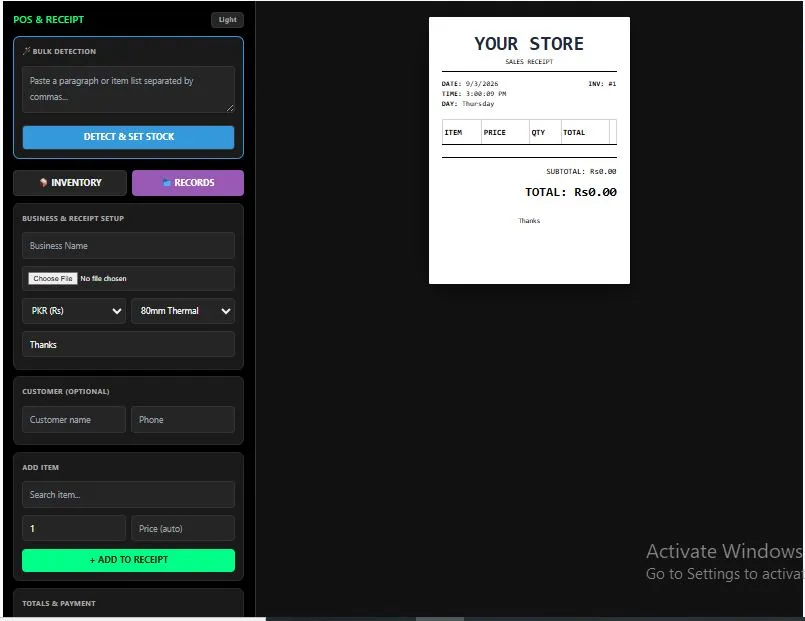
Getting your first sale rung up takes four steps. First, set up your inventory — paste a list of items into Bulk Detection and it separates them automatically, or add each one by hand with its price and starting stock. Second, search and add items to the sale — type a name, or if you use a USB or Bluetooth barcode scanner, just scan and hit Enter and it adds straight to the receipt.
Third, apply a discount or tax rate and pick a payment method; if it's a cash sale, enter what the customer handed over and the change due calculates itself. Finally, finish the sale — print it on 58mm or 80mm thermal paper (or A4/Letter), download it as a JPG, or share it straight to WhatsApp on mobile. There's no sign up, and every receipt and inventory change is saved locally, so this point of sale system is ready again the moment you reload the page.
Why Use This POS System No Sign Up
Free isn't always free. According to GoDaddy's 2026 POS system cost guide, point of sale software ranges from completely free to over $300 a month once you add advanced features — and even the "free" apps usually make their money back through a card-processing fee on every single sale. This point of sale system never touches your payments at all, so there's no hidden cut, no processing fee, and no upsell waiting once your business grows.
There's also no account standing between you and your first sale. Every major free POS option — the big names included — asks you to download an app, hand over your business details, and often link a bank account before you can ring anything up. This one skips all of that. No sign up, no app store, no waiting on approval — just a page that works the moment you open it, and closes without leaving anything behind on a server.
It's also not just a one-off receipt maker. Stock updates automatically as you sell, so your inventory stays accurate without a separate spreadsheet. Every sale is saved and searchable, with a report showing your top-selling items and daily revenue — the kind of basic business insight that usually sits behind a paid plan.
Who This POS System No Sign Up Is Built For
- Market and pop-up stall vendors — who need a real point of sale system for a single day of trading, not a monthly subscription they'll only use on weekends.
- Small shop owners — who want their inventory to update itself with every sale instead of tracking stock by hand in a notebook.
- Cafes and small restaurants — who need a fast receipt maker at the counter without linking a card processor or paying a per-transaction fee.
- Anyone testing a small business idea — who wants to see if a POS system is even worth paying for before signing up for one.
- Anyone who's been burned by a "free" POS app before — free plans that quietly take a cut of every card sale, or lock reports behind an upgrade, belong to other providers, not this one.
Tips for Getting Accurate Results
- Back up your data regularly — since this pos system no sign up requires, everything is saved only on your own device. Use the Backup button occasionally so a cleared browser or a new device doesn't mean starting your inventory from zero.
- Bulk Detection only pulls item names, not prices — it splits your pasted list into item rows automatically and sets a default stock of 10, but you still need to fill in each price before saving.
- Set your paper size before you print, not after — thermal receipts size themselves to the actual content, so switching between 58mm, 80mm, and A4 changes the printed layout each time.
- Use a USB or Bluetooth barcode scanner for speed — most scanners type the product name and press Enter automatically, and this receipt maker adds the item straight to the sale the moment that happens.
- Watch the low-stock warning in Inventory — items at 5 units or fewer are flagged in red, so you know what to reorder before you run out mid-sale.
Frequently Asked Questions
Is this pos system no sign up, completely free?
Yes. There's no account, no app to download, and no fee to use any feature — inventory, receipts, reports, and backups are all free.
Does this take a cut or fee from my sales?
No. This tool doesn't process payments at all — it's a receipt maker and inventory tracker, not a payment processor, so there's no percentage taken from any sale, ever.
Does my sales or inventory data get uploaded to a server?
No. Everything is saved locally on your own device using your browser's storage. Nothing you enter is ever sent anywhere.
What paper sizes does it support?
58mm and 80mm thermal roll paper, plus standard A4 and Letter pages — each one adjusts the receipt layout and the print size automatically.
Can I share a receipt directly to WhatsApp or by email?
Yes, on a phone or any device that supports it — tap Share Receipt and pick WhatsApp, email, or any app your device offers.
Does it work with a barcode scanner?
Yes. Most USB and Bluetooth barcode scanners type the product name and press Enter — this point of sale system adds that item straight to the sale automatically.
Can I export my sales records?
Yes. Export your full sales history as a CSV file at any time, or download a complete backup of your inventory and records as a single file.
Does this work without an internet connection?
Yes, once the page has loaded. Since nothing is uploaded and there's no external service involved, it keeps working even if you go offline mid-sale.
Quick Summary
This pos system no sign up requires runs entirely in your browser, so nothing you enter ever touches a server. Track inventory as you sell, add tax and discounts, and calculate change automatically. Print a receipt on thermal or standard paper, export it as a JPG, or share it straight to WhatsApp. Every sale is saved locally with searchable records and a sales report, and there's no processing fee, no watermark, and no account standing in the way — which is exactly what makes this a pos system no sign up actually needs to be trusted.
Disclaimer
This point of sale system is provided free of charge, "as is," with no warranty of any kind, express or implied, and without any guarantee of uptime, accuracy, or error-free operation. It is a general-purpose tool for creating receipts, tracking inventory, and recording sales, and it is not a substitute for professional accounting, bookkeeping, tax, or legal advice.
Tax rates, discounts, totals, and change are calculated based on the numbers you enter, and it is your responsibility to verify that these figures, and the receipts you generate, meet the tax, invoicing, and record-keeping requirements of your specific country, state, or region — these vary widely and may include rules this tool does not check for, such as fiscal registration, mandatory tax identification numbers, or specific formatting requirements.
All data is stored locally on your own device only; it is not backed up automatically, and we are not responsible for any data lost due to a cleared browser, a device failure, or any other cause — use the Backup feature regularly and keep your own copies.
To the fullest extent permitted by law, we accept no liability for any direct, indirect, incidental, or consequential loss or damage — including lost revenue, accounting errors, disputes with customers, or issues arising during a tax audit — resulting from the use of this tool, regardless of where you or your business are located. If you are unsure whether this tool meets your local legal or tax requirements, please consult a qualified accountant, tax advisor, or lawyer in your jurisdiction before relying on it for your business records.