This jpg to png converter changes your JPG images into the lossless PNG format instantly, right in your browser — no signup, no upload, no waiting. One honest note worth knowing upfront: converting to PNG cannot bring back detail a JPG already lost when it was first saved; it simply stops any further quality loss going forward, since PNG doesn't re-compress the image. Drop in one file or a hundred, and download them individually or as a single ZIP.
Drop JPG files here or click to upload
Any number of files — converted losslessly, no re-compression
Honest note: converting to PNG cannot restore detail already lost when the JPG was originally saved — it simply stops any further quality loss, since PNG is lossless. File sizes will usually be larger than the original JPG.
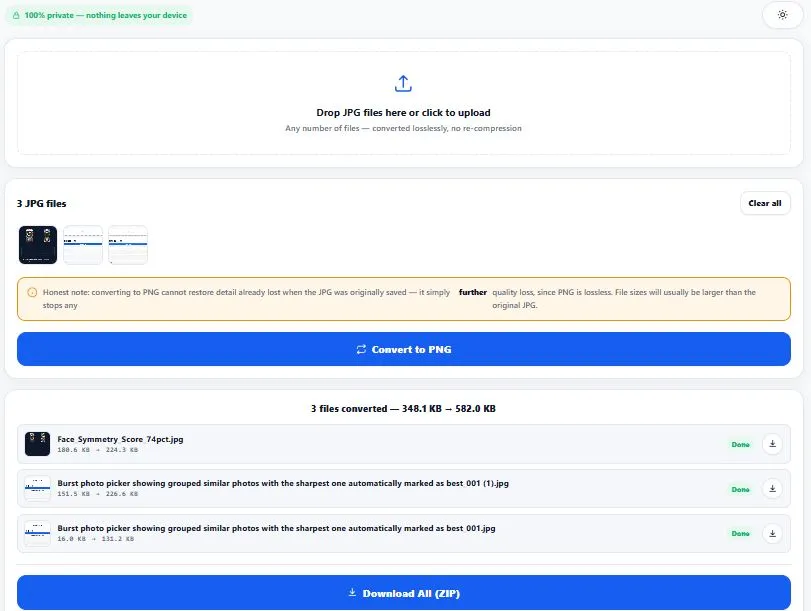
Table of Contents
How This JPG to PNG Converter Works
Converting JPG to PNG is a one-way trip, and it's worth understanding why before you rely on it. JPG uses lossy compression — every time a JPG is saved, some image detail is permanently discarded to shrink the file size, and that detail cannot be recovered by any tool, ever. PNG uses lossless compression — once an image is saved as PNG, no further detail is lost no matter how many times it's opened or re-saved.
So this converter draws your JPG onto a canvas at its exact original pixel dimensions, then encodes that canvas as a PNG with no compression parameter at all (PNG doesn't have a "quality" setting the way JPG does — it's either lossless, or it isn't PNG). The result is a PNG that's pixel-for-pixel identical to how the JPG looked after its original compression — not a restoration of whatever was lost before that.
| JPG | PNG |
|---|---|
| Lossy — loses some detail every time it's saved | Lossless — no detail lost, ever, once converted |
| No transparency support | Full transparency support (alpha channel) |
| Smaller file sizes, ideal for photos | Larger file sizes, especially for photos |
| Best for photos, screenshots, web images | Best for graphics, logos, and anything needing transparency |
Why Use This JPG to PNG Converter
Every feature below is something the tool above actually does, right now, in your browser:
- Lossless conversion, no quality setting to worry about — PNG doesn't have a compression slider, so there's nothing to configure or get wrong.
- No signup, no upload wait — click, drop your files, and download; nothing is sent to a server first.
- Batch conversion, any number of files — drop in one JPG or a hundred; each one converts individually so a single bad file never stops the rest.
- Per-file results with before/after size — see exactly how each file's size changed, individually.
- Download one file, or all of them as a ZIP — a single converted file downloads directly; multiple files bundle into one ZIP automatically.
- Clear pass/fail per file — if a specific JPG can't be converted, it's marked "Failed" clearly instead of silently vanishing from your results.
- An upfront, honest note about what conversion can and can't do — no false promise that converting to PNG will "restore" lost quality.
- Everything runs in your browser — your JPGs are only read locally to convert them and are never uploaded to any server.
- Light and dark mode — toggle to match your screen preference, saved for your next visit.
Who This JPG to PNG Converter Is Built For
This jpg to png converter is built for anyone who needs a lossless format for their next editing step, not necessarily better quality than they already have. Designers and developers convert JPG assets to PNG before layering them into design software or CSS, where PNG's format is often expected or easier to work with. People editing images further convert to PNG first so that additional edits and re-saves don't compound existing JPG compression artifacts on top of each other.
Anyone submitting to a form or platform that only accepts PNG — some upload systems, print services, or software tools reject JPG files outright and require PNG specifically, regardless of the original image quality. Students and casual users who were told "just convert it to PNG" without knowing exactly what that does or doesn't fix. In every case, the goal is the same — get a lossless file for whatever comes next, with realistic expectations about what changed.
Tips for Best Results
- Don't expect PNG to "fix" a low-quality JPG. This jpg to png converter changes the format losslessly going forward, but it cannot recover detail, blur, or compression artifacts that were already baked into the original JPG — the output will look exactly as sharp (or soft) as the source file did.
- Expect the file size to grow, not shrink. PNG's lossless compression is less efficient than JPG's lossy compression for photo-like images — a converted PNG is typically larger than the original JPG, sometimes significantly.
- Convert before making further edits, not after. If you plan to edit, crop, or re-save an image multiple times, converting to PNG first prevents each additional save from adding new JPG compression on top of what's already there.
- Batch large groups in reasonable sizes. Converting hundreds of files at once works, but very large batches take longer since each file is processed individually — the progress bar shows exactly where the conversion stands.
- Check the individual result rows if something looks off. Each file shows its own before/after size and a clear "Done" or "Failed" status, so you can spot and re-try any file that didn't convert as expected instead of assuming the whole batch worked.
The lossy-versus-lossless distinction between JPG and PNG isn't a minor technical detail — it's defined in each format's official specification. PNG's lossless guarantee is part of the format's core design, standardized by the W3C, which is exactly why re-saving a PNG file any number of times never degrades it further. For the full technical specification of how PNG achieves lossless compression, see the official W3C PNG specification.
Frequently Asked Questions
Does converting JPG to PNG improve image quality?
No — it cannot recover detail that was already lost when the JPG was originally compressed. What it does do is stop any further quality loss going forward, since PNG is lossless and JPG is not. The converted PNG will look exactly as sharp or soft as the source JPG did.
Why is my converted PNG file bigger than the original JPG?
This is expected. PNG uses lossless compression, which preserves every pixel exactly but generally produces larger files than JPG's lossy compression, especially for photographs. A JPG that's a few hundred KB can easily become several MB as a PNG.
Will converting to PNG add transparency to my JPG?
No — a JPG never had any transparent areas to begin with, since JPG doesn't support transparency at all. Converting to PNG just changes the file format; it doesn't create transparency where none existed. If you need to remove a background and make it transparent, that requires a separate background-removal step, not just a format conversion.
Is PNG always better than JPG?
No, it depends on the use case. PNG is better for graphics, logos, and anything needing transparency, since it's lossless. JPG remains better for photos and screenshots where smaller file size matters more than lossless storage, since PNG files for photo-like images are often several times larger.
Can I convert multiple JPG files to PNG at once?
Yes — this tool supports batch conversion of any number of files. Each file converts individually, so if one file happens to fail, the rest of the batch still completes normally, and the failed file is clearly marked instead of silently skipped.
Do I need to install any software to convert JPG to PNG?
No — this jpg to png converter runs entirely in your web browser using built-in browser technology (the HTML canvas). There's nothing to download or install, and it works the same way on Windows, Mac, Linux, or mobile.
Why would I need a PNG instead of just using the JPG?
Some platforms, print services, and software tools specifically require PNG and reject JPG uploads outright, regardless of quality. PNG is also the more practical format if you plan to edit an image further, since it won't add its own compression on top of what the JPG already has.
Is this converter free, and does it upload my images anywhere?
Yes, it's completely free with no sign-up required. Every JPG is read and converted locally in your browser — nothing is ever uploaded to a server, which is also why there's no limit on file count or how often you can use it.
Quick Summary
A jpg to png converter changes an image from JPG's lossy, compressed format into PNG's lossless format — the key thing to understand is that this stops future quality loss, but it cannot undo compression that already happened when the JPG was first saved. This converter does that instantly and losslessly, drawing every pixel onto a canvas and encoding it as PNG with no compression parameter at all.
Expect the file size to grow rather than shrink, since PNG generally produces larger files than JPG for photo-like images. Whether you need PNG for a platform that requires it, or to prevent further quality loss during editing, the same rule applies: converting format doesn't restore quality, it just changes how the file is stored going forward.
Disclaimer
BytePriva strives for accuracy, but conversions can occasionally fail or behave unexpectedly on certain files — please review your converted images yourself before relying on them for professional, commercial, or print work. This tool converts images losslessly using standard, well-established browser technology (the HTML canvas), but as explained above, it cannot restore detail already lost in the original JPG — by using this tool, you agree that you understand this limitation and are responsible for checking your own converted files before final use. Your images are processed entirely in your browser and are never uploaded, stored, or sent anywhere.