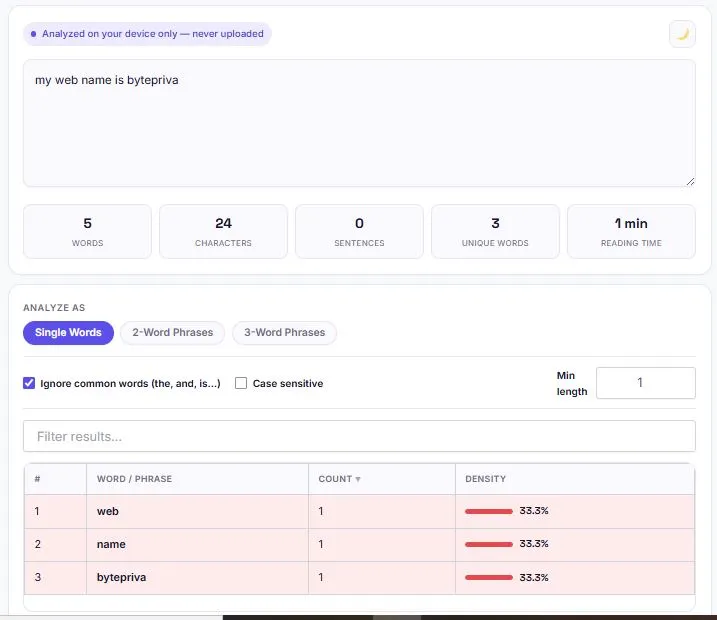
A keyword density checker calculates how often a word or phrase appears in a piece of content, expressed as a percentage of the total word count — a quick way to spot both underused target keywords and overused ones that risk looking like keyword stuffing. This free keyword density checker analyzes text at three levels: single words, two-word phrases, and three-word phrases, since long-tail phrases often reveal a page's real topic focus better than individual words do.
It automatically filters out common words like "the" and "and" so the results show meaningful terms instead of noise, and it flags any word or phrase above roughly 2.5% density as a potential over-optimization risk. Everything runs instantly in your browser — nothing you paste is uploaded, logged, or stored.
| # | Word / Phrase | Count ▼ | Density |
|---|---|---|---|
| Paste some text above to see word frequency results. | |||
A keyword density above ~3% is often flagged by search engines as potential keyword stuffing — rows above that threshold are highlighted automatically.
Table of Contents
Does Keyword Density Still Matter for SEO in 2026?
Keyword density was treated as a near-literal ranking formula in the early 2000s, when repeating a target phrase enough times could genuinely push a page higher in search results. That approach broke down after Google's Panda update in 2011, and search has moved even further since — Google's Helpful Content System, introduced in 2022 and folded into core ranking in 2024, now works alongside E-E-A-T signals (Experience, Expertise, Authoritativeness, Trustworthiness) to evaluate whether content was written for readers or written to game a formula.
By 2026, density on its own carries no ranking weight at all. What it still does well is act as a warning sign: an unusually high density on one phrase is often a symptom of writing for an algorithm instead of a person, and that's precisely the pattern modern core updates are built to catch. Checking density before publishing isn't about hitting a target number — it's about catching that pattern before it becomes a problem.
How This Keyword Density Checker Works
The math behind keyword density is simple: divide how many times a word or phrase appears by the total word count, then multiply by 100 to get a percentage. This tool automates that calculation and adds a few layers most basic checkers skip. It counts single words, two-word phrases, and three-word phrases separately, so you can see both "seo" and "seo keyword density" as distinct results.
A stop-word filter removes common words like "is," "the," and "and" from single-word results, and removes phrases made up entirely of common words from the phrase results, so the list stays focused on terms that actually carry meaning. Every row in the results table is also color-coded — density above 2.5% is flagged amber, and above 4% is flagged red — so overused terms are visible at a glance instead of requiring manual math.
Why Check 2-Word and 3-Word Phrases, Not Just Single Words
Single-word density can be misleading on its own. A word like "seo" might look perfectly balanced at 1.5%, while the phrase "seo keyword density" quietly repeats in nearly every paragraph — a pattern that only shows up when phrases are counted as units instead of individual words. Two-word and three-word phrases also tend to reveal a page's actual topic focus more clearly than single words do, since phrases carry more specific search intent.
This is why this tool analyzes all three levels separately: single words catch basic repetition, while 2-word and 3-word phrases catch the more common real-world problem of a specific phrase being repeated too often without anyone noticing while writing.
What Counts as Keyword Stuffing?
There's no official cutoff, but these general ranges are widely used as a practical guide:
| Density Range | Risk Level | What It Usually Means |
|---|---|---|
| Under 1% | Low | Keyword may be underused — consider using it a bit more naturally |
| 1% – 2.5% | Healthy | Generally considered a safe, natural range |
| 2.5% – 4% | Caution | Worth reviewing — may read as repetitive |
| Above 4% | High Risk | Likely to read as keyword stuffing to both readers and algorithms |
These ranges apply per keyword or phrase, not to your content as a whole. A long article can safely use several different keywords, each within a healthy range, without any single one crossing into stuffing territory.
How to Use This Tool
- Paste your article, blog post, or webpage text into the box above.
- Choose Single Words, 2-Word Phrases, or 3-Word Phrases to switch analysis modes.
- Toggle "Ignore common words" to filter out terms like "the" and "and" from the results.
- Check the Density column — anything highlighted amber or red is worth reviewing.
- Use the search box to quickly check the density of one specific keyword.
- Sort by clicking any column header, or export the full table as a CSV file.
FAQs
Is this keyword density checker free to use?
Yes. There's no account, no sign-up, and no limit on how much text you can analyze.
Does keyword density still affect Google rankings in 2026?
Not directly. Google's Helpful Content System and E-E-A-T signals now evaluate content quality and intent rather than keyword repetition. Density is still useful as a diagnostic check to catch accidental over-optimization before publishing.
Why does this tool check 2-word and 3-word phrases too?
Phrases often reveal repetition that single words miss. A phrase like "best seo tool" can repeat too often even when the individual words "best," "seo," and "tool" each look fine on their own.
Is my text uploaded or stored anywhere?
No. The analysis runs entirely in your browser using JavaScript. Nothing you paste is sent to a server, logged, or saved.
Disclaimer
BytePriva's Keyword Density Checker is a free browser-based tool provided for general content review. All analysis happens locally in your browser — no text you paste is ever uploaded, transmitted, or stored. Keyword density is not a Google ranking factor on its own, and this tool should be used as a diagnostic aid alongside good judgment about content quality, not as a guarantee of search performance. Use of this tool is at your own discretion.
Keyword density won't make or break your rankings on its own, but catching an accidentally overused phrase before you hit publish is still worth thirty seconds — this tool makes that check instant instead of a manual word-by-word count.