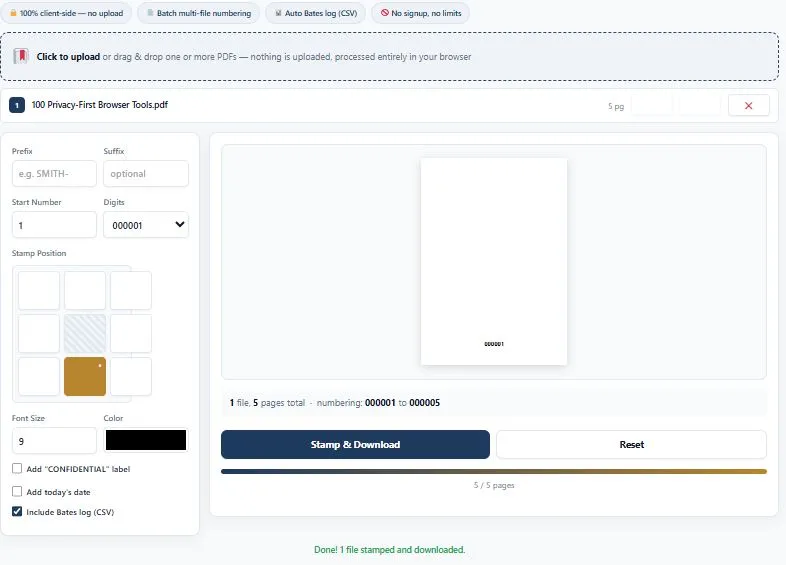
This free bates stamping tool applies sequential Bates numbers to one or more PDF documents at once, keeping the numbering continuous across every file in the order you arrange them. Bates stamping is the standard method for numbering legal documents during discovery, depositions, and trial exhibits, and this tool handles both single files and full batches the same way a legal support team would need it: upload your PDFs, reorder them using the up and down arrows, and set a custom prefix, suffix, starting number, and digit padding.
You can place the stamp in any of eight positions, add a "CONFIDENTIAL" label and today's date, and choose your font size and color. Every stamped file downloads together with an optional CSV log listing the exact Bates range for each document. Everything runs entirely inside your browser, so sensitive legal files are never uploaded anywhere.
Upload PDFs to begin.
0 / 0 pages
🔒 100% private — your PDFs never leave your device.
Table of Contents
How This Bates Stamping Tool Works
Applying Bates numbers to a batch of legal documents takes just a few steps. Here's how it works:
- Upload your PDFs — click the upload area or drag and drop one or more PDF files, then reorder them with the up and down arrows if needed.
- Set your numbering — choose a prefix, suffix, starting number, and digit padding to match your case or firm's numbering format.
- Pick a stamp style — select one of eight stamp positions, font size, and color, and optionally add a "CONFIDENTIAL" label or today's date.
- Stamp and download — click the button to generate your stamped files, delivered together with an optional CSV log of every Bates range.
Why Use This Bates Stamping Tool
Under Federal Rule of Civil Procedure 34, parties in litigation are required to produce documents and electronically stored information in a reasonably usable form during discovery, and Bates numbers are the practical way legal teams keep that production organized and referenceable in court. Manually stamping hundreds of pages one at a time, or trying to keep numbering consistent across dozens of separate PDF exhibits, is slow and easy to get wrong — a single skipped or duplicated number can create real problems when a case gets to trial.
This tool handles the parts of that process that are easiest to mess up by hand. Numbering stays continuous automatically across every file in your batch, in whatever order you arrange them, so there's no manual tracking of where one document's numbering ends and the next begins. The optional CSV log gives you an instant, exportable record of exactly which Bates range belongs to which document — useful for exhibit lists, privilege logs, or handing off to co-counsel. And because everything runs locally in your browser rather than on a remote server, sensitive discovery documents are never uploaded anywhere, which matters when the files themselves may be confidential or privileged.
Who This Bates Stamping Tool Is Built For
- Lawyers and attorneys — preparing court filings, exhibits, and document productions with consistent, defensible numbering.
- Paralegals and legal assistants — handling the bulk of day-to-day Bates stamping work for discovery and case files.
- Litigation support teams — organizing large batches of documents across multiple cases without losing track of numbering.
- Insurance and claims professionals — numbering claim files, medical records, and supporting documents for consistent reference.
- Anyone assembling a formal document set — where every page needs a unique, sequential identifier for tracking and citation.
Tips for Getting Accurate Results
- Set your file order before generating — use the up and down arrows to arrange documents in the exact sequence you want them numbered, since reordering after stamping means starting over.
- Double-check your starting number — if you're continuing from a previous production, confirm the correct starting number so ranges don't overlap or skip.
- Save the CSV log for your records — keep it alongside the stamped files as a quick reference for exhibit lists or when handing documents off to colleagues.
- Test the position on one file first — if you're unsure how a stamp will look on your specific document layout, try a single file before running a full batch.
- Very large batches may take a little longer to process — since everything runs locally in your browser rather than on a server, processing time depends on your device and file sizes.
FAQs
What is Bates stamping and why is it used?
Bates stamping applies a unique, sequential number to every page of a document set, typically with a custom prefix. It's the standard way legal teams track and reference documents during discovery, depositions, and trial so any page can be identified precisely.
Is this bates stamping tool free to use?
Yes, this tool is completely free with no signup required. You can upload PDFs, stamp them, and download the result without creating an account or paying anything.
Can I number multiple PDF files continuously?
Yes. Upload as many PDFs as you need, arrange them in order using the up and down arrows, and the numbering will continue seamlessly from one file to the next without restarting.
Is my PDF uploaded to a server?
No. This tool processes your PDFs entirely inside your browser. Your files are never sent to a server, which matters for confidential or privileged legal documents.
Can I customize the prefix and starting number?
Yes. You can set any custom prefix, an optional suffix, a starting number, and how many digits the number is padded to, so it matches your case or firm's format.
What does the CSV log include?
The optional CSV log lists each uploaded file's name, page count, and its exact Bates number range, giving you an instant reference for exhibit lists or handoffs.
Can I add a confidentiality label or date to the stamp?
Yes. You can optionally add a "CONFIDENTIAL" label and today's date alongside the Bates number, in any of eight stamp positions on the page.
How are multiple stamped files delivered?
If you upload a single file with no CSV log requested, you get one PDF directly. Otherwise, all stamped files are packaged together into a single ZIP download.
Why did I get a ZIP file even though I only uploaded one PDF?
If the CSV Bates log option is checked, the tool packages your stamped PDF together with the log file into a single ZIP, even for one document. Uncheck "Include Bates log (CSV)" if you'd rather download just the stamped PDF directly.
Quick Summary
This free bates stamping tool applies sequential Bates numbers to one or more PDF documents, keeping numbering continuous across every file in your batch. Simply upload your PDFs, set your prefix, starting number, and stamp position, then download instantly — with an optional CSV log listing the exact Bates range for each document. This bates stamping tool works entirely inside your browser, so sensitive legal files are never uploaded anywhere, making it a fast, private way to prepare documents for discovery, depositions, or trial.
Disclaimer
This Bates stamping tool is provided for free, as-is, and processes your documents entirely within your own browser — no files are ever uploaded to or stored on any server. It is a general-purpose numbering tool and does not constitute legal advice on document production requirements, formatting standards, or discovery obligations for your specific case or jurisdiction. BytePriva is not responsible for any loss, damage, or other issues that may result from using this tool, and it is provided with no warranty of any kind. Always verify stamped documents carefully and consult a qualified attorney or your firm's procedures before using them in an official legal filing or production.