Convert JPG to PDF instantly with BytePriva's free, browser-based converter — no software to install and no file ever leaves your device. This tool also supports PNG, WebP, GIF, and BMP images, so you can mix different formats in the same conversion. Simply upload one or more images, arrange them in the order you want using the up and down arrows, and choose your page size: Fit to Image, A4, or US Letter. Click convert, and every image becomes a page in a single PDF file, ready to download in seconds. Because the entire conversion runs locally in your browser, your photos and documents are never uploaded to a server, making it a safe choice for personal or sensitive images.
Tap to choose images or drag & drop them here
Supports JPG, PNG, WebP, GIF, and BMP — select multiple at once
Done!
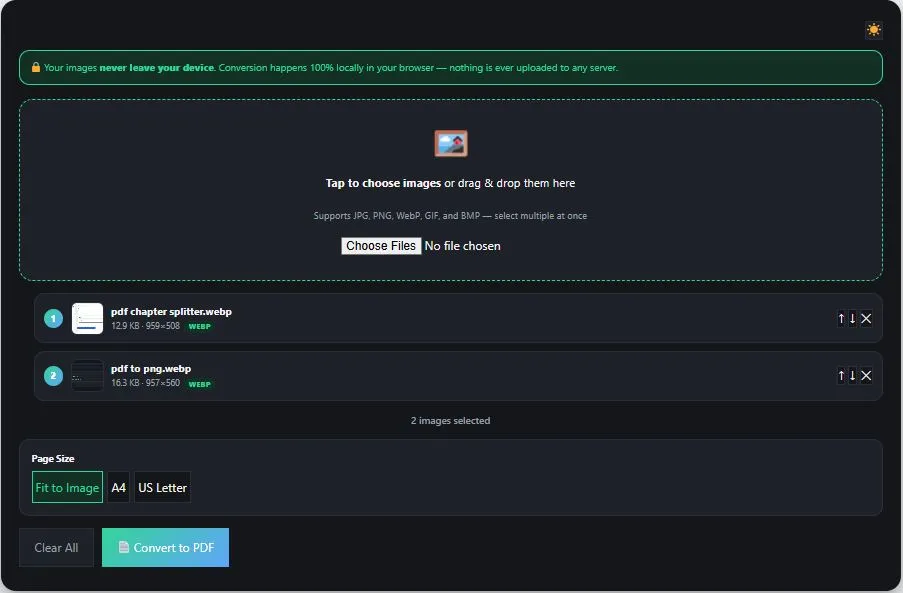
Table of Contents
How to Convert JPG to PDF
- Upload your images — Tap the upload box or drag and drop one or more images (JPG, PNG, WebP, GIF, or BMP) into the converter.
- Arrange the order — Use the up and down arrows next to each image to set the order they'll appear as pages in your PDF. Remove any image you don't need with the ✕ button.
- Choose a page size — Select Fit to Image to match each page exactly to its image, or choose A4 or US Letter for a standardized document size.
- Click "Convert to PDF" — The tool builds your PDF directly in your browser, with a progress bar showing conversion status, then automatically offers the file for download.
Why Use This JPG to PDF Converter
Most online JPG to PDF converters require uploading your images to a remote server before anything happens. This means your photos or documents — even if temporarily — sit on someone else's computer while being processed, which is a real concern if the images contain personal photos, IDs, receipts, or other private content.
This converter avoids that entirely by running inside your own browser. JPG and PNG images are embedded directly into the PDF, while WebP, GIF, and BMP images are first drawn onto an HTML canvas using drawImage() — a standard, well-established browser API — before being added as a page. Your images are never transmitted to any server at any point in the process.
This approach also means there's no file-size cap tied to someone else's server, no waiting for uploads to finish, and no queue behind other users. Since everything runs locally, your PDF starts building the moment you click convert.
FAQs
Is this JPG to PDF converter free to use?
Yes, this converter is completely free to use with no limit on the number of images or conversions.
Does this tool upload my images to a server?
No. The entire conversion happens locally in your browser using JavaScript. Your images are never uploaded to any server at any point.
Can I combine different image formats in the same PDF?
Yes. You can mix JPG, PNG, WebP, GIF, and BMP images in a single conversion, and they'll all be combined into one PDF in the order you set.
Can I change the order of my images before converting?
Yes. Use the up and down arrows next to each image to rearrange them before clicking convert. The final PDF will follow that exact order.
What's the difference between the page size options?
"Fit to Image" makes each page exactly match your image's dimensions. "A4" and "US Letter" use standard paper sizes and center your image on the page, which is better suited for printing.
Quick Summary
This free JPG to PDF converter lets you turn one or more images into a single PDF entirely inside your browser, with no software installation and no file upload to any server. Beyond JPG, it also supports PNG, WebP, GIF, and BMP formats, so you can mix different image types in the same conversion. Choose from three page size options — Fit to Image, A4, or US Letter — reorder your images with simple arrow buttons, and download your finished PDF in seconds. Because everything runs locally using your browser's own rendering engine, your images stay completely private throughout the process, making this a fast and safe way to turn photos, scans, or graphics into a properly organized PDF.
Disclaimer
This JPG to PDF converter is provided free of charge. It combines your images into a PDF directly in your browser, and no file or data is ever uploaded to our servers.
Output quality and file size may vary depending on your original images' resolution, format, and content. This tool is provided "as is" without any warranty, and we are not liable for any loss, damage, or issue arising from its use.
For documents where accuracy or quality is critical — such as legal, official, or print-ready materials — we recommend reviewing your converted PDF carefully and consulting the appropriate software or professional if needed.