This is an Instagram photo editor no sign up is ever needed for — open it and start editing immediately, no account, no email, no waiting. Crop your photo to the exact Instagram size you need (Square, Portrait, Landscape, or Story), apply one-tap filters, fine-tune brightness and color, and add stickers or text directly on top, all with drag-to-move and a single handle to resize and rotate. Everything runs locally in your browser using nothing but the Canvas API — your photo is never uploaded to a server, not even temporarily. When you're happy with the result, export it at the correct resolution for Instagram as a PNG or JPG, ready to post.
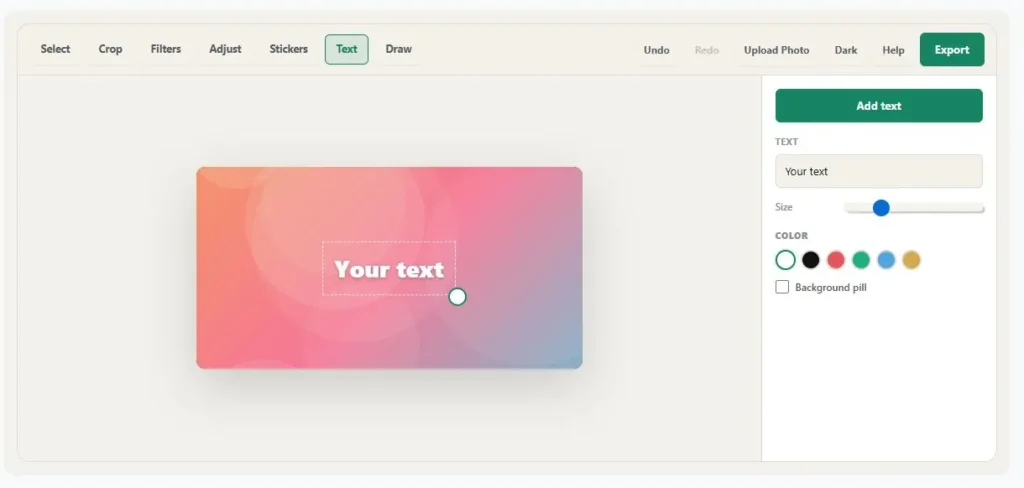
Tap a sticker or text layer to select it — drag to move, use the corner handle to resize and rotate, or the × to delete.
Table of Contents
How to Use This Instagram Photo Editor No Sign Up Needed
- Start editing right away. The editor opens instantly with every tool visible — no account, no upload required to explore it first.
- Upload your photo and pick the right Instagram size: Square, Portrait, Landscape, or Story.
- Apply a filter or fine-tune it manually with brightness, contrast, saturation, warmth, and vignette sliders.
- Add stickers or text — drag to position, use the corner handle to resize and rotate, and tap the × to remove anything you don't want.
- Export as PNG or JPG, sized correctly for Instagram, ready to post.
Why Use
Most Instagram photo editors ask for an account before you can even see what they offer — CapCut requires sign-in, Facetune runs on a paid trial, and several others push you toward AI credits before you can export anything. None of that is necessary for basic edits like cropping to the right size, adjusting color, or adding a sticker.
Getting the size right matters more than most people realize. According to Instagram's own Help Center, photos are uploaded at a resolution of up to 1080 pixels wide, and any aspect ratio outside the supported range gets cropped automatically — which is exactly why this editor's Square, Portrait, Landscape, and Story presets are built to match Instagram's own specifications, not arbitrary numbers.
Tips for Getting the Best Result
- Start with the highest-resolution photo you have — this Instagram photo editor exports at 1080px, matching Instagram's own recommended width, so a sharper source gives a sharper result.
- For Stories, turn on the blurred-background fill if your photo isn't already a 9:16 shape — it avoids the plain black bars you'd otherwise get.
- Keep filter intensity below 100% if a preset looks too strong on your specific photo — it's adjustable for a reason.
- Add text or stickers last, after you've finished cropping and adjusting color, so you're not repositioning them twice.
- Use the Undo button freely — every layer move, filter, and adjustment is tracked, right up until you export.
Frequently Asked Questions
Is this Instagram photo editor really no sign up required?
Yes. There's no account, no email, and no login screen at any point — you can open the tool and start editing immediately, and export without ever being asked to register.
Is my photo uploaded to a server?
No. Everything happens locally in your browser using the Canvas API. Your photo is never sent anywhere, not even temporarily during editing or export.
What Instagram sizes does this support?
Square (1:1), Portrait (4:5), Landscape (1.91:1), and Story (9:16) — matching Instagram's own recommended dimensions, so your photo won't get awkwardly cropped after you post it.
Does this work on mobile?
Yes. Dragging, resizing, and rotating stickers and text all work with touch, and the layout adjusts for smaller screens.
Disclaimer
This tool is provided free of charge as a browser-based photo editor — nothing you upload is ever sent to a server, and no account is required to use it.
Results can vary depending on your device, browser, and the photo you start with, so no specific outcome is guaranteed. This tool is offered as-is, with no warranty of any kind, and we accept no liability for how an exported image is used or shared afterward.
You are responsible for reviewing your exported photo before posting it, and for making sure you have the rights to any photo, sticker, or logo you add. Instagram's own size and format requirements can change over time, so it's worth double-checking against their current guidelines for anything important.