Stop guessing what a laser cutting job actually costs. This laser cutting cost estimator breaks the price down the way a real shop floor does — material, cutting time, pierces, assist gas, setup, and overhead — so the number you get isn't a rough ballpark, it's a real quote you can stand behind.
Job Specification
Part Geometry
Rectangular bounding box of the part/sheet — used for material takeoff and the preview. Your actual nested part may use less material than this box.
Cutting Parameters
Use the actual cutting speed from your machine's cutting parameter chart for this material, thickness and gas — it varies too much by laser type/power to assume.
Machine, Labor & Gas
Machine rate should reflect your shop's depreciation, maintenance and overhead per hour, not just electricity.
Job & Overhead
Setup cost is spread across this quantity.
Live Preview
Results
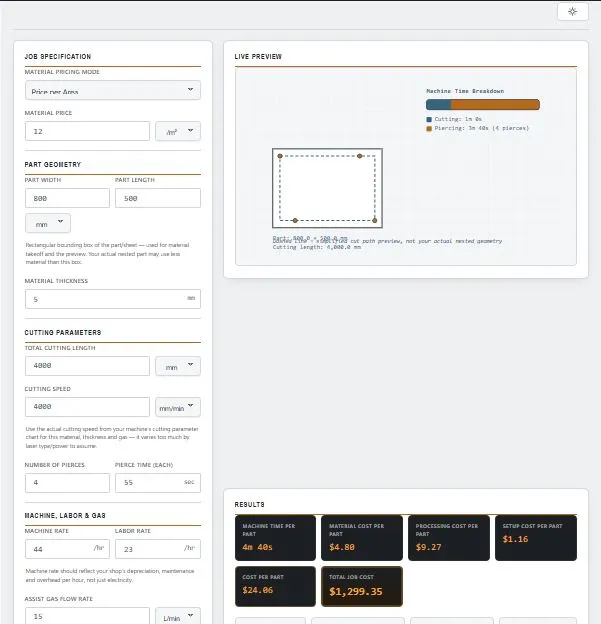
Table of Contents
How the Cost Actually Gets Built
Most "cost calculators" just multiply one number by another and call it a day. This one builds the price the way a laser actually spends its time and your money — layer by layer.
Cutting time comes first: your total cutting length divided by your machine's real cutting speed. Not a guessed speed — yours, from your own parameter chart, because a 1kW fiber laser and a 6kW one aren't cutting the same job in the same time.
Every pierce adds up. A part with 20 small holes can burn more time piercing than cutting, so pierce count × pierce time gets added straight into the machine clock — no hiding it in a vague "extra 10% for complexity" fudge factor.
Material cost is calculated your way — by area if you're pricing sheet stock per m²/ft², or by actual weight (area × thickness × density) if you buy by the kg. Either way, it's real geometry, not a flat per-part guess.
Gas doesn't cut for free. Assist gas flow rate × your cutting time × your gas price gets folded in, because oxygen, nitrogen or compressed air all cost something per hour the nozzle's open.
Setup gets spread out, not dumped on one part — programming and fixturing time divides across your whole batch, so a 50-piece run doesn't carry the same setup burden as a 1-piece job.
Add material, machine/labor time, gas, and setup together, apply your overhead and margin, and that's your real per-part price — multiplied out to the full job total.
Why This Beats a Napkin Estimate
Most shops either eyeball a price from experience or run a spreadsheet nobody's updated since the gas prices changed — which is exactly the gap a proper laser cutting cost estimator is meant to close.
This tool doesn't hide any of the moving parts. Every line item that goes into the final number is broken out separately, so you can see exactly where the money's going before you send a quote:
Table:
| Cost Component | Driven By | Why It Matters |
|---|---|---|
| Material | Area or weight × your price | Biggest line item on thick or expensive stock |
| Cutting Time | Cutting length ÷ your machine's speed | Scales directly with part complexity |
| Piercing | Pierce count × pierce time | Often underestimated on detail-heavy parts |
| Assist Gas | Flow rate × cutting time × gas price | Adds up fast on long nitrogen-cut jobs |
| Setup | Programming time ÷ batch quantity | Crushes small-batch margins if ignored |
Change one input — swap steel for aluminum, add ten more pierces, double the batch size — and every downstream number updates instantly. No spreadsheet formulas to fix, no forgetting to update the gas price cell.
What Actually Moves the Needle on Your Numbers
Two shops cutting the same 3mm mild steel part can land on wildly different costs — not because one of them is wrong, but because the inputs behind the scenes are genuinely different.
Laser type and power decide your speed, not the material alone. A 1kW fiber laser and a 12kW one aren't in the same conversation on thick steel, and even two machines at the same power can differ based on beam quality, focus lens, and nozzle condition. That's exactly why this tool asks for your real cutting speed instead of quietly assuming one — any "typical speed chart" would be wrong for half the machines reading it.
Reflective metals change the math. Aluminum, brass, and copper reflect more of the laser energy than mild steel absorbs it, which is part of why they often need different power settings, gas types, or even a different laser source entirely (fiber handles reflective metals far better than older CO2 systems).
Assist gas isn't just a cutting aid — it's a cost lever. Oxygen is cheap and boosts cutting speed on steel through an exothermic reaction, but leaves an oxide edge. Nitrogen gives a clean, oxide-free edge but costs more and usually cuts slower on thicker material. Compressed air sits in between — cheapest option, but with real limits on thickness and finish quality.
Thickness doesn't scale linearly. Doubling material thickness rarely just doubles cutting time — thicker material often needs a slower speed and longer pierce times, which is why pierce count matters more on heavier gauge parts than people expect.
None of these get guessed at in this tool. They're exactly why the speed, gas, and pierce fields are yours to fill in — your machine, your gas choice, your actual numbers.
For a deeper technical comparison of assist gas selection, see Lincoln Electric's guide to laser cutting gases.
Who This Is Actually Built For
Job shop owners quoting a new customer use it to build a defensible number fast — one they can walk through line by line if the customer asks "why does this cost that much."
Estimators at fabrication shops run it before a bid goes out, catching jobs where the pierce count or setup time would quietly eat the margin if nobody flagged it early.
Production planners use it to compare batch sizes — running the same job at quantity 5 versus quantity 50 shows exactly how much setup cost gets absorbed per part as the run grows.
Buyers and procurement teams on the other side of the table use it too, as a sanity check against a supplier's quote before signing off on a purchase order.
Even laser operators learning to estimate use it to build intuition — seeing cutting time, pierce time, and gas cost as separate numbers instead of one opaque total makes it obvious which lever actually moves the price.
Getting Numbers You Can Actually Trust
The formula's only as good as what goes into it — and three fields cause almost every bad estimate.
Your machine rate needs to be a real shop rate, not just "what electricity costs." If it doesn't include depreciation, maintenance, and a slice of overhead, every quote built on it is quietly losing money even when it looks profitable.
Pull cutting speed from your own cut charts, not memory. Speeds drift as nozzles wear, lenses get dirty, or gas pressure gets tweaked — a number that was accurate six months ago might not be anymore.
Don't skip the wastage that isn't "cutting." Nesting scrap, offcuts, and material lost to kerf width aren't part of this calculator's material formula directly — factor them into your material price per unit if your supplier price doesn't already account for them, or your material cost will run consistently low.
Small batches punish sloppy setup-time estimates the hardest. On a 2-piece job, an extra 5 minutes of setup you forgot to log can swing the per-part cost more than almost anything else in the calculation — check this field first if a small-batch quote looks off.
Frequently Asked Questions
How is laser cutting cost calculated?
This laser cutting cost estimator builds cost from material cost (by area or weight), machine and labor time (cutting length ÷ speed, plus pierce count × pierce time), assist gas cost, and setup cost (spread across the batch) are added together, then your overhead/margin percentage is applied.
Why do I have to enter my own cutting speed?
Cutting speed depends on laser power, type (fiber vs CO2), focus, nozzle condition, and gas — it varies too much across machines for any single "typical speed" to be accurate. Your own cutting parameter chart gives a real number instead of a misleading guess.
What's the difference between "Price per Area" and "Price per Weight"?
Price per Area multiplies your part's area by a price per m²/ft². Price per Weight calculates actual weight (area × thickness × material density) and multiplies by a price per kg/lb — useful if your supplier prices sheet stock by the kilogram.
Does the tool account for material waste or nesting scrap?
Not directly — it calculates cost for the part's own area/weight. If your supplier price doesn't already build in typical scrap, factor that into the material price you enter.
How does batch quantity affect the cost per part?
Setup and programming time is fixed per job but gets divided across the quantity entered, so cost per part drops as batch size increases, even though material and cutting time per part stay the same.
Can I price in a currency other than USD?
Yes, over 20 currencies are available, plus a custom currency symbol option if yours isn't listed.
What if my machine uses compressed air instead of nitrogen or oxygen?
Enter your actual gas flow rate and price regardless of gas type — the formula treats assist gas cost the same way whether it's oxygen, nitrogen, or compressed air.
Is the "Total Job Cost" the price I should quote a customer?
It's your calculated cost, including your overhead/margin input. Whether to quote that exact number, round it, or add further business considerations is still your call.
Laser Cutting Cost Estimator — Quick Summary
This laser cutting cost estimator turns your real cutting speed, pierce data, and shop rates into a line-by-line job cost — not a rough guess. Whether you're quoting one part or a full production batch, this laser cutting cost estimator shows exactly where material, machine time, gas, and setup each land in the final number.
Disclaimer
This laser cutting cost estimator is provided by BytePriva as a free reference tool to help estimate job cost using standard shop-floor cost modeling. Results are intended for general planning, quoting, and educational purposes only.
Actual costs can vary based on real machine performance, material batch variation, nesting efficiency, and shop-specific overhead not captured in a simplified model. For formal quotes or production planning, verify cutting speed, rates, and material pricing against your own equipment data and supplier pricing.
BytePriva makes no warranty regarding the accuracy of results generated by this tool and is not liable for any loss, cost, or damage arising from decisions made using these estimates. Use of this calculator is entirely at the user's own discretion.