This tool lets you unlock password protected images that were locked using real AES-256-GCM encryption — upload your locked ZIP file, enter the password you used to create it, and your original images are decrypted instantly, entirely inside your browser. If the password is wrong, decryption fails cleanly with a clear "incorrect password" message — nothing corrupted, no guesswork. There's no password recovery option here either, for the same reason there wasn't one when you locked them: real encryption means the password is the only key that exists.
Your Photos, Your Eyes.
Drop your locked ZIP file here or click to upload
The .zip file you downloaded when you locked your images
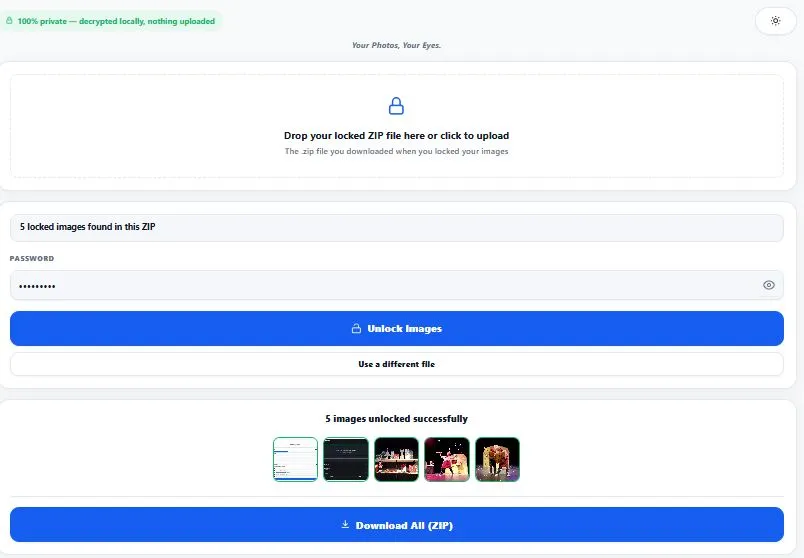
Table of Contents
How This Tool Unlocks Your Images
To unlock password protected images that were locked with our companion tool, this page reads a small manifest.json file bundled inside your locked ZIP — it contains the exact salt and iteration count that were used to turn your password into an encryption key the first time. When you enter your password here, the same PBKDF2 process runs again with those identical settings, regenerating the exact same 256-bit key — but only if the password is correct.
AES-GCM (the encryption mode used) includes a built-in authentication check: if the derived key is wrong, decryption fails immediately and cleanly with a clear error, rather than producing a corrupted or garbled image. This is why you'll see an honest "incorrect password" message instead of a broken file if you mistype it — the math itself catches the mistake.
Why Use This Tool
Every feature below is something this tool actually does, right now, in your browser:
- Reads the exact settings from your locked ZIP automatically — no need to remember or re-enter the encryption details; the manifest file inside handles that.
- Clean, honest wrong-password detection — a mistyped password fails immediately with a clear message, instead of producing a broken or corrupted image file.
- Unlocks your entire batch in one pass — whether you locked 3 images or 300, one password unlocks all of them at once.
- Live thumbnail preview before downloading — see your unlocked images right in the browser to confirm everything decrypted correctly.
- Download one image, or all of them as a ZIP — a single unlocked file downloads directly; multiple files bundle into one ZIP automatically.
- Works with the exact ZIP structure our lock tool produces — if a ZIP is missing the expected manifest file, you're told clearly instead of getting a confusing failure.
- Everything runs in your browser — your locked ZIP is only read locally to decrypt it and is never uploaded to any server.
- Light and dark mode — toggle to match your screen preference, saved for your next visit.
Who Needs to Unlock Password Protected Images With This Tool
This tool is for anyone on the receiving end of a locked ZIP — whether that's you, days or months after locking your own photos, or someone else you shared a locked file with. People who locked sensitive documents earlier — ID scans, financial paperwork, private photos — and now need access again on the same or a different device. Anyone who received a locked ZIP from someone else along with the password, and needs a way to open it without installing dedicated encryption software.
People switching devices or computers who locked images before a transfer and need to unlock password protected images once they've moved to the new machine. Anyone double-checking their own encryption setup — locking a test image, then immediately unlocking it here to confirm the password works before relying on it for something important. In every case, the same two things are required: the locked ZIP file, and the exact password used to create it.
Tips for Best Results
- Upload the exact ZIP file the lock tool gave you, unmodified. Renaming individual files inside the ZIP, extracting and re-zipping it, or editing
manifest.jsoncan all break the unlock process, even with the correct password. - Type your password carefully — it's case-sensitive. A password with different capitalization will fail the authentication check just like a completely wrong password would, since even a single-character difference produces a completely different encryption key.
- If you get "incorrect password," don't assume the ZIP is corrupted. In the vast majority of cases, this message means exactly what it says — double-check for typos, extra spaces, or a different password you may have used for a different batch.
- Keep the unlocked images somewhere safe once you've downloaded them. Unlocking creates plain, unencrypted copies — if the images are still sensitive, treat the unlocked files with the same care you gave the originals.
- Test with a small batch first if you're unsure. If you locked several different batches with different passwords, unlock one small ZIP first to confirm you have the right password before working through larger ones.
The Technology Behind Decryption
This tool doesn't rely on any custom or proprietary decryption logic — it uses the Web Crypto API, a standardized cryptography interface built directly into modern browsers, specifically its SubtleCrypto interface for PBKDF2 key derivation and AES-GCM decryption.
Using a browser's native, standardized implementation rather than a custom one matters for trust: it means the actual decryption math has been reviewed, tested, and implemented by browser vendors themselves, not written from scratch by any single website. For the full technical reference on how this browser API works, see MDN's official documentation on SubtleCrypto.
Frequently Asked Questions
How do I unlock password protected images with this tool?
Upload the .zip file you downloaded when you locked your images, enter the password you used at that time, and click "Unlock Images." All images inside are decrypted at once, with previews shown right in your browser.
What happens if I enter the wrong password?
Decryption fails cleanly with a clear "incorrect password" message — AES-GCM includes a built-in check that detects a wrong key immediately, so you'll never end up with a corrupted or half-broken image file from a mistyped password.
Can I unlock images that weren't locked with your lock tool?
Only if the ZIP contains a compatible manifest.json file with the expected structure (salt, iteration count, and algorithm details) — this tool is built specifically to read that format. ZIPs from other encryption tools or password-protection apps generally won't be compatible.
Do I need the same device I used to lock the images?
No — the locked ZIP file and your password are the only two things required. You can lock images on one device and unlock them later on a completely different one, as long as you have both the ZIP and the exact password.
Why does it say "no manifest.json found" for my ZIP?
This means the ZIP either wasn't created by our lock tool, or its contents were modified after locking (for example, re-zipped without the manifest file). The manifest is required because it stores the exact settings needed to regenerate your decryption key.
Does this tool upload my locked images anywhere to decrypt them?
No — every file is read and decrypted entirely inside your browser using the Web Crypto API. Nothing is ever uploaded, which also means your password and your images never leave your device at any point.
Is there a limit to how many images I can unlock at once?
There's no hard limit — decryption happens sequentially and is computationally lightweight, so batches of hundreds of images process without crashing. Larger batches simply take a little longer, shown clearly on the progress bar.
Is this tool free, and does it require an account?
Yes, it's completely free with no sign-up required. Since nothing is uploaded or stored on a server, there's no account needed to use it, and no limit on how often you can come back to unlock more images.
Quick Summary
This tool exists to unlock password protected images that were encrypted with real AES-256-GCM encryption — upload the locked ZIP, enter your password, and every image inside is decrypted at once, entirely in your browser. The manifest file inside your ZIP carries the exact settings (salt, iterations, algorithm) needed to regenerate the correct decryption key, and AES-GCM's built-in authentication check means a wrong password fails cleanly instead of producing a broken file.
Whether you're a returning to your own locked photos or opening a ZIP someone shared with you, the process is the same: the ZIP and the password are the only two things you'll ever need — there's no recovery path if either one is lost, which is what makes the underlying encryption genuine in the first place.
Disclaimer
BytePriva strives for accuracy, but no software is completely free of bugs — please confirm your unlocked images look correct before deleting the original locked ZIP. This tool relies on the standard Web Crypto API built into your browser for decryption, but it cannot recover a lost or forgotten password under any circumstances — by using this tool, you acknowledge that a wrong or lost password will result in permanent inability to access the locked images. Your locked ZIP and password are processed entirely in your browser and are never uploaded, stored, or sent anywhere.