Base64 encoding turns text or binary data, such as a file or an image, into a string of 64 safe ASCII characters. This free Base64 encoder lets you encode text, upload a file or an image, and copy the result as a raw Base64 string or a ready-to-paste Data URI. It supports URL-safe output, MIME line wrapping and batch mode, and it runs in your browser, so nothing is uploaded.
Free · No sign-up · Runs in your browser · Last updated: November 2026
Related Tools
Table of Contents
How to Encode Text, Files and Images to Base64
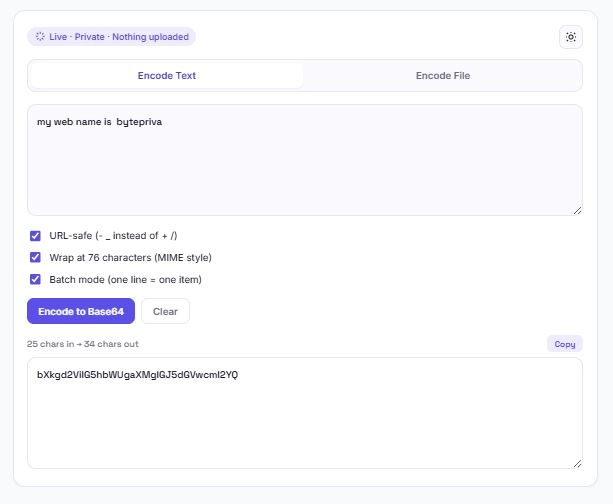
To encode text:
- Type or paste your text into the input box.
- Choose your options: URL-safe, line wrap at 76 characters, or batch mode.
- Click Encode to Base64.
- Copy the result, or download it as a .txt file.
To encode a file or an image:
Copy the full Data URI (ready to paste into HTML or CSS), copy the raw Base64 string, or download it as a .txt file.
Switch to the Encode File tab.
Drag a file into the drop zone, or tap to browse.
The file is encoded automatically. If it is an image, you will see a live preview.
What Is Base64 Encoding?
Base64 is a binary-to-text encoding. It represents data using 64 printable ASCII characters: A–Z, a–z, 0–9, plus (+) and slash (/). It exists because many systems that carry data, such as email, JSON, URLs and HTML, are designed for text and can corrupt or reject raw binary bytes. Base64 converts those bytes into plain text that passes through safely and can be converted back to the exact original. The method is defined in RFC 4648.
How Base64 Encoding Works
The encoder reads the input three bytes (24 bits) at a time and splits them into four groups of 6 bits. Each 6-bit value (0 to 63) maps to one character in the Base64 alphabet. So every 3 bytes become 4 characters.
If the input length is not a multiple of three, the output is padded with one or two equals signs (=) so its length is a multiple of four. For example, "Man" becomes TWFu, "Ma" becomes TWE=, and "M" becomes TQ==.
Why Base64 Output Is Bigger Than the Input
Because 3 bytes become 4 characters, Base64 output is about 33% larger than the original (exactly 4 × ⌈n ÷ 3⌉ characters). A 3,000-byte file becomes 4,000 characters, and more if line breaks are added. This is the price of making binary data text-safe.
Base64 Encoding Examples
Here are real inputs and their Base64 output. You can paste any of them into the encoder above to check.
| Input | Standard Base64 | URL-safe Base64 |
|---|---|---|
| Hello World! | SGVsbG8gV29ybGQh | SGVsbG8gV29ybGQh |
| Hello, World! | SGVsbG8sIFdvcmxkIQ== | SGVsbG8sIFdvcmxkIQ |
| hello?world>> | aGVsbG8/d29ybGQ+Pg== | aGVsbG8_d29ybGQ-Pg |
| café | Y2Fmw6k= | Y2Fmw6k |
| Aladdin:open sesame | QWxhZGRpbjpvcGVuIHNlc2FtZQ== | QWxhZGRpbjpvcGVuIHNlc2FtZQ |
Two things to notice. First, URL-safe output swaps + and / for - and _ and drops the = padding. Second, "café" is encoded from its UTF-8 bytes, where "é" takes two bytes, which is why accented letters and emoji give longer output than plain English letters.
The last row is the classic HTTP Basic Authentication example. Basic Auth sends username:password as Base64 in the header Authorization: Basic QWxhZGRpbjpvcGVuIHNlc2FtZQ== (see RFC 7617).
Base64 Encoder Options Explained
Three settings change how the output is formatted. Choose them based on where the Base64 string will be used.
| Standard Base64 | URL-safe Base64 (Base64URL) | |
|---|---|---|
| Special characters | + and / | - and _ |
| Padding (=) | Kept | Removed in this encoder |
| Safe in a URL or query string | No, needs extra escaping | Yes |
| Typical use | Email, JSON, Data URIs, Basic Auth | URLs, query parameters, JWTs |
- URL-safe mode replaces
+and/with-and_and removes padding. Standard Base64 can break URLs and query strings, because+,/and=have special meanings there. JWTs (JSON Web Tokens) use this URL-safe form. - Line wrap (76 characters) splits long output into lines of at most 76 characters, the format used by MIME for email attachments (RFC 2045) and some older systems.
- Batch mode treats each line of input as a separate item and encodes each one individually. It is useful for lists of usernames, IDs or keys that each need their own Base64 string.
What Is a Data URI?
A Data URI embeds a file directly inside HTML or CSS instead of linking to it. It looks like data:image/svg+xml;base64, followed by the Base64 data, as defined in RFC 2397. For example, this tiny SVG:
data:image/svg+xml;base64,PHN2ZyB4bWxucz0iaHR0cDovL3d3dy53My5vcmcvMjAwMC9zdmciLz4=
Data URIs work best for small icons and images. Because Base64 adds about 33%, large images make your HTML or CSS heavier, and the browser cannot cache them separately. If an image is big, compress it first or convert it to WebP.
Where Base64 Encoding Is Used
| Use case | Why Base64 is needed | Setting to use |
|---|---|---|
| Embedding images in CSS or HTML | A Data URI loads an image without a separate file request | Encode File, Copy Data URI |
| HTTP Basic Authentication | Credentials are sent as Base64 of username:password | Standard |
| JWTs (JSON Web Tokens) | The header and payload are Base64URL-encoded | URL-safe |
| Email attachments | MIME encodes attachments as Base64 with 76-character lines | Line wrap (76) |
| Binary data inside JSON or XML | These formats only carry text, so binary must be encoded first | Standard |
| Values placed in a URL or query string | URL-safe output avoids characters that would break the URL | URL-safe |
In every case the reason is the same: Base64 converts binary or special-character data into plain text that is safe to pass through systems built for text.
Common Base64 Mistakes
- A trailing newline changes the result.
echo "Hello"adds a newline before encoding, so the output differs from the encoder. Useecho -n. - Calling
btoa()on non-Latin text. It throws an error for characters outside Latin-1. Encode to UTF-8 bytes first. - Using standard Base64 in a URL or token. The
+,/and=characters can break the URL. Use URL-safe Base64. - Mixing up outputs between tools. Different results usually come from URL-safe mode, missing padding, line wrapping, or different text encoding (UTF-8 vs something else).
- Treating Base64 as encryption. It is not. See the next section.
- Embedding large images as Data URIs. The file grows by about 33% and cannot be cached on its own. Keep Data URIs for small assets.
Base64 Is Encoding, Not Encryption
A common misconception is that Base64 hides or protects data. It does not. Base64 is fully reversible by design, and anyone can decode the string in seconds with any Base64 decoder. It is meant for compatibility, turning data into a text-safe format, not for security or confidentiality.
The MDN Web Docs glossary entry on Base64 explains this in more detail, along with the btoa() and atob() functions. If you need to protect sensitive data, use proper encryption. As a general habit, avoid pasting real passwords, API keys or private data into any online tool. If you need a strong password, use our Password Generator.
Limitations
- Encoding only. This page encodes to Base64. To convert Base64 back to text or a file, use the Base64 Decoder.
- Large files depend on your device. Encoding runs in your browser, so very large files use a lot of memory, and the Base64 output is about 33% bigger than the file itself. If the page slows down, try a smaller file.
- Text is encoded as UTF-8. Accented letters and emoji take more than one byte each, so their Base64 output is longer.
- Not a security tool. Base64 does not encrypt or protect data.
Frequently Asked Questions
Is this Base64 encoder free to use?
Yes. There's no sign-up, no limit on how much you can encode, and no premium tier. Both text and file encoding are free.
What is Base64 encoding?
Base64 is a way to represent binary data or text using 64 printable ASCII characters (A–Z, a–z, 0–9, + and /). It lets data pass safely through systems built for text, such as email, JSON and URLs, and it can be converted back to the original exactly.
Is Base64 encryption?
No. Base64 is an encoding, not encryption. Anyone can decode it instantly, so it provides no security or confidentiality. Use real encryption to protect sensitive data.
How do I convert an image to Base64?
Open the Encode File tab, drop in your image, and copy the result. You get a live preview, a raw Base64 string, and a Data URI you can paste straight into HTML or CSS. Data URIs work best for small images.
Is it safe to paste passwords or API keys into a Base64 encoder?
This encoder runs in your browser and does not upload your input, but as a general rule you should avoid pasting real secrets into any online tool. Remember that Base64 does not protect data, so anyone who sees the string can decode it.
Can I encode emoji or non-English text?
Yes. Text is converted to UTF-8 bytes before encoding, so accented letters, other scripts and emoji work. They use more than one byte each, so the Base64 output is longer.
Disclaimer
This Base64 encoder is provided as a free utility for encoding text and files into Base64 format. Base64 encoding is not encryption and does not provide security or confidentiality — it is fully reversible by design and should never be relied on to protect sensitive information.
BytePriva and its owner(s) make no guarantees regarding the suitability of this tool for any specific security, compliance, or production use case, and shall not be held liable for any loss, error, or consequence arising from its use. You remain responsible for using appropriate encryption or security measures for any genuinely sensitive data.
This tool is safe to use — there is nothing to install, no account required, and no data is uploaded or stored. This disclaimer simply clarifies that final responsibility for how encoded output is used rests with you.