A URL encoder is a free online tool that converts text into a URL-safe format by replacing spaces, symbols, and special characters with percent-encoded equivalents. Beyond basic text encoding, this URL encoder also includes a query string builder for constructing full URLs from key-value pairs, and a Punycode converter for internationalized domain names — all processed instantly in your browser.
Convert an internationalized domain name (with non-Latin characters, like Urdu, Arabic, or Chinese) into the ASCII Punycode format browsers actually use.
How to Use This URL Encoder
This URL encoder covers three different situations, so start with the tab that matches your task.
Encode Text — paste any text or URL, choose Component or Full URI mode, decide whether spaces should become %20 or +, and click "Encode."
Query Builder — optionally add a base URL, then add key-value pairs one at a time. Each value is automatically URL-encoded as you type, and the full query string (or complete URL, if you added a base) builds live below.
Domain (IDN) — paste a domain name that includes non-Latin characters, like Urdu, Arabic, or Chinese script, and this URL encoder converts it into the ASCII Punycode format browsers actually use to look it up.
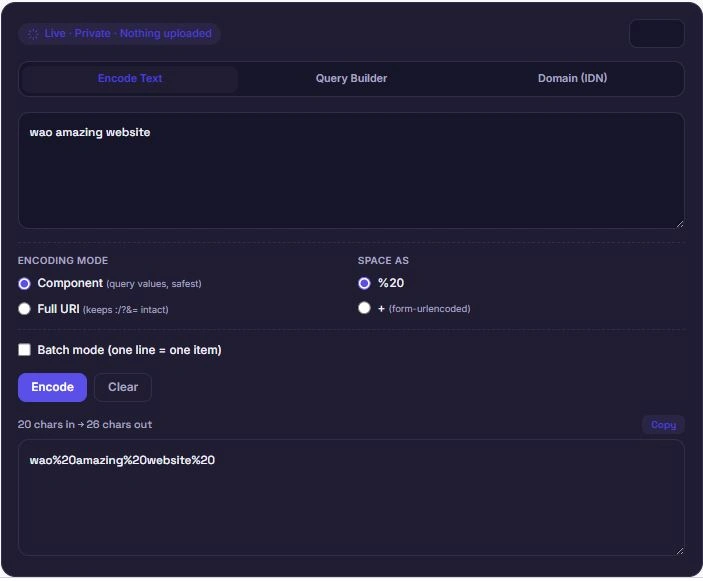
Component vs. Full URI: Which Mode to Use
This URL encoder offers two encoding modes because they solve different problems.
Component mode (encodeURIComponent) encodes almost every special character, including /, :, ?, &, and =. Use this whenever you're encoding a single value that will be placed inside a URL — like a search term, a parameter value, or any user-generated text — since those reserved characters need to be escaped to avoid breaking the URL structure.
Full URI mode (encodeURI) leaves structural characters like /, :, ?, &, and = untouched, since it assumes you're encoding an entire URL rather than a single piece of it. Use this when you already have a full URL with unsafe characters (like spaces or non-ASCII characters) that needs cleaning up, without breaking its existing structure.
Choosing the wrong mode is one of the most common URL encoding mistakes — encoding a full URL in Component mode turns the / and : in https:// into garbled percent-codes, breaking the link entirely.
Why Query String Building Matters
Manually building a query string by hand is a common source of broken links — a forgotten &, an unencoded space, or a raw # symbol can silently break a URL without any obvious error. This URL encoder's Query Builder handles the encoding automatically for every value you enter, so the final result is guaranteed to be valid regardless of what characters your values contain.
This is especially useful for building shareable links with tracking parameters, constructing API request URLs, or generating search URLs with multiple filters — anywhere a URL needs several key=value pairs joined together correctly with & and a leading ?.
Understanding Punycode and Internationalized Domains
Domain names were originally limited to ASCII characters, but internationalized domain names (IDNs) allow non-Latin scripts — Urdu, Arabic, Chinese, and many others — to be used in a domain name. Since the underlying DNS system still only understands ASCII, browsers convert these domains into a special ASCII format called Punycode, prefixed with xn--, behind the scenes.
| Domain (Original Script) | Punycode Equivalent |
|---|---|
| münchen.de | xn--mnchen-3ya.de |
| مثال.com | xn--mgbh0fb.com |
| 中国.cn | xn--fiqs8s.cn |
This matters whenever you're working with a non-Latin domain in a context that expects plain ASCII — configuring DNS records, debugging an email deliverability issue, or checking how a domain will actually resolve. This URL encoder's Domain (IDN) tab handles that conversion using the same standard your browser uses internally, so the result matches exactly what a browser would produce.
Percent-Encoding: The Standard Behind This URL Encoder
Percent-encoding — the %XX format this URL encoder produces — is defined by RFC 3986, the official specification for URI syntax maintained by the Internet Engineering Task Force. Every reserved or unsafe character gets converted into a percent sign followed by its hexadecimal byte value, which is why a space becomes %20 and an ampersand becomes %26.
The official RFC 3986 specification documents exactly which characters are reserved and how percent-encoding should be applied. This URL encoder follows the same encoding behavior built into every modern browser's JavaScript engine, so the output here matches exactly what encodeURIComponent() or encodeURI() would produce in any browser console.
Whether you're using this URL encoder to prepare a single value, build a full query string, or convert an internationalized domain, the underlying goal is the same: making sure the result is something every server, browser, and system can interpret correctly, without ambiguity.
Frequently Asked Questions
Is this URL encoder free to use?
Yes. There's no sign-up, no limit on how much you can encode, and no premium tier. Text encoding, the query builder, and the domain converter are all free.
Does my data get uploaded anywhere?
No. This URL encoder runs entirely in your browser using JavaScript. Nothing you type, build, or convert is ever sent to a server, logged, or stored.
Should I use Component mode or Full URI mode?
Use Component mode when encoding a single value, like a search term or parameter. Use Full URI mode when you already have a complete URL that needs cleanup without breaking its existing structure.
Does the Query Builder work without a base URL?
Yes. If you leave the base URL field empty, this URL encoder just outputs the query string on its own (like key=value&key2=value2) so you can append it to any URL yourself.
Can I encode an entire list of values at once?
Yes. Enable Batch mode on the Encode Text tab, and each line of your input will be encoded separately as its own item.
Disclaimer
This URL encoder is provided as a free utility for encoding text, building query strings, and converting internationalized domain names into Punycode. While it follows standard, browser-consistent encoding rules, it does not validate whether a resulting URL is reachable, correctly formatted for a specific application, or free of other issues beyond character encoding.
BytePriva and its owner(s) make no guarantees regarding the suitability of this tool's output for any specific production, DNS, or application use case, and shall not be held liable for any loss, error, or consequence arising from its use. You remain responsible for testing and verifying any encoded URL or converted domain before relying on it in a live system.
This tool is safe to use — there is nothing to install, no account required, and no data is uploaded or stored. This disclaimer simply clarifies that final responsibility for how the output is used rests with you.