Use this flat bar weight calculator to instantly find the weight and cost of any rectangular metal bar. Simply enter the material, thickness, width, length, and quantity — the tool calculates cross-sectional area, total volume, weight per piece, and total cost automatically, with support for metric and imperial units, 9 common materials, and 20+ currencies.
Specification
Live Preview
Results
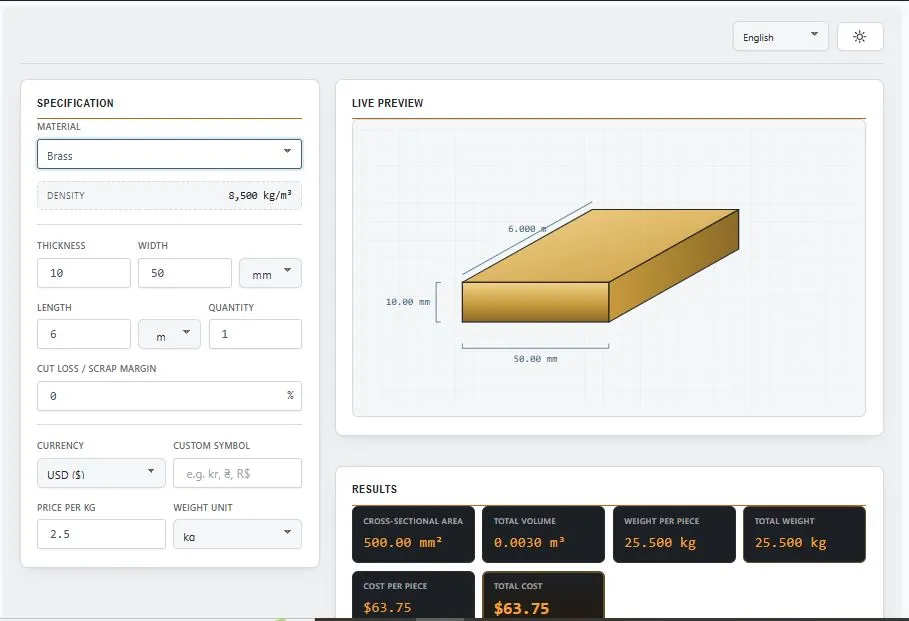
Table of Contents
How the Flat Bar Weight Calculator Works
This flat bar weight calculator uses standard engineering formulas to convert your dimensions into an accurate weight and cost estimate.
1. Cross-Sectional Area — Thickness × Width gives the bar's cross-sectional area (shown in mm² or in²).
2. Volume — The area is multiplied by the bar's length to get the volume of a single piece, then multiplied by quantity for total volume.
3. Weight — Volume is multiplied by the material's density to calculate weight. Each material has a standard density value:
| Material | Density (kg/m³) |
|---|---|
| Mild Steel | 7850 |
| Stainless Steel | 8000 |
| Aluminum | 2700 |
| Brass | 8500 |
| Copper | 8960 |
| Titanium | 4500 |
| Cast Iron | 7100 |
| Zinc | 7140 |
You can also enter a custom density for any other material not listed.
4. Scrap Margin — If you add a cut loss / scrap percentage, it's added on top of the total weight to reflect the extra material typically ordered to account for cutting waste.
5. Total Cost — The final weight is multiplied by your entered price per kg or per lb, in your selected currency, to give the total cost and cost per piece.
Common Flat Bar Materials and Where They're Used
Not every metal behaves the same way once it's cut into a flat bar, and the material you pick changes both the weight and the price per piece by a wide margin. Here's a quick look at the materials supported in this calculator and where each one typically shows up on a job.
Mild steel (7850 kg/m³) is the default choice for most fabrication work — gates, frames, brackets, structural supports — because it's cheap relative to its strength and easy to weld.
Stainless steel (8000 kg/m³) costs more but resists rust, so it turns up in food equipment, kitchens, marine fittings, and anywhere hygiene or weather exposure matters.
Aluminum (2700 kg/m³) is roughly a third the weight of steel, which makes it the go-to when a part needs to stay light — vehicle panels, ladders, window frames.
Brass (8500 kg/m³) and copper (8960 kg/m³) are denser and pricier, mostly reserved for electrical components, decorative trim, and plumbing fittings.
Titanium (4500 kg/m³) is the outlier — light but very strong, and it costs enough that it's usually limited to aerospace or medical parts.
Cast iron (7100 kg/m³) and zinc (7140 kg/m³) round out the list and are common in older machinery parts and galvanizing work.
Working with something not on this list? Switch the material dropdown to "Custom" and type in the exact density — the calculator will use that figure for every result.
For a more detailed reference covering additional alloys and grades, see EngineeringToolbox's metal density chart.
Who This Calculator Is Built For
Metal fabricators and workshop owners use it to price a job before quoting a customer — knowing the exact weight of the flat bar needed means the material cost isn't a guess.
Structural and mechanical engineers reach for it during early-stage design, when a rough weight figure is enough to check whether a part fits within load or shipping limits, without pulling out a full CAD model.
Steel and metal suppliers rely on it to quote stock quickly — punching in a customer's thickness, width, and length gives an instant price across whatever currency the buyer works in.
It's also common among engineering students and hobbyist welders who just need to double-check a textbook density figure or confirm how much a cut piece will actually weigh before it goes on the scale.
Tips for Getting Accurate Results
A few small habits make the difference between a rough estimate and a number you can actually order against.
Double-check your unit before typing in thickness and width — mixing up millimeters and inches is the single most common reason a result looks wrong. The calculator converts automatically once you switch the dropdown, so there's no need to re-enter values by hand.
If you're ordering material rather than just checking a design, add a scrap margin. A 5-10% allowance is typical for straight cuts, and it should go up if the job involves a lot of angled or curved cutting where more offcut is wasted.
For anything outside the nine listed materials — a specific steel grade or alloy, for instance — use the custom density option and pull the figure from the supplier's datasheet rather than guessing.
Frequently Asked Questions
How is flat bar weight calculated?
Weight is found by multiplying the bar's volume (thickness × width × length) by the density of the chosen material. This calculator does that automatically and also adds any scrap margin you enter before showing the final weight.
What materials does this calculator support?
Nine options are built in — mild steel, stainless steel, aluminum, brass, copper, titanium, cast iron, and zinc — plus a custom density field for any material not on that list.
Does the calculator show cost in my local currency?
Yes, over 20 currencies are available in the dropdown, including USD, EUR, GBP, INR, and PKR, and you can also type a custom currency symbol if yours isn't listed.
Is the weight result per piece or total?
Both are shown separately — "Weight per Piece" gives the weight of one bar, and "Total Weight" multiplies that by the quantity you enter, including any scrap margin.
What if my material isn't in the list?
Select "Custom Material" from the dropdown and enter its density in kg/m³. The calculator will use that exact value for every calculation instead of a preset one.
Flat Bar Weight Calculator — Quick Summary
This flat bar weight calculator gives instant, accurate results for any rectangular metal bar — no manual formulas, no unit conversion headaches, no guesswork on material cost. Whether you're pricing a single flat bar or an entire order, this flat bar weight calculator handles the density, volume, and currency conversion in one step, saving time on every quote.
Disclaimer
This flat bar weight calculator is provided by BytePriva as a free reference tool to help estimate weight and cost using standard density values and basic geometric formulas. Results are intended for general planning, quoting, and educational purposes only.
Actual material weight can vary slightly due to manufacturing tolerances, alloy composition, and rolling process. For structural, safety-critical, or high-value orders, always confirm the final figures against certified mill test certificates or your supplier's official specification sheet before purchasing or fabrication.
BytePriva makes no warranty regarding the accuracy of results generated by this tool and is not liable for any loss, cost, or damage arising from decisions made using these estimates. Use of this calculator is entirely at the user's own discretion.