This free bulk passport photo maker lets you create passport, visa and ID photos for a whole family, class or office in one go. Add up to 20 photos, choose 35x45 mm, 2x2 inch or a custom size, then download everything as a ZIP or as a print-ready PDF sheet. It runs in your browser, so your photos are never uploaded.
Quick answer: A bulk passport photo maker crops and resizes many photos to the same passport size at once. This one also builds a passport photo PDF with several photos per page and optional cut lines.
1. Photo size
2. Download photo
Adjust photo
PDF sheet mode
Related Tools
Table of Contents
How the Bulk Passport Photo Maker Works
Most people do not need just one passport photo. They need five for a family trip, thirty for a class form or a stack for a visa office. Doing that one photo at a time is slow, so this passport size photo maker online handles the whole batch together.
- Add your photos. Drag them in, paste them or select several files. You can load up to 20 at a time.
- Choose a size. Pick a preset or enter your own size in millimetres.
- Frame each face. Tap a thumbnail, drag to move, pinch or scroll to zoom, and use the face guide to centre the head. Light, contrast and rotate can be changed for each photo separately.
- Pick format and DPI. Export as JPG, PNG or WebP at 150 to 600 DPI.
- Download. Tap Download all photos (ZIP) to save every photo in one file.
With six photos loaded, the ZIP contains six separate files, each at the size you chose.
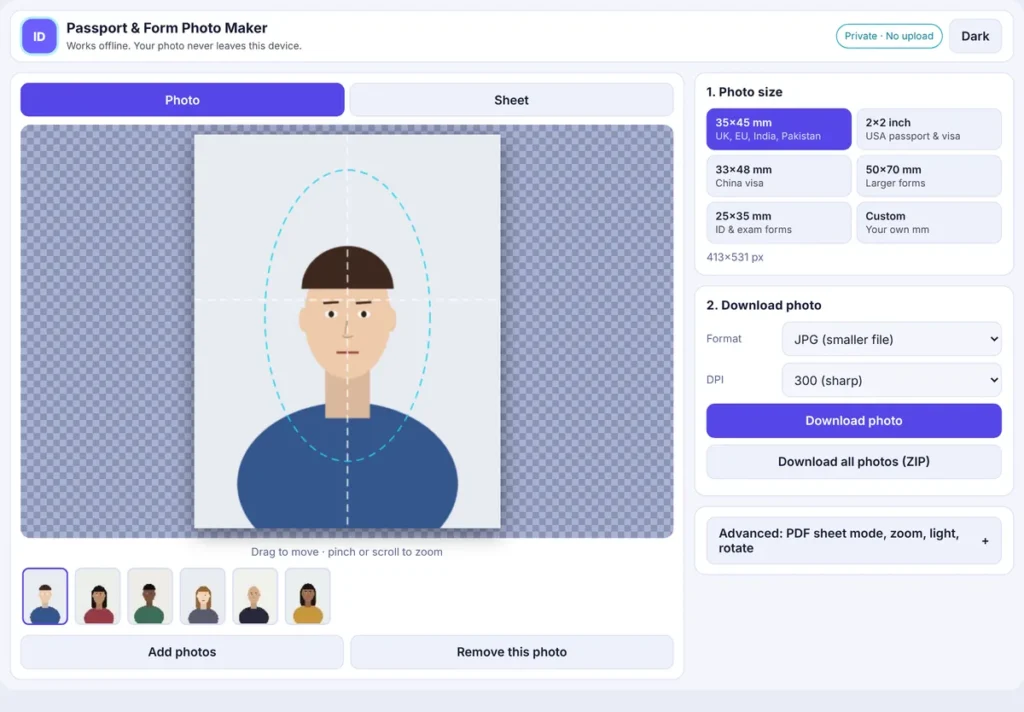
Screenshot of the tool with six sample portraits loaded (illustrations, not real people).
Passport Photo Sheet Maker: Multiple Passport Photos on One Page
Printing one small photo on a full page wastes paper. Open Advanced: PDF sheet mode to turn the tool into a passport photo sheet maker. Choose your paper (4x6 inch, 5x7 inch, A4 or US Letter), set the copies for each photo (1 to 200) or tap Fill sheet, then download the passport photo PDF. Cut lines are optional, and extra pages are added automatically when your photos do not fit on one.
If several people are loaded, the page is shared between them. For example, six people with five copies each fill one A4 page with 30 photos. Prefer an image for your print shop? Use Sheet as JPG instead.
| Paper | 35x45 mm photos per sheet | 2x2 inch photos per sheet |
|---|---|---|
| 4x6 inch | 6 | 2 |
| 5x7 inch | 9 | 6 |
| A4 | 30 | 15 |
| US Letter | 28 | 15 |
Counts are for the default spacing and may change if you use a different size.
When you print the PDF, choose Actual size (100%), not "Fit to page", or the photos can shrink.
Custom Size Passport Photo in Millimetres
Not every form uses a standard size. Choose Custom and enter a width from 10 to 120 mm and a height from 10 to 160 mm. The tool shows the pixel size straight away. A 40x50 mm custom size passport photo at 300 DPI is 472 x 591 pixels.
The formula is simple: pixels = millimetres / 25.4 x DPI. In bulk mode, the same custom size is applied to every photo in the batch.
2x2 Inch and 35x45 mm Passport Photo Sizes
A 2x2 inch passport photo is square, while a 35x45 mm passport photo is a taller rectangle, so pick the one your form asks for. These presets are built in:
| Preset | Size | Pixels at 300 DPI | Often used for |
|---|---|---|---|
| 35x45 mm | 3.5 x 4.5 cm | 413 x 531 | Passports and IDs in the UK, Europe, Pakistan and others |
| 2x2 inch | 50.8 x 50.8 mm | 600 x 600 | US passports and visas |
| 33x48 mm | 3.3 x 4.8 cm | 390 x 567 | China visa |
| 50x70 mm | 5 x 7 cm | 591 x 827 | Larger forms |
| 25x35 mm | 2.5 x 3.5 cm | 295 x 413 | ID cards and exam forms |
Sizes are a general guide. Always confirm your own country's rules.
For a US passport, the State Department asks for a 2 x 2 inch photo with the head between 1 and 1 3/8 inches (25 to 35 mm) from chin to top of head. It also advises against altering photos with software or filters, so keep adjustments small. The full rules are in the official U.S. passport photo requirements.
Features at a Glance
Here is what the bulk passport photo maker includes:
| Feature | Why it helps |
|---|---|
| Bulk mode, up to 20 photos | Finish a family or class in minutes |
| PDF sheet with cut lines | Print many photos on one page |
| Custom size in mm | Works for unusual forms |
| Face guide, drag and zoom | Centre every face accurately |
| Light, contrast and rotate | Fix small problems per photo |
| JPG, PNG, WebP at 150 to 600 DPI | Match upload or print needs |
| No upload | Photos stay on your device |
Browser support for some formats, such as HEIC and WebP, can vary by device.
Who Needs an ID Photo Maker With Bulk Mode?
- Families applying for passports or visas together
- Schools and coaching centres collecting photos for exam forms
- Travel and visa consultants preparing files for many clients
- Print shops laying out photos on A4 or 4x6 sheets
- Offices making photos for staff ID cards
Tips for Better Results
A bulk passport photo maker saves time, but good results still start with a good photo:
- Use a plain, light background. This tool does not remove backgrounds.
- Face the camera straight on, with a neutral expression and even light.
- Keep the camera at eye level, then zoom in here instead of taking a close-up.
- Use a recent photo that looks like you today.
- Check the printed size with a ruler before you submit.
What This Tool Does Not Do
To be upfront, this bulk passport photo maker does not remove or replace backgrounds, detect faces automatically or check whether a photo meets a specific country's rules. You control the framing and you are responsible for confirming the requirements of the office you are applying to.
FAQs
Is this bulk passport photo maker free?
Yes. You do not need an account or signup. Add your photos, choose a size and download.
How many photos can I process at once, and can I use my own size?
You can load up to 20 photos in one batch, and the chosen size, format and DPI apply to all of them. For your own size, choose Custom and enter the width and height in millimetres.
How do I make a passport photo PDF sheet?
Open Advanced: PDF sheet mode, pick your paper, set the copies or tap Fill sheet, then click Download PDF. When you print, select Actual size (100%).
Does it remove the background or upload my photos?
It does not remove backgrounds, so use a plain light wall. It also does not upload anything: all processing happens in your browser.
Passport size photo online kaise banayein?
Apni photo add karein, 35x45 mm, 2x2 inch ya custom size chunein, chehre ko guide ke andar drag aur zoom karein, phir download par click karein. Bohat si photos hon to bulk mode mein 20 tak ek saath add kar ke ZIP mein download kar sakte hain.
Ek page par bohat si passport size photos kaise print karein?
Advanced mein "PDF sheet mode" kholein, paper chunein (A4, 4x6, 5x7 ya Letter), "Fill sheet" dabayein aur "Download PDF" par click karein. Print karte waqt "Actual size" select karein, "Fit to page" nahi.
Disclaimer
Sizes, pixel values, and photos-per-sheet counts are approximate and provided for guidance only. Photo requirements vary by country and may change over time. This tool does not guarantee that your photo will be accepted. Please verify the official requirements of the issuing authority before printing or submitting your photo.