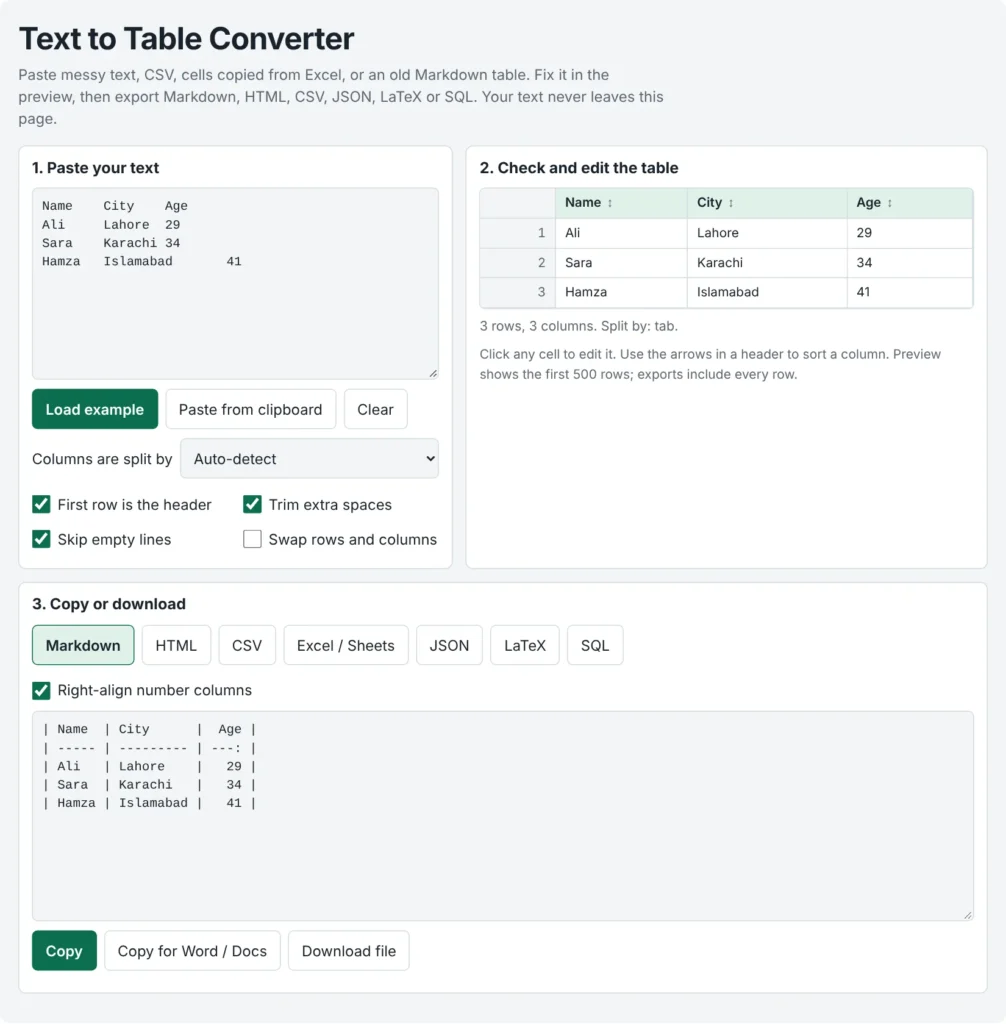
You can convert text to table online free by pasting your text, picking how the columns are separated (or keeping Auto-detect), fixing any cell in the preview, then copying or downloading the table as Markdown, HTML, CSV, JSON, LaTeX or SQL. This text to table converter follows fixed rules instead of AI guesses, so the same input always gives the same output. Nothing is uploaded and there is no sign-up.
People use it for Excel to Markdown table jobs, CSV to Markdown table and CSV to JSON conversions, and quick text to HTML table snippets.
Paste messy text, CSV, cells copied from Excel, or an old Markdown table. Fix it in the preview, then export Markdown, HTML, CSV, JSON, LaTeX or SQL. Your text never leaves this page.
Click any cell to edit it. Use the arrows in a header to sort a column. Preview shows the first 500 rows; exports include every row.
Related Tools
Table of Contents
See It Work: 4 Real Before-and-After Examples
1. Excel cells to a Markdown table
Copy three columns from a spreadsheet and paste them (cells are separated by tabs):
Name    City    Age
Ali    Lahore  29
Sara    Karachi 34
Open the Markdown tab. The number column is right-aligned:
| Name | City    |  Age |
| ---- | ------- | ---: |
| Ali  | Lahore  |   29 |
| Sara | Karachi |   34 |
2. Aligned text from a report, split by 2 or more spaces
Item             Qty   Unit price   Notes
MS pipe 2 inch   12    45.50        Cut to 6 m
Flat bar 40x6    8     18.25        Hot rolled
Because "MS pipe 2 inch" contains single spaces, Auto-detect chooses 2 or more spaces and keeps each item in one cell:
| Item           |  Qty | Unit price | Notes      |
| -------------- | ---: | ---------: | ---------- |
| MS pipe 2 inch |   12 |      45.50 | Cut to 6 m |
| Flat bar 40x6  |    8 |      18.25 | Hot rolled |
3. CSV with a comma inside a value, to SQL
Product,Price,Note
Pen,1.50,"Blue, fine tip"
Book,12,Hardcover
With the separator set to Comma, the quoted note stays in one cell. The SQL tab gives:
CREATE TABLE my_table (
  product TEXT,
  price NUMERIC,
  note TEXT
);

INSERT INTO my_table (product, price, note) VALUES
  ('Pen', 1.50, 'Blue, fine tip'),
  ('Book', 12, 'Hardcover');
Rename my_table and check the column types for your own database before you run it.
4. Swap rows and columns
Paste this, then tick Swap rows and columns:
| Month | Jan | Feb |
|---|---|---|
| Sales | 100 | 120 |
| Month | Jan | Feb | | ----- | ---: | ---: | | Sales | 100 | 120 |
Why Your Table Looks Wrong, and the 10-Second Fix
| What you see | Why it happens | Fix |
|---|---|---|
| Everything lands in one column | The separator doesn't match your text | Choose Comma, Semicolon or Tab, or switch back to Auto-detect |
| "MS pipe 2 inch" splits into four columns | Any spaces is selected | Use 2 or more spaces |
| A comma inside a value creates an extra column | The value isn't in quotes | Wrap it in double quotes, like "Blue, fine tip", or use Tab or Semicolon instead |
| The first row shows as data, or headers read "Column 1" | The header option doesn't match your data | Toggle First row is the header |
| Blank rows appear | Empty lines are being kept | Tick Skip empty lines |
| Rows have different numbers of cells | Your source is uneven | The converter pads short rows with empty cells so every row lines up |
| The Markdown table doesn't render on GitHub | There is no blank line above it | Add a blank line before the table and paste again |
One Paste, Seven Exports
| Format | Best for | Saved as |
|---|---|---|
| Markdown | READMEs, docs, notes | .md |
| HTML | Web pages and CMS content | .html |
| CSV | Data imports | .csv |
| Excel / Sheets | Pasting into spreadsheet cells | .tsv |
| JSON | Apps, scripts and APIs | .json |
| LaTeX | Papers and reports | .tex |
| SQL | Databases | .sql |
You can edit any cell and sort any column in the preview before exporting. The preview shows the first 500 rows, but every export includes all of your rows.
Text to Table Converter Without AI: What It Does and Doesn't Do
This tool applies the separator rules you choose. It doesn't try to read meaning into your text, which keeps results predictable and means your text isn't handed to an AI service.
| Works well with | Not built for |
|---|---|
| Tab, comma, semicolon or pipe separated text, including quoted values that contain commas or line breaks | PDF, .xlsx or Word files (there is no file upload, so copy the text and paste it) |
| Columns aligned with 2 or more spaces | Free-form sentences or paragraphs (a plain sentence just becomes one row of words) |
key: value lines (untick First row is the header) | |
| Old Markdown tables |
Your Text Stays in Your Browser
The converter runs as JavaScript on this page. While it converts, it makes no network requests, and it doesn't save your text to cookies or local storage. You can check this yourself by watching your browser's Network tab as you paste. As with any website, avoid pasting passwords or other highly sensitive data on a shared computer.
Frequently Asked Questions
How do I convert text to table online free?
Paste the text into the converter, keep Auto-detect or choose a separator, check the preview, then copy or download the table in the format you need. No account is needed.
Is this text to table converter AI-based?
No. It uses fixed parsing rules, so the same input and settings always produce the same table. It doesn't guess column meanings, which is why it works best with text that already has a consistent separator.
How do I convert Excel to a Markdown table?
Copy the cells in Excel or Google Sheets, paste them in, and open the Markdown tab. Copied cells are normally tab-separated, so Auto-detect handles it. Number columns are right-aligned by default, and you can turn that off.
Can I convert a PDF, Excel file or Word file?
Not directly. The tool reads pasted text only. Copy the table or text out of your file, paste it in, and choose the separator that matches.
How do I convert text to a table in Word?
Select the text, go to Insert > Table > Convert Text to Table, and choose how it is separated. Microsoft's guide lists paragraphs, commas, tabs or a special character as options and advises tabs if your text already contains commas. Use this converter when you need the result as Markdown, HTML, JSON, SQL or LaTeX instead.
What if a value contains a comma?
Put that value in double quotes and split by comma, semicolon, tab or pipe. The quoted value stays in one cell, even if it contains a line break. Or choose a separator that doesn't appear inside your values.
Can I turn a Markdown table back into CSV?
Yes. Paste the Markdown table and Auto-detect reads the pipes and ignores the dashed separator row. A pipe with a backslash in front of it stays inside its cell. Then open the CSV tab.
How do I convert CSV to JSON or SQL?
Paste the CSV and open the JSON tab for an array of objects, using your header names as keys. The SQL tab gives a CREATE TABLE and INSERT script. Numbers are exported as numbers, while values with leading zeros, such as 007, stay as text.
Quick Summary
Use this free text to table converter to convert text to table online free: paste your text, edit the preview, then export Markdown, HTML, CSV, Excel/Sheets, JSON, LaTeX or SQL. It follows clear rules instead of AI guesses, needs no sign-up, and keeps your text in your browser.
Disclaimer
This tool is provided free and as is. Please review the converted table before you use it, especially for important data, and avoid pasting highly sensitive information on a shared device.