This PDF to DOC Converter lets you convert PDF to Word online in seconds, directly inside your browser — no software, no account, and 0 uploads to any server. Most online converters send your file to a remote server and promise to delete it later; this tool skips that step entirely by doing the actual conversion on your own device using your browser's built-in processing power. It turns any locked PDF into a fully editable Word document, so your resumes, contracts, and personal files never leave your computer or phone.
The tool automatically detects text and even scanned pages, converting them into a clean, ready-to-edit .docx file that opens directly in Microsoft Word, Google Docs, or LibreOffice. It's completely free, has no watermarks, no sign-up requirement, and works the same way on mobile, tablet, and desktop.
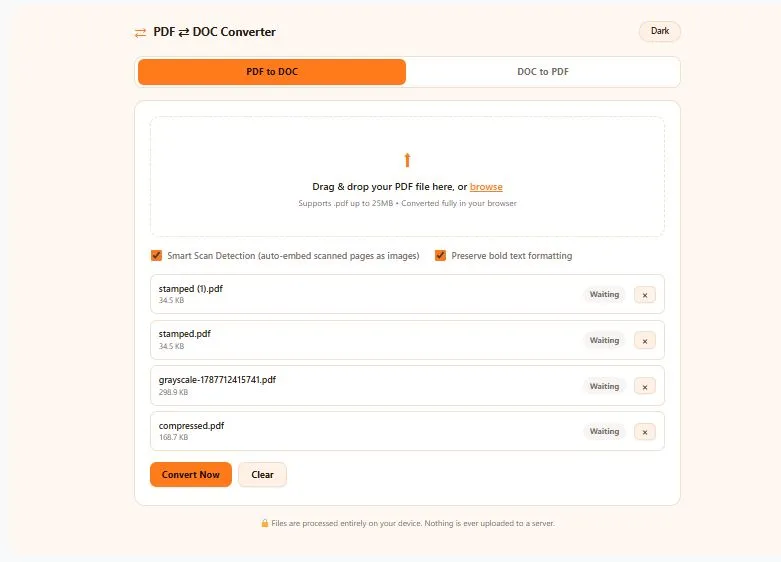
Drag & drop your PDF file here, or browse
Supports .pdf up to 25MB • Converted fully in your browser
🔒 Files are processed entirely on your device. Nothing is ever uploaded to a server.
Table of Contents
How the PDF to DOC Converter Works
- Upload your PDF — Drag and drop your file into the tool, or click to browse. Nothing is uploaded to a server; your file loads directly into your browser's memory.
- Automatic text detection — The PDF to DOC Converter scans every page, extracting text, formatting, and layout. If a page is scanned (image-only), it's intelligently converted into an embedded image so no content is lost.
- Instant conversion — With one click, your PDF is rebuilt as a real, standards-compliant .docx file — right there in your browser, in seconds.
- Download your DOC file — Click download and your fully editable Word document is saved straight to your device. No email, no waiting, no watermark.
Why Use This PDF to DOC Converter
PDF files are great for sharing, but terrible for editing. The moment you need to fix a typo, update a paragraph, or reuse content from a contract, resume, or report, a PDF turns into a wall. That's exactly the gap this PDF to DOC Converter fills — it takes a locked, fixed-layout PDF file and rebuilds it as a fully editable Word document, so you can jump straight into editing without retyping a single line.
What makes this a genuinely different browser based PDF converter is where the conversion actually happens. Most "free" converters online quietly upload your file to a remote server and promise to delete it "within 24 hours." As a true no upload PDF converter, this tool skips that entirely — your PDF is read and rebuilt as a .docx file using your own browser's engine, meaning the file never leaves your device. For anything sensitive — contracts, ID scans, medical forms, financial statements — that's a real difference, not just a marketing line.
It's also a genuinely free PDF to DOCX converter — no account to create, no email to confirm, no daily conversion limit, and no watermark stamped across your document. Open it on your phone during a commute or on your desktop at work — the interface adjusts automatically, and the output is a standard .docx file that opens cleanly in Word, Google Docs, or LibreOffice.
Who This PDF to DOC Converter Is Built For
- Students & researchers — pull text from lecture PDFs, research papers, or scanned notes into Word so you can quote, cite, and rework them without retyping.
- Job seekers — convert a PDF resume or offer letter back into an editable format when you need to make last-minute updates.
- Freelancers & small business owners — turn client contracts, invoices, or PDF proposals into editable Word docs to customize for the next client.
- Remote & hybrid teams — quickly reuse content from shared PDF reports without asking IT for special software or waiting on a paid subscription.
- Anyone handling sensitive documents — since the file never leaves your device, this is especially useful for legal papers, medical forms, or ID documents you'd rather not upload anywhere.
Tips for Best Results
- Use text-based PDFs when possible — files created directly from Word, Google Docs, or a website (not scanned) convert with the cleanest, most accurate formatting.
- Turn on Smart Scan Detection for scanned documents — if your PDF is a scanned image (like a signed contract or old printed form), this setting automatically embeds those pages as images so no content is lost.
- Keep formatting simple where you can — PDFs with multiple columns, heavy graphic design, or dense tables may need a few manual touch-ups in Word after conversion.
- Check the file size before uploading — this tool handles files up to 25MB smoothly; very large PDFs may take a little longer to process in-browser.
- Review the output before sharing — always give the converted .docx a quick read-through, since converted spacing and page breaks can occasionally shift slightly from the original PDF.
Frequently Asked Questions
Is this PDF to DOC Converter really free?
Yes, this PDF to DOC Converter is completely free with no hidden costs, no watermarks, and no daily conversion limit. There's no sign-up or credit card required to use it.
Does my PDF file get uploaded to a server?
No, your file is never uploaded anywhere. The entire conversion happens locally inside your own browser, so your document stays on your device at all times.
What file format does the converted document come in?
The output is a standard .docx file, the native Microsoft Word format. It opens directly in Word, Google Docs, and LibreOffice without any extra plugins.
Can this tool convert scanned PDFs?
Yes, when Smart Scan Detection is turned on, scanned or image-only pages are automatically embedded as images in the Word document so no content is lost, though the text on those pages won't be separately editable.
Will the formatting stay exactly the same after conversion?
Simple, text-based PDFs convert with clean, accurate formatting, but PDFs with complex multi-column layouts or heavy design elements may need small manual adjustments in Word afterward.
Is there a file size limit?
Yes, this tool supports PDF files up to 25MB, which comfortably covers the vast majority of resumes, contracts, reports, and everyday documents.
Do I need to install any software to use this converter?
No installation is needed at all. The tool runs entirely in your web browser and works the same way on mobile, tablet, and desktop devices.
Can I convert multiple PDF files at once?
Yes, you can add several PDF files to the queue and convert them one after another, then download all the finished Word documents together as a single ZIP file.
Quick Summary
This PDF to DOC Converter turns any PDF into an editable Word document in seconds, entirely inside your browser — 0 uploads, no sign-up, and no watermarks. Unlike most online converters that send your file to a remote server, this tool processes everything locally, so sensitive documents like contracts, resumes, or ID files never leave your device. It automatically detects text and scanned pages, supports batch conversion with a ZIP download, and works the same way on mobile, tablet, and desktop. Fast, free, and genuinely private — no strings attached.
Disclaimer
This PDF to DOC Converter is provided as a free utility to help you quickly turn PDF files into editable Word documents. Since conversion happens locally in your browser, results depend on how your original PDF was created — text-based PDFs convert cleanly, while scanned or heavily designed files may need minor manual adjustments afterward. We recommend reviewing your converted document before using it for official, legal, or professional purposes.