This invoice and estimate generator runs entirely in your browser, so your business and client details are never uploaded or stored on a server. Create invoices, estimates, and credit notes from the same tool, and save your business profile, clients, and product catalog locally so you're never retyping the same details twice — no account required.
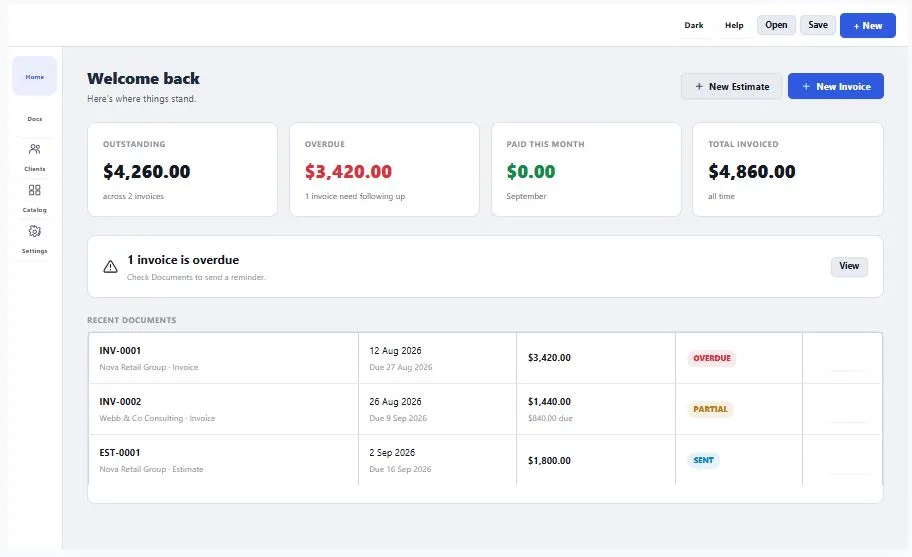
Track payments against each invoice, and when one runs late, generate a payment reminder in a tone that fits the relationship, from polite to firm. Every document supports multiple currencies, so it works whether you bill in dollars, euros, rupees, or your own local currency. There's no AI writing your line items for you and no sign up wall between you and your first invoice. When you're ready, export as a PDF or a DOCX file, completely free, with nothing held back behind a paywall at the last step.
Table of Contents
How to Use This Invoice and Estimate Generator
Getting a finished document takes four steps. First, pick a document type — invoice, estimate, or credit note — and fill in your business profile and client details once; both get saved locally so you never retype them again. Second, add your line items, either typed fresh or pulled straight from your saved product catalog, and the totals, tax, and currency calculate automatically. Third, choose a template to match how you want the document to look, then review it in the live preview before sending anything out.
Finally, export as a PDF or DOCX file, or generate a polite-to-firm payment reminder if an invoice runs late. There's no sign up at any point, and nothing you enter is ever uploaded — this invoice and estimate generator works the same way for a single freelance invoice or your fiftieth client this month.
Why Use This Invoice and Estimate Generator
Late payments aren't a small problem. According to Intuit QuickBooks' 2026 Small Business Late Payments Report, 59% of small businesses currently have overdue invoices, with an average of $17.7K sitting unpaid per business. That's exactly why this invoice and estimate generator includes a built-in payment reminder — track what's outstanding, and generate a reminder in a tone that fits the relationship, from polite to firm, instead of writing an awkward follow-up email from scratch every time.
There's also nothing hiding behind the word "free." Many invoice tools let you build a document for free, then charge you the moment you try to download it, or lock your saved clients behind an account. This one doesn't. No sign up, no fee at export, and your business and client details stay saved locally on your own device — never on a server.
It's also not another tool putting words in your invoices for you. There's no AI generating your line items or descriptions — you stay in control of what your client sees. Create an invoice, estimate, or credit note from the same tool, bill in whichever of the supported currencies your client uses, and export the finished document as a PDF or DOCX file, whichever format the job requires.
Who This Invoice and Estimate Generator Is Built For
- Freelancers and contractors — who need a quick estimate before a job and a matching invoice once it's done, without paying for accounting software built for a full company.
- Small business owners — who want their clients and product catalog saved for next time, without creating an account just to avoid retyping the same details.
- Anyone chasing a late payment — who wants a ready-made reminder instead of drafting an awkward follow-up message from scratch every time an invoice runs overdue.
- International freelancers and businesses — who bill in a currency other than US dollars and need a document that reflects that correctly.
- Anyone who's been burned by a "free" invoice tool before — free tools that charge at download or lock your saved data behind a paid account belong to other sites, not this one.
Tips for Getting Accurate Results
- Set up your business profile once, with your logo — it's saved locally and applied to every invoice, estimate, and credit note automatically, so you don't re-enter it each time.
- Save frequently-billed items to your catalog — anything you charge for regularly, from an hourly rate to a fixed package, can be pulled in with one click instead of retyped.
- Double-check the due date if you set a late fee percentage — the late fee calculates automatically based on how many months overdue an invoice is, so an incorrect due date will throw off the amount owed.
- Apply tax rates per line item, not just once — if some items are taxed differently than others, set the rate on each line individually rather than assuming one rate applies to the whole document.
- Keep an eye on your numbering — invoices, estimates, and credit notes each have their own separate numbering sequence, so don't expect them to follow on from one another.
Frequently Asked Questions
Is this invoice and estimate generator really free, with no sign up?
Yes. There's no account, no email, and nothing to pay at any point, including when you export. You can create as many invoices, estimates, and credit notes as you need.
Does my business or client data ever get uploaded to a server?
No. Everything runs directly in your browser, so your business details, client information, and line items never leave your device.
Can I turn an estimate into an invoice without retyping it?
Yes. Once a client approves an estimate, converting it to an invoice takes one click, carrying over the client, line items, and totals.
Does this tool support recurring or repeat billing?
Not automatically. For a bill you send regularly, duplicate a past invoice and its dates shift to today, so you're editing instead of starting from scratch each time.
Does this tool use AI to write my invoices?
No. There's no AI generating your line items or descriptions — every invoice, estimate, and credit note reflects exactly what you enter.
What file formats can I download?
You can export your invoice, estimate, or credit note as a PDF or a DOCX (Word) file.
Can I bill in a currency other than US dollars?
Yes. Each document supports multiple currencies, so you can bill in whichever currency your client uses.
Can I save my work and come back to it later?
Yes. Use Save to download your entire workspace — business profile, clients, catalog, and documents — as a file, then use Open to load it back in later.
Quick Summary
This invoice and estimate generator runs entirely in your browser, so your business and client data never touches a server. Create invoices, estimates, and credit notes from one tool, save your clients and catalog without an account, and convert an approved estimate to an invoice in one click. Bill in whichever currency your client uses, track payments, and generate a payment reminder when one runs late. There's no AI writing your line items and no fee hiding behind the download button — which is exactly what makes this an invoice and estimate generator worth trusting over one that charges you at the last step.
Disclaimer
This invoice and estimate generator is provided free to use, and it runs entirely inside your browser — your business and client details are never uploaded to a server or stored anywhere outside your own device. It's a tool for creating documents, not a substitute for professional accounting, tax, or legal advice, and tax rates, late fees, and totals should be double-checked against your local requirements before you send anything to a client. This tool is offered as-is, with no warranty, and we're not liable for how a document is used once it's sent. For anything specific to your business or region, it's always worth checking with an accountant or your local tax authority.