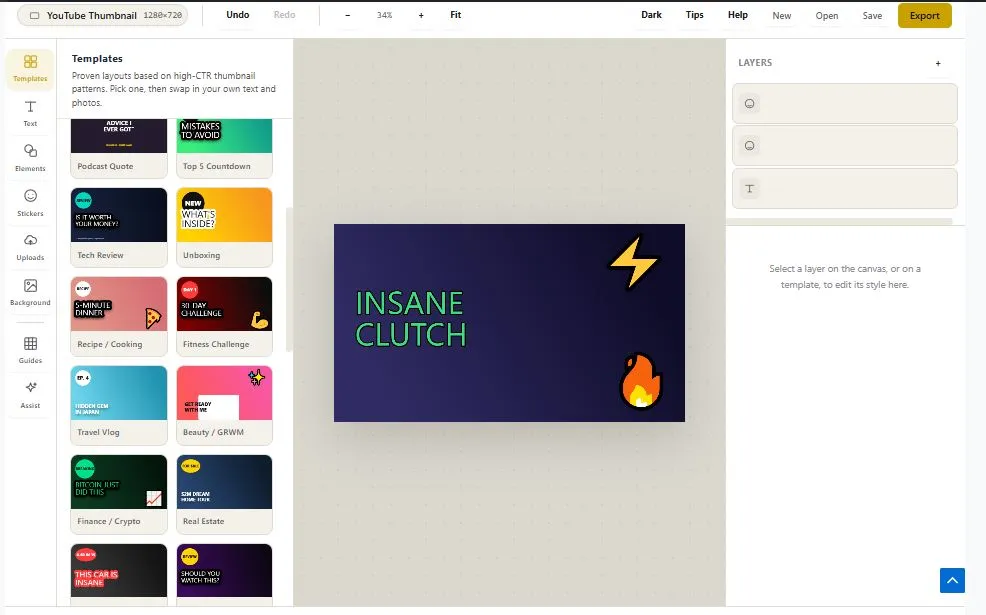
This is a free, unlimited thumbnail maker that works entirely inside your browser — no sign up, no watermark, and nothing you upload ever leaves your device. Whether you need a youtube thumbnail maker for your next video, a quick Instagram or Facebook graphic, or a podcast cover, this tool gives you real templates instead of AI guesswork. Pick from 30+ ready-made layouts, drop in your photo, and use the built-in green screen remover to cut out any background in seconds — no separate chroma key app required.
Add bold text, stickers, and shapes, then export in the exact size each platform expects, from YouTube and Shorts to LinkedIn and X. There is no account to create, no daily limit, and no watermark stamped across your work — just a fast, browser-based social media graphic maker built for creators who want full control over how their thumbnail looks.
Templates
Proven layouts based on high-CTR thumbnail patterns. Pick one, then swap in your own text and photos.
Text
Add a text layer, then style it from the panel on the right.
Elements
Shapes, badges and arrows to frame your subject.
Stickers
120+ reaction emoji plus a library of pro vector badge stickers.
Uploads
Your images never leave this browser tab.
Background
Set the base layer behind everything else.
Guides
Composition helpers. These never appear in your export.
Smart Assist
Rule-based checks from real thumbnail research — not a network call, everything runs on your device.
Layers
Table of Contents
How to Use This Unlimited Thumbnail Maker
Getting a finished graphic takes four quick steps. First, upload your photo — or start from a blank canvas if you don't have one ready yet. Second, pick a template from the 30+ layouts built for reaction faces, before/after shots, gaming, podcasts, and more, then swap in your own text and colors. Third, clean up the shot if you shot it on a green screen — the built-in green screen remover strips the background in seconds, right inside your browser, so you don't need a separate chroma key app.
Finally, hit export and download your image in the exact size for YouTube, Instagram, Facebook, X, or LinkedIn. There's no sign up at any point, no watermark added to your download, and no limit on how many times you repeat the process — this youtube thumbnail maker works the same way whether it's your first thumbnail or your five-hundredth.
Why Use This Unlimited Thumbnail Maker
Most "free" thumbnail makers still send your photo to a server before you ever see the result — that's where accounts, daily limits, and hidden storage usually come from. This tool skips that step entirely. Every template, text layer, and edit is rendered using the browser's own Canvas API, the same native browser technology used for real-time image processing — nothing you upload ever reaches a server, and nothing is stored anywhere but your own device.
There's also no catch hiding behind the word "free." Most competitors let you design for free but charge to remove the watermark, or cap you at a handful of exports before asking you to sign up. This is a genuinely unlimited thumbnail maker — no sign up, no daily cap, and no watermark stamped across your finished image, no matter how many times you use it.
It's also not another AI tool guessing what your thumbnail should look like. You get 30+ real, pre-built templates designed around patterns that already work — reaction faces, before/after splits, bold statements — so you're editing a proven layout instead of prompting and hoping. Combined with the built-in chroma key background remover and export sizes for every major platform, this works equally well as a social media graphic maker for creators who post across YouTube, Instagram, Facebook, and beyond.
Who This Thumbnail Maker Is Built For
- YouTubers and content creators — who need a fresh thumbnail for every upload without paying for a design subscription or waiting on a freelancer.
- Podcasters — who want a matching cover image and episode card without opening a full design app for a five-minute job.
- Small business owners and marketers — who post across Instagram, Facebook, and LinkedIn and need each graphic sized correctly for that platform, not just YouTube.
- Streamers and gamers — who record on a green screen and need the background gone before the shot goes into a thumbnail.
- Anyone who's been burned by a "free" tool before — free trials that lock templates, watermark exports, or ask for a card number belong to other tools, not this one.
Tips for Getting Accurate Results
- Use even, well-lit green screen footage — the background remover works by detecting color, so wrinkled fabric or uneven lighting can leave faint edges around your subject. A flat, evenly lit green backdrop gives the cleanest cut.
- Upload the highest-resolution photo you have — since everything is scaled and positioned inside the canvas, starting from a low-resolution image will show pixelation once exported at full size.
- Keep your text inside the safe zone guide — turn on the safe zone in the Guides panel so your headline doesn't get cropped when a platform trims your thumbnail differently than expected.
- Pick PNG only when you need transparency — PNG keeps a transparent background but produces a larger file; JPG and WEBP are smaller and better suited for a finished thumbnail with a solid background.
- Zoom to 100% before your final check — the canvas preview can look sharper at a small zoom than the actual exported file, so zoom in once before downloading to confirm text is readable at full size.
Frequently Asked Questions
Is this thumbnail maker really free, with no sign up needed?
Yes. There's no account, no email, and no credit card required at any point. It's a genuinely unlimited thumbnail maker — you can create and download as many thumbnails as you want, with no watermark added.
Does my photo or image ever get uploaded to a server?
No. Every edit happens locally in your browser using the Canvas API, so your photo never leaves your device. Nothing is stored on a server, which also means nothing is saved once you close the tab unless you use Save.
Can I remove a green screen background without separate software?
Yes. The built-in green screen remover detects the chroma key color and strips it out directly on the canvas, so you don't need a separate video or photo editor for that step.
What thumbnail sizes and ratios does this support?
You can switch between YouTube thumbnail, Shorts/Reels/TikTok, Instagram post and portrait, Facebook post and cover, X post, LinkedIn post, podcast cover, and a custom size, all from the ratio switcher in the top bar.
Will my downloaded thumbnail have a watermark?
No. Exports are clean with no watermark, logo, or branding added, regardless of how many times you export.
What file formats can I export in?
You can download your finished thumbnail as PNG, JPG, or WEBP. PNG is best when you need a transparent background; JPG and WEBP give a smaller file size for a finished image.
Can I save my project and come back to it later?
Yes. Use Save to download your project as a file, then use Open to load it back in later with every layer, template, and edit intact.
Is there a limit to how many thumbnails I can make?
No. There's no daily cap, no credit system, and no paywall — it's built to be used as many times as you need.
Quick Summary
This unlimited thumbnail maker runs entirely in your browser, so nothing you upload ever touches a server. Pick from 30+ real templates, add text and stickers, and use the built-in green screen remover to clean up any shot — then export in the exact size YouTube, Instagram, Facebook, X, LinkedIn, or your podcast needs. There's no sign up, no watermark, and no daily limit, which is what makes it a genuinely unlimited thumbnail maker rather than a free trial with a paywall waiting behind it.
Disclaimer
This unlimited thumbnail maker is provided free to use, and it works entirely inside your browser — your photos and files are never uploaded to a server or stored anywhere outside your own device. Because every design depends on the photo, text, and template you choose, results will naturally vary from person to person, and we can't guarantee a specific outcome like higher clicks or views; this tool is offered as-is, with no warranty, and we're not liable for how a finished thumbnail performs once published. For anything platform-specific, like exact thumbnail requirements for a particular app, it's always a good idea to double-check that platform's own current guidelines before publishing.