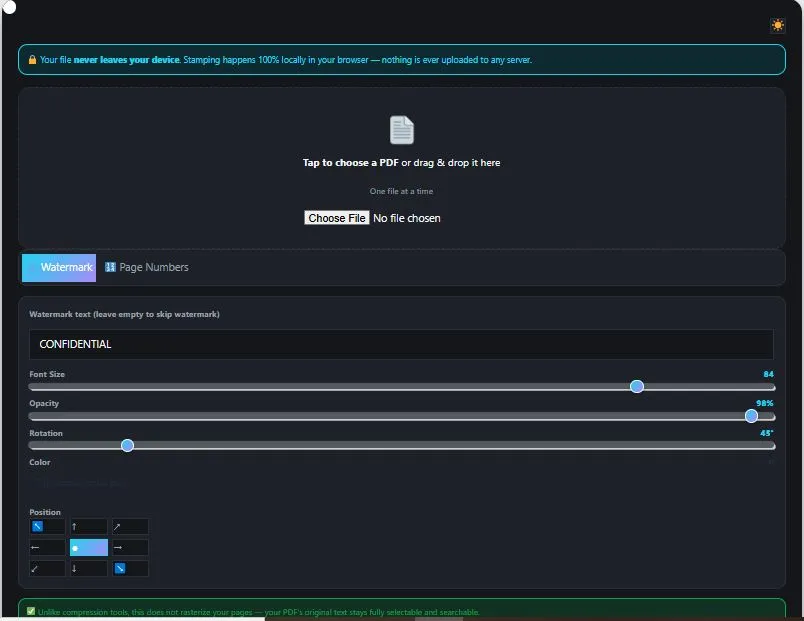
Watermark PDF files instantly with BytePriva's free, browser-based tool — no software to install and no file ever leaves your device. Type your watermark text, then customize its font size, color, opacity, and rotation, or enable tiling to repeat it diagonally across the entire page like a professional "CONFIDENTIAL" stamp. A live preview shows exactly how it will look on your actual document before you commit. This tool also adds page numbers in five formats — including "1", "Page 1", "1 / N", or Roman numerals — with a start number of your choice. Unlike compression tools, watermarking here doesn't rasterize your pages, so your PDF's original text stays fully selectable and searchable after processing.
Tap to choose a PDF or drag & drop it here
One file at a time
✅ Unlike compression tools, this does not rasterize your pages — your PDF's original text stays fully selectable and searchable.
Done!
Table of Contents
How to Watermark PDF Files
- Upload your PDF — Tap the upload box or drag and drop your PDF file into the watermark PDF tool.
- Type your watermark text — By default the text field shows "CONFIDENTIAL," but you can replace it with anything, or clear it entirely if you only want page numbers.
- Customize the look — Adjust font size, opacity, rotation, and color, or turn on "Tile across entire page" for a repeating diagonal stamp pattern. The live preview updates instantly so you can see the result on your actual document.
- Add page numbers (optional) — Switch to the Page Numbers tab, enable the toggle, and pick a format, position, and starting number.
- Click "Apply & Download" — The tool stamps every page directly in your browser and gives you the finished PDF to download.
Why Use This PDF Watermarking Tool
Most online tools to watermark PDF files require uploading your document to a remote server before anything happens. This means your document — even if temporarily — sits on someone else's computer while being processed, which is a real concern if it contains confidential agreements, drafts, or proprietary content you're trying to protect in the first place.
This watermark PDF tool avoids that entirely by running inside your own browser. It uses pdf-lib's drawText() function to add watermark and page number text directly onto your PDF's existing content, with precise control over position, rotation, opacity, and color. Your file is never transmitted to any server at any point in the process.
The live preview also sets this tool apart. Instead of guessing how a diagonal watermark or tiled stamp will look, you can see it rendered on your actual first page in real time, adjusting sliders and positions until it looks exactly right before applying it to every page.
Who This Watermarking Tool Is Built For
- Legal and business professionals — marking draft contracts, agreements, or proposals as "DRAFT" or "CONFIDENTIAL" before sharing them for review.
- Photographers and designers — adding a tiled watermark across proof PDFs to protect work shared with clients before final delivery.
- Students and researchers — adding page numbers to a thesis, report, or dissertation in a specific format required by their institution.
- Small business owners — stamping invoices or estimates with a company name or "PAID" watermark for record-keeping.
- Anyone distributing sensitive documents — using tiled or repeated watermarking to discourage unauthorized copying or redistribution of internal files.
Tips for Getting Accurate Results
- Use the live preview before applying — every setting change updates the preview instantly, so you can fine-tune position, rotation, and opacity on your actual first page before committing to all pages.
- Lower opacity works better for tiled watermarks — since tiling covers the whole page repeatedly, a high opacity can make the underlying text hard to read; try 15-30% for a subtle but visible effect.
- Diagonal rotation (around 45°) looks most natural for "CONFIDENTIAL" style stamps — this matches the classic look most people associate with official watermarks.
- Leave the watermark text field empty if you only want page numbers — the tool skips the watermark entirely when the text field is blank, so you can use either feature independently.
- Choose a start number other than 1 when combining documents — if this PDF will be merged with others later, set the starting page number to continue numbering from where the previous document left off.
FAQs
Is this PDF watermarking tool free to use?
Yes, this tool is completely free to use with no limit on the number of files or watermarks applied.
Does this tool upload my PDF to a server?
No. The entire watermarking process happens locally in your browser using JavaScript. Your file is never uploaded to any server at any point.
Can I see how the watermark will look before applying it?
Yes. A live preview renders your actual first page with the watermark and page numbers applied, updating instantly as you adjust settings, so you can check the result before processing the full document.
Can I add a watermark and page numbers at the same time?
Yes. Both features work independently and can be applied together in a single pass. Leave the watermark text field empty if you only want page numbers, or turn off the page number toggle if you only want a watermark.
Will watermarking make my PDF's text non-selectable?
No. This tool adds the watermark and page numbers as text directly onto your PDF's existing content without rasterizing the pages, so your original text stays fully selectable and searchable.
What does "tile across entire page" do?
It repeats your watermark text diagonally in a grid pattern across the whole page, similar to an official "CONFIDENTIAL" stamp, instead of placing it once in a single position.
What page number formats are available?
Five formats are available: a plain number, "Page 1" style, "1 / N" fraction style, dashed "- 1 -" style, and Roman numerals.
Does this tool work on mobile phones?
Yes. The tool is fully optimized for phones and tablets, not just desktop computers, and works the same way across all device sizes.
Quick Summary
This free tool lets you watermark PDF files with fully customizable text — controlling font size, color, opacity, rotation, and either a single position or a repeating tiled pattern across the page. A live preview shows the result on your actual document before you apply it, and you can add page numbers in five different formats at the same time. Because it uses pdf-lib to add text directly onto your PDF's existing content, your original text stays fully selectable and searchable, unlike tools that rasterize pages into images. With everything running locally in your browser, your documents stay completely private from upload to download, making this a fast and transparent way to stamp, label, or protect any PDF.
Disclaimer
This watermark PDF tool is provided free of charge. It adds text-based watermarks and page numbers directly onto your PDF in your browser, and no file or data is ever uploaded to our servers.
Watermark placement and appearance may vary depending on your PDF's page size and layout. A visible text watermark is a deterrent, not a guarantee — it can be removed by someone using advanced PDF editing tools. This tool is provided "as is" without any warranty, and we are not liable for any loss, damage, or issue arising from its use.
For legal or official documents where watermark permanence is critical, we recommend consulting a professional PDF security solution or legal advisor to confirm it meets your specific requirements.