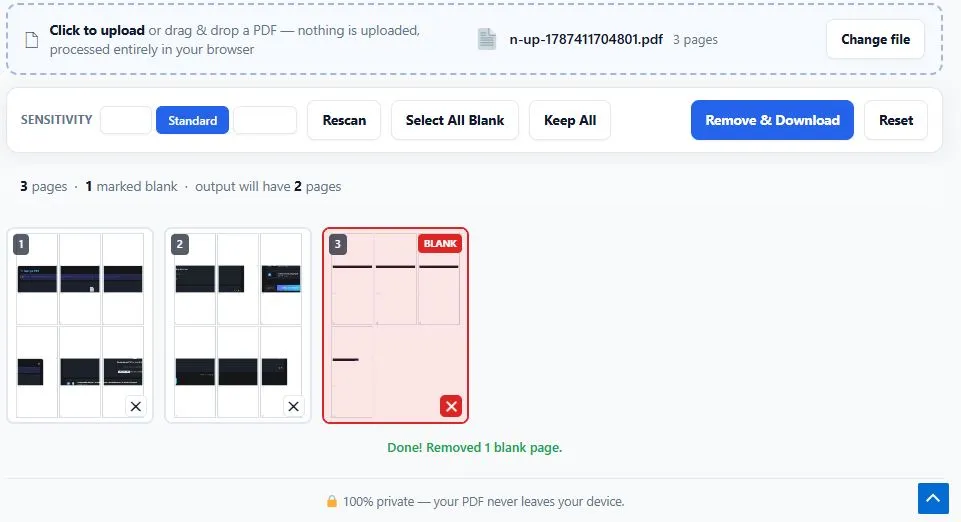
This free pdf blank page auto-remover scans every page of your document and instantly flags the ones that are blank, so you can remove blank pages from PDF files like scanned books, merged documents, or reports in seconds instead of checking each page by hand. Unlike tools that delete pages blindly, this one shows you a visual thumbnail of every page with detected blank pages clearly marked, so you can confirm the results or manually keep any page before downloading.
Three sensitivity levels — Strict, Standard, and Lenient — let you fine-tune blank page detection depending on whether your scans have faint marks, scanner noise, or completely empty pages. Everything runs entirely inside your browser using real page-content analysis, so your document is never uploaded anywhere, processing stays fast even on large files, and nothing about the original file's quality changes on the pages you keep.
Upload a PDF to begin.
Scanning pages...
🔒 100% private — your PDF never leaves your device.
Table of Contents
How This PDF Blank Page Auto-Remover Works
Cleaning empty pages out of a scanned or merged document takes just a few steps, with automatic detection doing the heavy lifting. Here's how to delete blank pages in PDF files with this tool:
- Upload your PDF — click the upload area or drag and drop any PDF file from your device.
- Every page is scanned instantly — the tool analyzes each page's actual content and displays a thumbnail grid with blank pages clearly marked.
- Review and adjust — switch between Strict, Standard, and Lenient sensitivity, or click any thumbnail to manually keep or remove that specific page.
- Remove and download — click the button to generate a clean PDF with only the marked blank pages taken out.
Why Use This PDF Blank Page Auto-Remover
Scrolling through a hundred-page scanned document to manually delete each blank page one by one wastes time that most people don't have, especially with files created by duplex scanners that leave every second page empty. This tool automates that entire process using genuine pixel-level content analysis, based on the browser's getImageData() Canvas API, rather than guessing from file size or page count. Every page is actually rendered and measured for real content before being marked, so the detection is grounded in what's visibly on the page.
Three adjustable sensitivity levels mean the tool works equally well on cleanly scanned documents and on older, noisier scans where faint marks or scanner artifacts would otherwise confuse a one-size-fits-all detector. Because everything runs locally in your browser, there's no upload wait, no file size limit, and your document never leaves your device.
FAQs
What does a pdf blank page auto-remover actually do?
It scans every page of a PDF, measures the actual visible content on each one, and automatically flags pages that are blank or empty so you can remove blank pages from PDF documents without checking each page by hand.
Is this tool free to use?
Yes, this tool is completely free with no signup required. You can upload a PDF, scan for blank pages, and download the cleaned file without creating an account or paying anything.
How accurate is the automatic blank page detection?
Detection is based on measuring real rendered content on each page rather than guessing, and the tool shows every result in a thumbnail grid so you can confirm or override it before any pages are removed.
Is my PDF uploaded to a server?
No. This tool processes your PDF entirely inside your browser. Your file is never sent to a server, which keeps your document private with no practical file size limit.
Can I keep a page that was incorrectly marked as blank?
Yes. Click any thumbnail in the grid to toggle it between marked and kept, so pages with light backgrounds or faint content are never deleted by mistake.
Disclaimer
This PDF blank page auto-remover is provided for free, as-is, and processes your document entirely within your own browser — no files are ever uploaded to or stored on any server. Automatic detection is based on visible page content and reviewed by you before removal, but results can vary depending on scan quality, background designs, or unusual page layouts. BytePriva is not responsible for any loss, damage, or other issues that may result from using this tool, and it is provided with no warranty of any kind. Always review the thumbnail grid carefully before downloading, especially for important, legal, or archival documents.