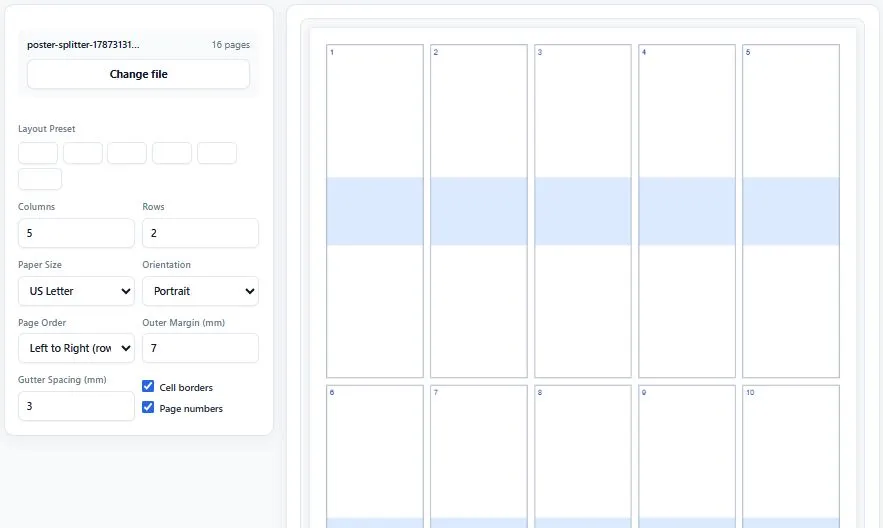
This free n-up PDF tool lets you combine multiple pages of any PDF onto a single printable sheet, cutting your paper usage by 50% to 94% depending on the layout you choose. Simply upload your PDF, pick a preset like 2-up, 4-up, 6-up, 9-up, or 16-up, or set a fully custom grid with your own rows and columns. You can choose A4 or Letter paper, portrait or landscape orientation, and control whether pages fill left-to-right or top-to-bottom.
Adjustable margins and gutter spacing keep your layout clean, and optional cell borders and page number labels make it easy to trim or reference pages later. A live preview shows exactly how your sheets will look before you generate anything. Everything runs entirely inside your browser using vector-quality rendering, so your original PDF is never uploaded anywhere and text stays sharp, not pixelated.
Click to upload or drag & drop a PDF
Nothing is uploaded — processed entirely in your browser
Upload a PDF to see the sheet layout preview
Upload a PDF to begin.
0 / 0 sheets
🔒 100% private — your PDF never leaves your device.
Table of Contents
How This N-Up PDF Tool Works
Creating an n-up PDF takes just a few steps, even with no prior experience laying out documents for print. Here's how it works:
- Upload your PDF — click the upload area or drag and drop any PDF file from your device.
- Choose your layout — pick a preset (2-up, 4-up, 6-up, 8-up, 9-up, or 16-up) or set a custom number of rows and columns.
- Adjust paper and spacing — select A4 or Letter, portrait or landscape, page order, margins, and gutter spacing, and preview the layout live.
- Generate and download — click the button to produce a ready-to-print PDF with your original pages arranged exactly as previewed.
Why Use This N-Up PDF Tool
Most online n-up tools rasterize each source page into an image before placing it into the grid, which means your text turns slightly blurry and is no longer selectable once printed or zoomed in. This tool takes a different approach: it embeds each original page as vector content directly onto the new sheet, following the same PDF standard defined in ISO 32000, the official international specification for the PDF format. That means your text and graphics stay exactly as sharp as the source file, no matter how small they get squeezed on a 9-up or 16-up layout.
Tips for Getting Accurate Results
- Stick to 2-up or 4-up for text-heavy documents — higher layouts like 9-up or 16-up shrink text significantly, so they work best for visual overviews rather than documents you need to actually read closely.
- Password-protected or corrupted PDFs won't load — if your file doesn't open in the tool, try removing the password first using a PDF unlock tool, then upload it again.
- Match page order to how you'll read the sheet — use left-to-right ordering for standard reading flow, or top-to-bottom ordering if you're assembling booklets or vertical layouts.
Frequently Asked Questions
What does n-up PDF mean?
N-up PDF refers to arranging multiple pages of a document onto a single printed sheet, where "N" is the number of pages per sheet, such as 2-up, 4-up, or 9-up. It's commonly used to save paper, create handouts, or produce compact reference copies.
Is this n-up PDF tool free to use?
Yes, this tool is completely free with no signup required. You can upload a PDF, arrange it into any layout, and download the result without creating an account or paying anything.
Will my PDF text stay sharp after using this tool?
Yes. Unlike tools that convert each page into a flat image, this tool embeds your original pages as vector content, so text and graphics stay exactly as sharp as the source file, even at small sizes like 9-up or 16-up.
Disclaimer
This n-up PDF tool is provided for free, as-is, and processes your document entirely within your own browser — no files are ever uploaded to or stored on any server. While we've built it to work reliably across standard PDFs, results can vary depending on your original document's formatting, fonts, and page sizes, and the tool does not guarantee identical output for every possible PDF structure.
BytePriva is not responsible for any loss, damage, wasted paper or ink, misprints, or other costs that may result from using this tool, and it is provided with no warranty of any kind. For important, legal, or official documents, always verify the final printed layout carefully, and consult a professional printing service or the relevant official source before relying on it for critical use.