A CSV to JSON converter reads spreadsheet data — rows and columns from a CSV export — and restructures it into JSON, the format most APIs and web applications expect. The catch is that a huge number of converters use a naive approach that simply splits text by commas, which breaks the moment a field contains a comma of its own, like an address written as "Lahore, Punjab."
This free CSV to JSON converter follows the RFC 4180 standard for parsing, correctly handles quoted fields, converts numbers and true/false values into real JSON types instead of leaving everything as text, and can even rebuild nested objects from dot-notation column names. Everything runs in your browser, with nothing ever uploaded or stored.
Paste CSV above to convert it to JSON.
Correctly handles quoted fields containing commas, line breaks, and escaped quotes — most basic converters break on these.
Table of Contents
The Problem With Basic CSV Parsers
| Common CSV Trap | What Basic Tools Do | What This Tool Does |
|---|---|---|
| A field contains a comma, like "Lahore, Punjab" | Splits it into two separate values, corrupting the row | Recognizes the quoted field and keeps it as one value |
| A field contains a line break | Breaks the row into two separate rows | Keeps multi-line fields intact within a single record |
| A field contains an escaped quote (""hello"") | Leaves stray quote marks in the output | Correctly unescapes it back to a normal quote |
| Every value becomes a string, even numbers | "30" stays as text instead of becoming a number | Numbers, true/false, and blanks convert to real JSON types |
| Delimiter isn't always a comma | Requires manual selection every time | Auto-detects comma, semicolon, tab, or pipe |
Real Type Conversion, Not Just Text
Many converters treat every CSV value as plain text, which means a JSON output full of "30" instead of 30, and "true" instead of true. That might seem like a small detail, but it matters the moment that JSON is used in actual code — a string "30" won't work correctly in a math operation, and a string "false" is technically truthy in most programming languages, which can silently break logic.
| CSV Value | Basic Tool Output | This Tool's Output |
|---|---|---|
| 30 | "30" (string) | 30 (number) |
| true | "true" (string) | true (boolean) |
| (empty cell) | "" (empty string) | null |
| PK-4521 | "PK-4521" (string) | "PK-4521" (stays a string, correctly) |
This behavior can be turned off with the "Convert numbers, true/false, and blanks" checkbox, which is useful for data like ID numbers or postal codes that happen to look numeric but should always stay as text.
Rebuilding Nested Objects From Column Names
Spreadsheet exports often flatten nested data into dot-separated column names, like address.city and address.zip sitting as two separate columns. Left alone, that produces a flat JSON object with oddly-named keys. With the "Rebuild nested objects" option enabled, this tool recognizes the dot notation and reconstructs the original nested structure automatically.
| CSV Columns | Without Rebuilding | With Rebuilding Enabled |
|---|---|---|
| name, address.city, address.zip | { "name": "Ali", "address.city": "Lahore", "address.zip": 54000 } | { "name": "Ali", "address": { "city": "Lahore", "zip": 54000 } } |
This pairs directly with a JSON to CSV converter that flattens nested objects the same way, making it possible to convert data back and forth between the two formats without losing its original structure.
RFC 4180 — The Standard Behind Every CSV File
CSV looks simple enough to define casually, but there's an official specification behind it — RFC 4180, published by the Internet Engineering Task Force in 2005 and still the reference standard every CSV parser is measured against today. It defines exactly how fields should be separated, when a value needs to be wrapped in double quotes, and how to escape a quote character that appears inside a field. This tool follows those rules directly, which is why quoted commas, embedded line breaks, and doubled quote marks all parse correctly instead of corrupting the row around them.
Delimiter Auto-Detection Explained
Not every CSV file uses a comma. This tool checks the first line of the pasted data and counts how often each candidate delimiter appears, picking whichever one shows up most consistently:
| Delimiter | Common Source |
|---|---|
| Comma (,) | Standard CSV exports from most English-language software |
| Semicolon (;) | Excel exports from many European locales |
| Tab | Data copied directly from a spreadsheet, or .tsv files |
| Pipe (|) | Some database exports and legacy systems |
Auto-detect works correctly for the vast majority of files, but the delimiter can always be forced manually using the chip buttons if a file happens to be an edge case.
How to Use This Tool
- Paste CSV data into the box at the top — including the header row.
- Leave the delimiter on Auto-detect, or choose one manually if needed.
- Toggle type conversion and nested-object rebuilding based on what your data needs.
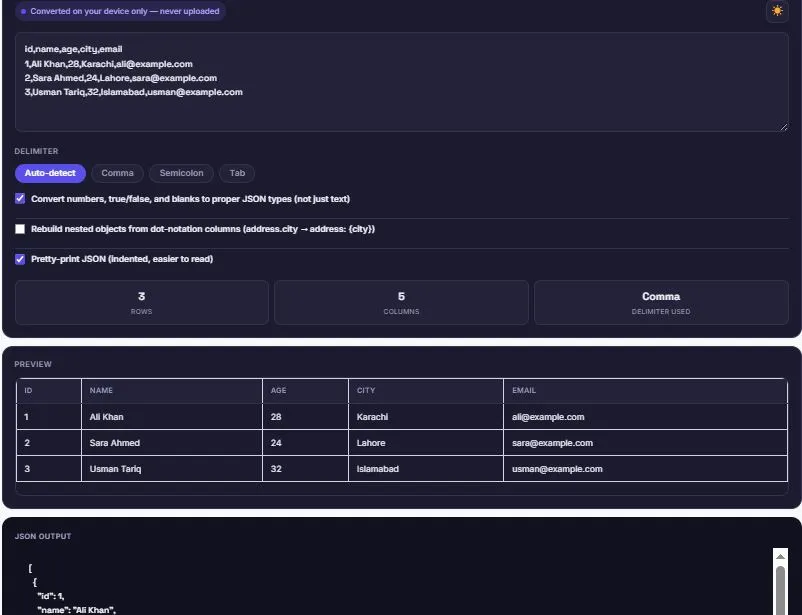
- Review the live table preview to confirm the data was read correctly.
- Copy the JSON, or download it as a .json file.
Who Uses a CSV to JSON Converter?
- Developers — preparing spreadsheet data to feed into an API, database seed script, or JavaScript application.
- Data analysts — converting exported reports into a structure that scripts and pipelines can process automatically.
- QA and testers — turning a spreadsheet of test cases into JSON fixtures for automated testing.
- No-code and automation builders — feeding CSV exports into tools like Zapier, Make, or n8n that expect JSON input.
- Students and researchers — converting public datasets from spreadsheet format into JSON for use in code.
FAQs
Is this CSV to JSON converter free to use?
Yes. There's no account, no sign-up, and no limit on how much CSV data you can convert.
Does this tool handle CSV fields that contain commas?
Yes. Fields wrapped in quotes, like "Lahore, Punjab," are correctly recognized as a single value instead of being split into two, following the RFC 4180 CSV standard.
Will numbers and true/false values convert to proper JSON types?
Yes, by default. Numbers become actual numbers and true/false become actual booleans instead of staying as text — this can be turned off if your data includes numeric-looking codes that should stay as strings.
Can this tool rebuild nested JSON from flat CSV columns?
Yes. Enabling "Rebuild nested objects" turns dot-notation columns like address.city and address.zip back into a proper nested address object.
Do I need to select the delimiter manually?
No. Auto-detect analyzes the header row and picks the correct delimiter — comma, semicolon, tab, or pipe — automatically, though it can be overridden manually.
Is my CSV data uploaded or stored anywhere?
No. All conversion happens locally in your browser using JavaScript. Nothing you paste is sent to a server, logged, or saved.
Can I preview the result before converting?
Yes. A live table preview shows exactly how your CSV was parsed, so you can confirm it's correct before copying or downloading the JSON.
What happens if a row has more or fewer values than the header?
Missing values become null, and the row is still included in the output rather than causing the whole conversion to fail.
Quick Summary
This free CSV to JSON converter follows the RFC 4180 standard, correctly handling quoted fields, embedded commas, and line breaks that break basic parsers. It converts numbers and booleans into real JSON types, can rebuild nested objects from dot-notation columns, and auto-detects the delimiter. Everything runs in your browser, and nothing is ever uploaded.
Disclaimer
BytePriva's CSV to JSON Converter is a free browser-based tool provided for general data conversion. All processing happens locally in your browser — no data you paste is ever uploaded, transmitted, or stored. Use of this tool is at your own discretion.
Real CSV files are rarely as clean as a tutorial example — quoted addresses, stray line breaks, and inconsistent delimiters are the norm. This tool is built to parse that mess correctly the first time, instead of leaving a corrupted row for you to track down manually afterward.