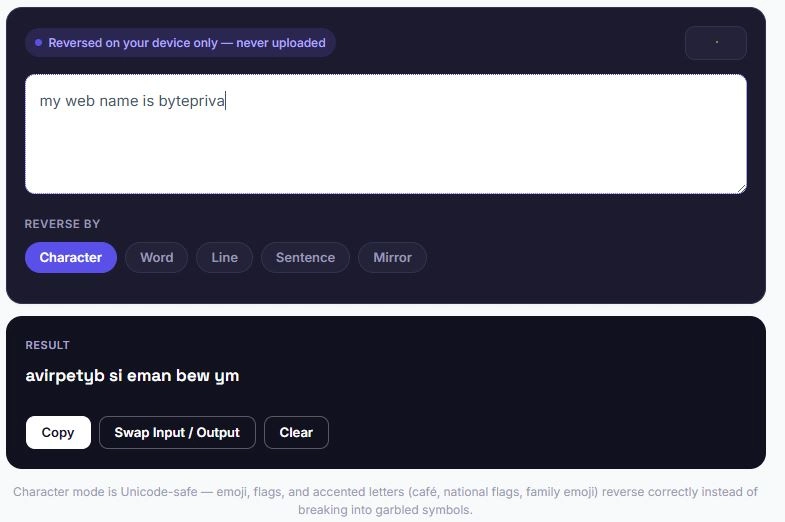
A text reverser flips the order of characters, words, lines, or sentences in any piece of text — instantly turning "hello" into "olleh," or "Hello World" into "World Hello," depending on the mode selected. This free text reverser supports five modes, handles emoji and accented characters correctly instead of breaking them, and automatically detects palindromes as you type. Everything runs in your browser, with nothing ever uploaded or stored.
Type something above to see it reversed.
Character mode is Unicode-safe — emoji, flags, and accented letters (café, national flags, family emoji) reverse correctly instead of breaking into garbled symbols.
Unlike a plain "flip my text" trick you might do manually, this tool separates reversal into distinct, purpose-built modes rather than treating every reversal the same way — which matters more than it sounds like once emoji, multi-line content, or full paragraphs are involved instead of a single short word.
Table of Contents
Why Character Reversal Breaks on Emoji (And How This Tool Fixes It)
Most simple text reversers split text one character at a time, which works fine for plain letters but breaks badly on emoji, flags, and some accented characters — these are often built from multiple underlying code points, and splitting them apart scrambles them into garbled symbols instead of reversing them cleanly.
| Input | Basic Reverser (broken) | This Tool (correct) |
|---|---|---|
| Hello 🇵🇰 | Garbled flag symbol | Hello 🇵🇰 (flag stays intact, reversed correctly) |
| café | é and accent separated incorrectly | éfac (accent stays attached) |
What Is a Palindrome?
A palindrome is a word, phrase, or sentence that reads the same forwards and backwards, ignoring spaces, punctuation, and capitalization. This tool automatically detects palindromes as you type and displays a confirmation message. Some well-known examples:
- Racecar
- A man a plan a canal Panama
- Was it a car or a cat I saw?
- Madam, I'm Adam
- Never odd or even
A Brief History of Mirror Writing
Long before digital tools existed, mirror writing was a real technique used by hand. The most famous example belongs to Leonardo da Vinci, who wrote most of his notebooks in reverse, right to left, so the text could only be read normally when held up to a mirror. Historians generally believe he did this partly out of convenience, since he was left-handed and reverse writing avoided smudging fresh ink across the page as his hand moved.
Mirror writing has shown up in other contexts too, from children who briefly reverse their letters while first learning to write, to a rare neurological condition where reversed handwriting appears involuntarily. It has also found a place in design and branding, where a mirrored logo can create a distinctive visual effect, or where text is intentionally reversed so it reads correctly when reflected in glass, water, or a rearview mirror. This tool's Mirror mode recreates that same flipped, backwards effect instantly, without needing to write anything by hand or hold a page up to a mirror to check the result.
Character vs Word vs Line — Choosing the Right Mode
With five modes available, it helps to know which one actually fits what you're trying to do.
Character mode is the right choice for pure novelty text, like spelling a word backwards to check if it's a palindrome, or creating a simple backwards caption. Word mode works best when the individual words need to stay readable but their order should flip, which is useful for testing sentence structure or creating a scrambled-but-legible effect. Line mode is built for multi-line content, such as reversing the order of a list, a poem's stanzas, or log entries where the most recent line should appear first.
Sentence mode suits longer paragraphs where the sentence order matters more than the words within them, such as restructuring a piece of writing to see it read in reverse order. Mirror mode is the most visual of the five, and works best for designs, social posts, or anything meant to be read as a flipped, backwards image rather than plain reversed text.
There's no single correct mode, since each one solves a different kind of reversal problem — matching the mode to the task saves time compared to manually working out which transformation you actually need.
Is this text reverser free to use?
Yes. There's no account, no sign-up, and no limit on how much text you can reverse.
Does this tool handle emoji correctly?
Yes. Character mode uses Unicode-aware processing, so emoji, flags, and family emoji stay intact instead of breaking into garbled symbols the way basic reversers often do.
What's the difference between Character mode and Mirror mode?
Character mode simply reverses the order of characters. Mirror mode also flips each character into a mirrored look-alike shape, creating a backwards, upside-down visual effect.
Can I reverse just the order of words, not the letters?
Yes. Word mode reverses the order of words while keeping each word spelled normally, turning "quick brown fox" into "fox brown quick."
Disclaimer
BytePriva's Text Reverser is a free browser-based tool provided for general and creative use. All processing happens locally in your browser — no text you enter is ever uploaded, transmitted, or stored. Use of this tool is at your own discretion.