A URL decoder is a free online tool that converts percent-encoded text back into its original, readable form. Beyond basic decoding, this URL decoder also parses full URLs into a readable table of key-value parameters, and converts Punycode domain names (like xn--mgbh0fb.com) back into their original script — Urdu, Arabic, Chinese, or any other language — all instantly, in your browser.
Convert a Punycode domain (starting with xn--) back into its original script — Urdu, Arabic, Chinese, or any other language.
How to Use This URL Decoder
This URL decoder covers three different situations, so start with the tab that matches your task.
Decode Text — paste any percent-encoded string, decide whether + should be treated as a space, and click "Decode" to get the original text back.
Parse URL — paste a full URL or just a query string, and this URL decoder breaks it down into a clean table of every key and its decoded value, so you can see exactly what parameters a link is carrying.
Domain (IDN) — paste a Punycode domain (one starting with xn--), and this URL decoder converts it back into its original script, revealing what the domain actually says in Urdu, Arabic, Chinese, or another language.
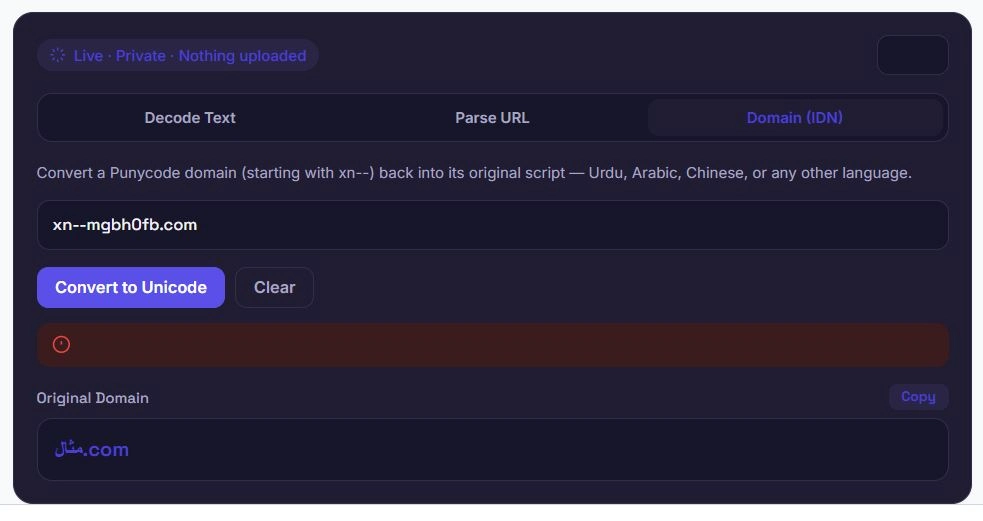
Table of Contents
Why Parse a URL Instead of Reading It Manually?
Long URLs with multiple tracking parameters, filters, or encoded values are genuinely difficult to read at a glance — a single query string can easily contain a dozen parameters, each percent-encoded and packed together with & symbols. This URL decoder's Parse URL tool takes that dense string and lays it out as a clean, readable table of keys and their decoded values.
This is especially useful for auditing marketing links (to see exactly which tracking parameters like utm_source or utm_campaign are attached), debugging an API request URL, or simply understanding what data a shared link is actually carrying before clicking it.
Revealing What a Punycode Domain Really Says
A domain like xn--mgbh0fb.com looks like meaningless characters, but it's actually an ASCII-safe encoding of a domain written in a non-Latin script — in this case, Arabic. This URL decoder's Domain (IDN) tool reverses that encoding, showing you the domain exactly as it would appear in a browser's address bar.
This matters for a few practical reasons: verifying a domain isn't being used for a homograph-based phishing attempt, checking what an unfamiliar xn-- domain in a server log or email header actually represents, or simply confirming that a domain converts correctly during international DNS setup.
Fixing Common URL Decoding Errors
When this URL decoder can't decode something, it's almost always one of these issues:
| Error | Likely Cause | Fix |
|---|---|---|
| "Stray %" or malformed sequence error | The text contains a % not followed by two valid hex digits | Check for a literal % in the original text that wasn't meant to be encoded |
Spaces showing as + instead of a blank | "Treat + as space" is turned off | Enable this option for form-urlencoded data |
| Garbled or incorrect characters | The text was double-encoded (encoded twice) | Run it through this URL decoder a second time |
| Domain conversion fails | The domain doesn't actually start with xn-- | Only Punycode-encoded labels (starting with xn--) need conversion — plain ASCII domains pass through unchanged |
Most decode issues trace back to one of these four causes, and checking them in order is usually the fastest way to find the fix.
Text-Safe Encoding, Not Encryption
It's worth repeating for anyone landing directly on a URL decoder: percent-encoding and Punycode are both meant for compatibility, not security. Anyone can decode a percent-encoded string or a Punycode domain back to its original form — there's no secret or key involved, which is exactly what makes a URL decoder like this one possible in the first place.
MDN's documentation on percent-encoding covers the technical details of how and why URLs get encoded this way. If a URL or domain needs to stay confidential, encoding alone was never designed to provide that — it only makes data safe to transmit through systems built for plain ASCII text.
Frequently Asked Questions
Is this URL decoder free to use?
Yes. There's no sign-up, no limit on how much you can decode, and no premium tier. Text decoding, URL parsing, and domain conversion are all free.
Does my data get uploaded anywhere?
No. This URL decoder runs entirely in your browser using JavaScript. Nothing you paste is ever sent to a server, logged, or stored.
Why do I need to toggle "Treat + as space"?
Data submitted from HTML forms (application/x-www-form-urlencoded) encodes spaces as + instead of %20. If your text came from a form submission or a URL query string, keep this toggle on. If it doesn't, spaces will show up as literal plus signs.
What does the Parse URL tool actually show me?
It breaks a full URL or query string into a list of every parameter it contains, with each key and value already decoded — so instead of reading a long, encoded string, you see a clean table of what data the URL is actually carrying.
Can this URL decoder reveal any Punycode domain?
Yes, as long as the domain starts with the xn-- prefix, which marks it as Punycode-encoded. Regular ASCII domains don't need conversion and will simply pass through unchanged.
What should I do if I get a "malformed" decode error?
This usually means there's a stray % symbol in the text that isn't followed by two valid hexadecimal characters. Check the original source for a literal percent sign that wasn't meant to be part of an encoded sequence.
Can I decode multiple values at once?
Yes. Enable Batch mode on the Decode Text tab, and each line of your input will be decoded separately as its own item.
Will this work on my phone?
Yes. All three modes work the same way on mobile browsers as they do on desktop, with the layout adjusting for smaller screens.
Quick Summary
This URL decoder handles three tasks: decoding percent-encoded text back to its original form, parsing full URLs into a readable table of key-value parameters, and converting Punycode domains back into their original script. Unlike a basic URL decoder that only handles plain text, this one includes a hand-verified Punycode decoder tested against real internationalized domains, plus helpful error messages when something doesn't decode cleanly. Everything runs locally in your browser — nothing you paste is ever uploaded or stored.
Disclaimer
This URL decoder is provided as a free utility for decoding percent-encoded text, parsing URLs, and converting Punycode domains. While it follows standard, browser-consistent decoding rules, it does not verify that a decoded URL or domain is safe, legitimate, or free from malicious intent.
BytePriva and its owner(s) make no guarantees regarding the safety or accuracy of any decoded output, and shall not be held liable for any loss, error, or consequence arising from its use — including visiting a URL or domain revealed through this tool. You remain responsible for exercising your own judgment before visiting any decoded link or domain.
This tool is safe to use — there is nothing to install, no account required, and no data is uploaded or stored. This disclaimer simply clarifies that final responsibility for how the output is used rests with you.