A slug generator converts any title or piece of text into a clean, URL-safe string — lowercase, hyphen-separated, and free of spaces, punctuation, or special characters that could break a link. This free slug generator handles accented characters (é, ñ, ü, ø) correctly, converts "&" into "and" instead of deleting it, and includes a batch mode for converting dozens of titles into slugs at once. Everything runs instantly in your browser, with nothing ever uploaded or stored.
| Title | Slug |
|---|---|
| Paste titles above, one per line, to generate slugs in bulk. | |
Accented characters (é, ñ, ü, ø, ß) are automatically converted to their plain-letter equivalents, and "&" becomes "and" — both common causes of broken URLs.
Table of Contents
How This Slug Generator Works
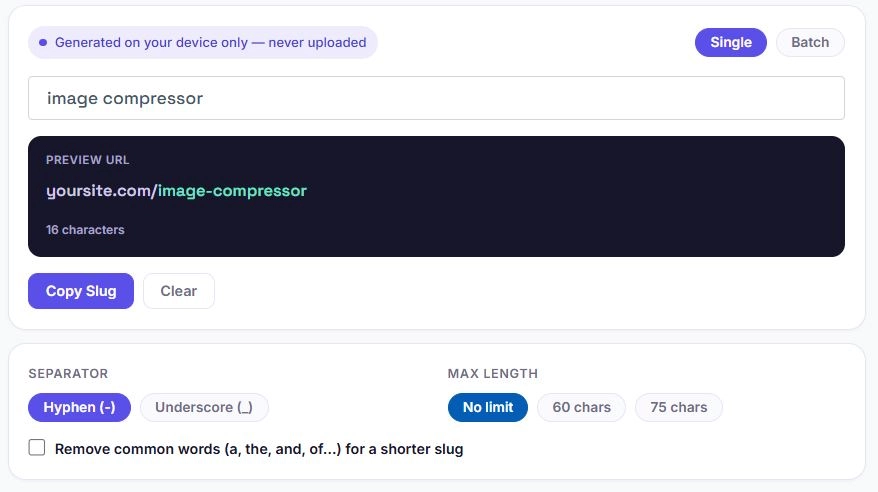
- Type or paste a title into the input box, or switch to Batch mode to convert multiple titles at once.
- The tool converts the text to lowercase and replaces spaces with your chosen separator.
- Accented characters are converted to their plain-letter equivalents — "café" becomes "cafe," "Straße" becomes "strasse."
- "&" is converted to "and" instead of being deleted, so meaning isn't lost.
- Special characters and punctuation are stripped, and duplicate separators are collapsed into one.
- The finished slug appears instantly in the preview, along with a character count.
What Makes a URL Slug "SEO-Friendly"?
A good slug generator follows a few consistent rules:
| Rule | Bad Example | Good Example |
|---|---|---|
| Use lowercase only | /My-Article-Title | /my-article-title |
| Separate words with hyphens | /my_article_title | /my-article-title |
| Remove stop words when possible | /the-best-way-to-learn | /best-way-learn |
| Avoid special characters | /article?id=123&ref=fb | /article-title |
| Keep it short and descriptive | /this-is-a-very-long-slug-that-repeats-the-title-word-for-word | /article-title |
| Never leave it blank or numeric-only | /12345 | /product-name |
How Long Should a URL Slug Be?
There's no hard rule enforced by Google. As John Mueller has stated, URL length itself doesn't affect rankings, since Google primarily uses URLs as identifiers rather than a ranking signal. What does matter is readability, since a slug that runs on for a full sentence is harder to scan, share, and remember than a short, focused one.
Most SEO guidance converges on a similar range: three to five words, or roughly 50 to 60 characters, is generally considered the sweet spot. This is why this slug generator includes two preset length options, 60 characters and 75 characters, alongside the default of no limit at all.
Hyphens vs Underscores — Which Should You Use?
Google's own John Mueller has confirmed that hyphens are treated as word separators, while underscores are often read as joining words together — making hyphens the safer default for SEO.
| Separator | Example | Google Reads It As |
|---|---|---|
| Hyphen (-) | best-seo-tools | best, seo, tools (3 separate words) |
| Underscore (_) | best_seo_tools | bestseotools (one joined word) |
This slug generator defaults to hyphens for that reason, though underscores remain available for cases like internal file naming or systems that specifically require them.
Common Slug Mistakes to Avoid
- Leaving the default numeric or ID-based slug (like /p=12345) instead of a descriptive one.
- Using underscores instead of hyphens, which can hurt how search engines parse the words.
- Including stop words that add length without adding meaning, like "a," "the," or "of."
- Stuffing the slug with repeated keywords instead of a natural, readable phrase.
- Leaving special characters or spaces unconverted, which can break links entirely.
- Changing a slug after a page is already indexed, which can create broken links unless a proper redirect is set up.
Single vs Batch Mode — When to Use Which
| Single Mode | Batch Mode | |
|---|---|---|
| Best for | One title at a time | Multiple titles at once |
| Live preview | Yes, with full URL preview | Table view of all results |
| Ideal use case | Writing a new blog post | Migrating an old site or bulk-renaming pages |
| Export options | Copy the single slug | Copy all, or download as CSV |
FAQs
Is this slug generator free to use?
Yes. There's no account, no sign-up, and no limit on how many titles or slugs you can generate.
Does this slug generator handle accented characters?
Yes. Characters like é, ñ, ü, ø, and ß are automatically converted to their plain-letter equivalents, such as "cafe" instead of "café."
Should I use hyphens or underscores in a slug?
Hyphens are recommended. Google treats hyphens as word separators, while underscores are often read as joining words together.
Can I convert multiple titles into slugs at once?
Yes. Switch to Batch mode, paste one title per line, and every slug is generated at once in a table you can copy or export as a CSV file.
What happens to "&" when I generate a slug?
It's converted to "and" instead of being deleted, so the meaning of the title isn't lost.
Is my text uploaded or stored anywhere?
No. Every slug is generated locally in your browser using JavaScript. Nothing you type is sent to a server, logged, or saved.
Should I change a slug after my page is already published?
Generally, no — changing a slug after a page is indexed can break existing links and lose accumulated SEO value unless a proper redirect is set up from the old URL to the new one.
Quick Summary
This free slug generator converts any title into a clean, hyphen-separated, SEO-friendly URL. It handles accented characters correctly, converts "&" into "and," and includes a batch mode for converting multiple titles at once — with copy and CSV export options. Everything runs in your browser, and nothing is ever uploaded.
Disclaimer
Disclaimer: BytePriva's Slug Generator is a free browser-based tool provided for general convenience. All conversion happens locally in your browser — no text you enter is ever uploaded, transmitted, or stored. This tool applies common SEO conventions for URL slugs, but specific requirements can vary by platform or content management system. Use of this tool is at your own discretion.
A clean slug takes a few seconds to get right and can quietly help both search engines and readers understand a page before they even click — this tool just removes the manual guesswork from getting there.