A Base64 encoder is a free online tool that converts text or files into Base64 — a text-safe format commonly used for embedding data in URLs, APIs, HTML, and email. Encode plain text or drag in a file, and get a ready-to-use Base64 string instantly, with options for URL-safe encoding, batch processing, and Data URI output for images — all directly in your browser.
How to Use This Base64 Encoder
This Base64 encoder handles both text and files, so the steps depend on which you're working with.
For text — type or paste your text into the box, choose your options (URL-safe, line wrap, or batch mode), and click "Encode to Base64." Copy the result when you're done.
For files — switch to the "Encode File" tab, drag a file into the drop zone (or tap to browse), and this Base64 encoder converts it automatically. If it's an image, you'll see a live preview. Copy the full Data URI (ready to paste into CSS or HTML), the raw Base64 string, or download it as a .txt file.
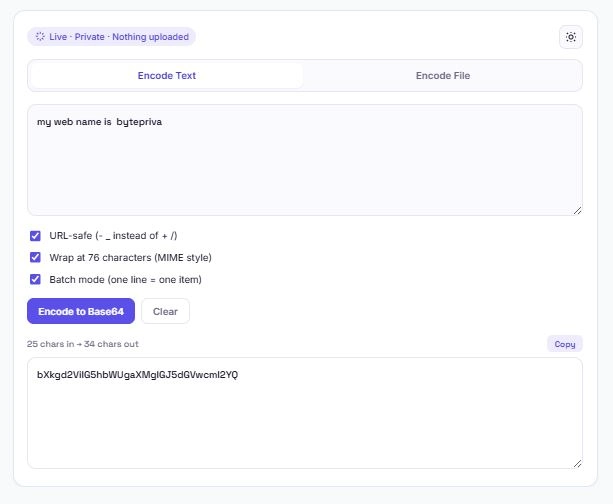
Understanding This Base64 Encoder's Options
Three settings in this Base64 encoder change how the output is formatted, depending on where you're using it:
- URL-safe mode replaces the
+and/characters with-and_, and removes padding — this matters because standard Base64 output can break URLs and query strings if used as-is. This is the format used in JWTs (JSON Web Tokens) and URL parameters. - Line wrap (76 characters) follows the MIME standard used in email attachments and some older systems, wrapping long Base64 strings across multiple lines instead of one continuous line.
- Batch mode treats each line of input as a separate item to encode individually — useful when you have a list of values (like usernames or IDs) that each need their own Base64 string, rather than encoding the whole list as one block.
Where Base64 Encoding Is Actually Used
Base64 shows up in more places than most people realize. Here's where this Base64 encoder tends to get used most:
| Use Case | Why Base64 Is Needed |
|---|---|
| Embedding images in CSS/HTML | A Data URI lets an image load without a separate file request |
| API authentication headers | Basic Auth credentials are Base64-encoded before being sent |
| JWTs (JSON Web Tokens) | The header and payload sections are URL-safe Base64-encoded |
| Email attachments | MIME-encoded attachments use Base64 with 76-character line wrapping |
| Storing binary data in JSON | JSON only supports text, so binary data must be Base64-encoded first |
| Data passed in URLs | URL-safe Base64 avoids characters that would break a query string |
In each case, the underlying reason is the same: Base64 turns binary or special-character data into plain text that's safe to transmit through systems built for text.
Text-Safe, Not Encryption
A common misconception is that Base64 encoding hides or protects data — it doesn't. Base64 is fully reversible by design, and anyone with the encoded string can decode it back to the original in seconds using any Base64 decoder. This Base64 encoder is meant for compatibility (turning data into a text-safe format), not for security or confidentiality.
The MDN Web Docs glossary entry on Base64 — Mozilla's official developer documentation — covers this distinction in more detail, along with how Base64 is used in web platform APIs like btoa() and atob(). If you need to actually protect sensitive data, encoding alone is never a substitute for proper encryption.
Frequently Asked Questions
Is this Base64 encoder free to use?
Yes. There's no sign-up, no limit on how much you can encode, and no premium tier. Both text and file encoding are free.
Does my text or file get uploaded anywhere?
No. This Base64 encoder runs entirely in your browser using JavaScript. Nothing you type or upload is ever sent to a server, logged, or stored.
What's the difference between regular Base64 and URL-safe Base64?
Regular Base64 uses + and / characters, which have special meaning in URLs and can break them. URL-safe Base64 replaces those with - and _ and removes padding, making it safe to use directly in a URL or query string.
Will this work on my phone?
Yes. The layout adjusts for smaller screens, and file uploads work by tapping to browse instead of dragging on touch devices.
Disclaimer
This Base64 encoder is provided as a free utility for encoding text and files into Base64 format. Base64 encoding is not encryption and does not provide security or confidentiality — it is fully reversible by design and should never be relied on to protect sensitive information.
BytePriva and its owner(s) make no guarantees regarding the suitability of this tool for any specific security, compliance, or production use case, and shall not be held liable for any loss, error, or consequence arising from its use. You remain responsible for using appropriate encryption or security measures for any genuinely sensitive data.
This tool is safe to use — there is nothing to install, no account required, and no data is uploaded or stored. This disclaimer simply clarifies that final responsibility for how encoded output is used rests with you.