A case converter is a free online tool that instantly changes the capitalization or formatting style of any text — from simple UPPERCASE and lowercase, to developer-friendly formats like camelCase and snake_case. It works directly in your browser as you type or paste content, with no upload and no account required.
Text Case
Code Case
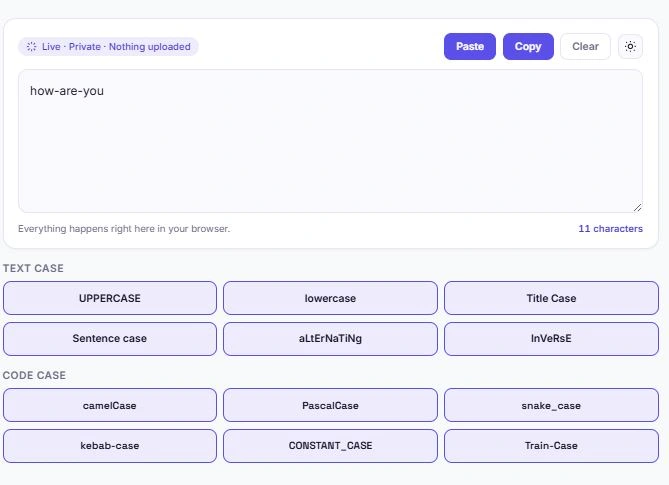
Table of Contents
How to Use This Case Converter
Converting text with this case converter takes just a couple of clicks. Type or paste your text into the box above, then pick the case style you need — the conversion happens instantly, right in the same box.
- Paste directly using the Paste button to pull text straight from your clipboard
- Pick a text case — UPPERCASE, lowercase, Title Case, Sentence case, aLtErNaTiNg, or InVeRsE
- Pick a code case — camelCase, PascalCase, snake_case, kebab-case, CONSTANT_CASE, or Train-Case
- Copy the result with one click, or hit Clear to start over
Naming Conventions in Programming: A Quick Reference
Every major programming language and style guide expects variables, functions, and files to follow a specific naming convention, and getting it wrong isn't just a style issue — in some languages, it can cause actual errors or make code harder for other developers to read and maintain.
JavaScript developers typically use camelCase for variables and function names, while class names follow PascalCase. Python leans heavily on snake_case for variables and function names, as laid out in the language's official style guide. CSS class names and URL slugs almost always use kebab-case, since browsers and web servers don't handle uppercase letters or underscores in URLs consistently. Environment variables and constants, meanwhile, are conventionally written in CONSTANT_CASE across nearly every language, making them instantly recognizable in a sea of lowercase code.
MDN Web Docs — Mozilla's official developer documentation — offers a detailed breakdown of camelCase and how it's used across JavaScript, CSS, and HTML attributes, if you want to go deeper into the reasoning behind these conventions.
Switching between these formats manually, especially across a large file or when refactoring old code, is slow and easy to get wrong. Pasting your variable names or file names into this case converter and picking the target format handles the conversion in a single click, without the risk of a typo breaking your build.
Text Case vs. Code Case: What's the Difference?
This case converter is split into two groups because they solve different problems for different people.
Text cases — UPPERCASE, lowercase, Title Case, Sentence case, aLtErNaTiNg, and InVeRsE — are for everyday writing. Title Case is standard for headlines and titles, Sentence case fixes text that got stuck in all-caps, and UPPERCASE is useful for emphasis or short labels.
Code cases — camelCase, PascalCase, snake_case, kebab-case, CONSTANT_CASE, and Train-Case — are naming conventions used in programming. Most style guides expect specific casing depending on the context: camelCase for JavaScript variables, PascalCase for class names, snake_case for Python variables, kebab-case for URLs and CSS classes, and CONSTANT_CASE for constants. Typing these out by hand or renaming variables across a naming convention switch is tedious — this tool does it instantly instead.
When to Use Each Case Style
Not sure which case fits your situation? Here's a quick breakdown of what each one is typically used for:
| Case Style | Common Use |
|---|---|
| UPPERCASE | Headlines, warnings, short emphasis |
| lowercase | Casual captions, stylized branding |
| Title Case | Blog titles, headings, book titles |
| Sentence case | Fixing text that got stuck in all-caps |
| aLtErNaTiNg | Stylized or playful social media text |
| InVeRsE | Quick case-flipping for fun or emphasis |
| camelCase | JavaScript variables and function names |
| PascalCase | Class names, component names |
| snake_case | Python variables, database column names |
| kebab-case | URL slugs, CSS class names |
| CONSTANT_CASE | Constants and environment variables |
| Train-Case | HTTP headers, some config file keys |
Common Text Formatting Problems This Tool Fixes
- A few formatting problems show up often enough that it's worth calling them out directly.
- The "Caps Lock got stuck" problem. Everyone has typed out a paragraph only to realize Caps Lock was on the whole time. Retyping it isn't necessary — running it through Sentence case fixes the capitalization instantly while still correctly capitalizing the start of each sentence.
- Inconsistent heading styles. If you're writing blog posts, product listings, or documentation, headings that switch between "all lowercase," "ALL CAPS," and "Random Capitalization" look unpolished. Running every heading through Title Case keeps things consistent without you having to manually capitalize each word.
- Mixed naming conventions in code. This happens constantly when merging code from different sources, converting a project between languages, or refactoring an old codebase that didn't follow a consistent standard. A variable might be written as
user_namein one file anduserNamein another — picking one convention and running your variable names through the matching case converter keeps everything aligned. - Copy-pasted text with broken formatting. Text copied from a PDF, an old document, or certain messaging apps sometimes carries over inconsistent capitalization or gets mangled. Running it through the appropriate case option is often the fastest way to clean it up before publishing.
- Social media and branding consistency. Brands that use a specific case style for their name, hashtags, or captions can end up with inconsistent formatting across posts and platforms. This tool lets you standardize wording quickly, without retyping it in the exact case each time.
- None of these are complicated fixes on their own, but doing them by hand — especially across a long document or an entire codebase — adds up. This case converter handles each of them in a single click, without altering anything else about your text.
Frequently Asked Questions
Is this case converter free to use?
Yes. There's no sign-up, no limit on how many times you can use it, and no premium tier. Every case style is free.
Does my text get uploaded anywhere?
No. All conversions happen locally in your browser using JavaScript. Your text never leaves your device and isn't stored or logged anywhere.
Can this handle large blocks of text?
Yes. Since the conversion runs in your browser rather than on a server, there's no upload delay, and it works the same whether you're converting a single word or several paragraphs.
What's the difference between camelCase and PascalCase?
camelCase starts with a lowercase letter (like myVariableName), while PascalCase starts with an uppercase letter (like MyClassName). Both remove spaces and capitalize the start of each subsequent word.
Will this work on my phone?
Yes. The tool is fully responsive and works the same way on mobile browsers, tablets, and desktops.
How does Sentence case handle text with multiple sentences?
It capitalizes the first letter after each sentence-ending punctuation mark — periods, question marks, and exclamation points — while converting the rest of the text to lowercase.
Can I use the kebab-case output directly as a URL slug?
Yes. kebab-case output is lowercase with hyphens between words, which matches the standard format most websites use for URL slugs.
Does this tool support text in other languages?
Basic case conversion (UPPERCASE, lowercase, Title Case, Sentence case) works with most languages that use the Latin alphabet. Code case conversions (camelCase, snake_case, etc.) are designed primarily for English-based variable and file naming.
Quick Summary
This case converter switches your text between 12 different case styles — 6 for everyday writing (UPPERCASE, lowercase, Title Case, Sentence case, aLtErNaTiNg, InVeRsE) and 6 for code (camelCase, PascalCase, snake_case, kebab-case, CONSTANT_CASE, Train-Case) — all instantly, right in your browser. There's nothing to install, no account needed, and your text is never uploaded. Whether you're fixing a caps-lock accident, formatting a headline, or renaming variables to match a naming convention, this tool gets it done in one click.
Disclaimer
This tool is provided as a free utility for general text formatting purposes. While case conversions are applied using standard, predictable rules, results for edge cases — such as text with unusual punctuation, mixed languages, or non-standard characters — may occasionally differ from what you expect.
BytePriva and its owner(s) make no guarantees regarding the accuracy or suitability of the output for any specific purpose, including professional, academic, or commercial use, and shall not be held liable for any loss, error, or consequence arising from its use. You remain responsible for reviewing the converted text before using it.
This tool is safe to use — there is nothing to install, no account required, and no data is uploaded or stored. This disclaimer simply clarifies that final responsibility for how the results are used rests with you.