A word and character counter is a free online tool that instantly counts the words, characters, sentences, and paragraphs in any piece of text. It works directly in your browser as you type or paste content, showing live results without uploading your text to a server or requiring an account.
Top keywords
Most repeated words, common words excluded- Start typing to see your most-used words
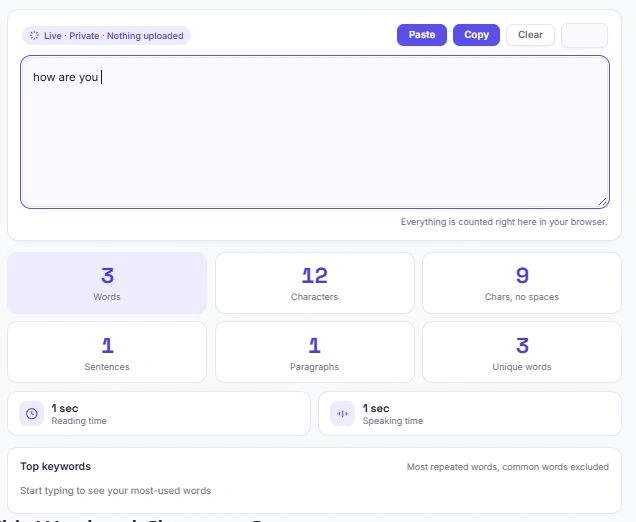
Table of Contents
How to Use This Word and Character Counter
Using this tool takes just a few seconds. Simply type or paste your text into the box above, and the counter updates automatically — there's no button to click or page to reload.
- Paste directly using the Paste button to pull text straight from your clipboard
- Watch the stats update live as you type — words, characters, sentences, and more
- Check reading and speaking time to see how long your content will take to read or present
- Review your top keywords to spot words you're repeating too often
- Copy your text back out with one click, or hit Clear to start over
What This Tool Counts
This tool tracks several text metrics at once, so you get a complete picture of your content in a single glance:
- Words — the total number of words in your text
- Characters (with spaces) — every character including spaces, useful for platforms with strict character limits
- Characters (no spaces) — just the letters, numbers, and punctuation
- Sentences — detected using sentence-ending punctuation like periods, question marks, and exclamation points
- Paragraphs — counted based on line breaks in your text
- Unique words — the number of distinct words used, giving a rough sense of vocabulary variety
- Reading time — estimated at an average reading speed of 200 words per minute
- Speaking time — estimated at an average speaking pace of 130 words per minute, useful for scripts and presentations
- Top keywords — your five most frequently repeated words, with common filler words like "the" and "and" automatically excluded
Why Word and Character Counts Matter
Different platforms and formats come with their own limits, and going over them can mean your content gets cut off, rejected, or simply doesn't perform as well. Here's where word and character counts commonly come into play:
- Academic and professional writing — essays, cover letters, and reports often come with strict word count requirements. Too short can look underdeveloped; too long can get rejected before anyone even reads it
- SEO and meta descriptions — Google typically displays around 150–160 characters of a meta description before cutting it off with an ellipsis
- Social media posts — every platform has its own character ceiling, and copy that gets clipped can lose its call-to-action entirely
- Video scripts and presentations — knowing your speaking time in advance helps you avoid scrambling to cut content minutes before going live
- Resumes and cover letters — recruiters skim fast, and word count is a quick way to check you're staying concise
Word and Character Counter for Students and Writers
Students, bloggers, and professional writers all rely on a word and character counter for slightly different reasons, but the need is the same: staying within a set limit without constantly recounting by hand. A word and character counter takes the guesswork out of this — whether you're checking a 500-word essay requirement, trimming a cover letter, or making sure a product description fits your platform's limit.
For students specifically, most universities and style guides (APA, MLA, Chicago) enforce word count minimums or maximums as part of formatting requirements. The Purdue Online Writing Lab offers detailed guidance on formatting academic papers correctly, and pairing that with a quick word and character counter check before submission can save you from losing marks over a technicality.
Common Character Limits to Know
Every platform enforces its own character limit, and knowing them in advance saves you from rewriting a caption or headline at the last minute. Here's a quick reference for the ones you'll run into most often:
| Platform / Use Case | Typical Limit |
|---|---|
| Google meta description | ~155–160 characters |
| Google title tag | ~55–60 characters |
| X (Twitter) post | 280 characters |
| Instagram caption | 2,200 characters |
| LinkedIn post | 3,000 characters |
| SMS / text message (single segment) | 160 characters |
| YouTube video title | 100 characters |
These numbers shift occasionally as platforms update their systems, so treat this as a general guide rather than a hard guarantee — always double-check against the platform's current guidelines if you're working right up to the edge.
How Reading Time Is Calculated
Reading time is estimated using an average adult reading speed of about 200 words per minute for general content. This is a widely used benchmark, though your actual reading speed can vary depending on how complex the text is, how familiar you already are with the topic, and whether you're skimming or reading closely. Speaking time, on the other hand, uses a slower pace of around 130 words per minute, since spoken delivery is naturally more measured than silent reading — pauses, emphasis, and breathing all add time that reading on a page simply doesn't have.
Frequently Asked Questions
Is this word counter really free?
Yes. There's no sign-up, no daily limit, and no premium tier hiding extra features. Every function on this page is free to use for as long as you need it.
Does my text get uploaded anywhere?
No. All counting happens locally in your browser using JavaScript. Your text never leaves your device, and nothing is stored, logged, or sent to a server.
How is the word count calculated?
Words are counted by splitting your text on whitespace. Standalone numbers, hyphenated words, and words with apostrophes each count as one word.
Why does my sentence count seem off?
Sentence counting relies on detecting punctuation like periods, question marks, and exclamation points. Text with unconventional punctuation, abbreviations like "Dr." or "e.g.," or missing end punctuation can occasionally throw the count off by a line or two.
Can I use this for languages other than English?
Word and character counts work for any language that separates words with spaces. Keyword detection and filler-word filtering, however, are currently tuned for English text.
Will this work on my phone?
Yes. The tool is fully responsive and works the same way on mobile browsers, tablets, and desktops.
Quick Summary
This word and character counter is designed to give writers, students, and marketers an instant, accurate read on their text. This word and character counter gives you an instant, accurate read on your text — words, characters, sentences, paragraphs, unique words, reading time, speaking time, and top keywords, all updating live as you type. There's nothing to install, nothing to sign up for, and nothing ever leaves your browser. Whether you're staying within a platform's character limit, hitting an assignment's word count, or timing a script before you record it, this tool gives you the numbers instantly so you can focus on the writing itself.
Disclaimer
This tool is provided as a free utility for general informational and productivity purposes. While we've built it to be accurate and reliable, word counts, character counts, reading time, and other figures are estimates based on standard text-parsing rules and average speeds — they may not be exact in every case.
BytePriva and its owner(s) make no guarantees regarding the accuracy, completeness, or suitability of the results for any specific purpose, including academic, legal, professional, or commercial use. Character limits referenced for third-party platforms (such as Google, X, Instagram, or LinkedIn) are accurate as of the time of writing but are subject to change without notice.
By using this tool, you agree that BytePriva and its owner(s) shall not be held liable for any loss, error, or consequence arising from its use. You remain solely responsible for verifying your content against the specific requirements of the platform, institution, or purpose you're using it for.
This tool is safe to use — there is nothing to install, no account required, and no data is uploaded or stored. This disclaimer simply clarifies that final responsibility for how the results are used rests with you.