This tool lets you password protect images in bulk using real AES-256-GCM encryption — the same standard used by banks and governments, not a password-only UI trick that leaves your photos readable underneath. Drop in any number of images, set a password, and download a locked ZIP that cannot be opened without it. There's no reset option if you forget your password — that's not a limitation, it's proof the encryption is genuine, since a real "backdoor" would mean it isn't real security at all.
Your Photos, Your Eyes.
Drop images here or click to upload
Any number of files — locked with real encryption, not a password-only trick
Keep your locked ZIP and your password somewhere safe — both are needed to unlock your photos later.
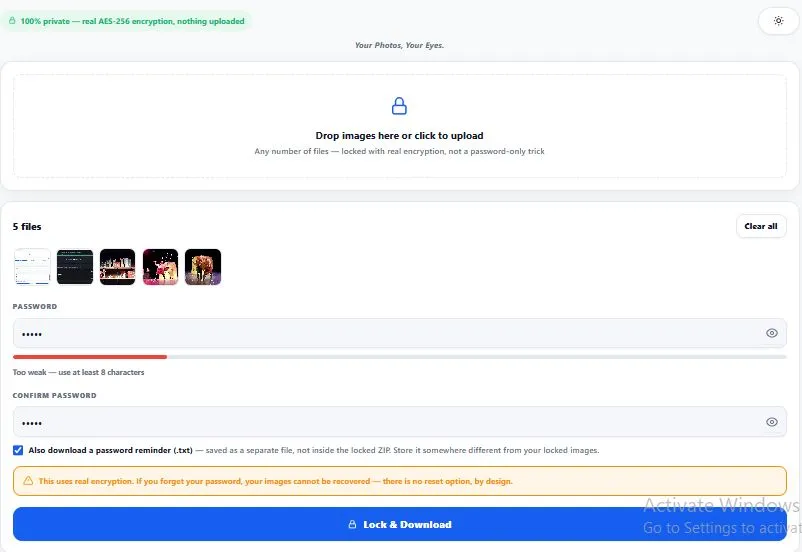
Table of Contents
How This Tool Works (Real Encryption, Not a Trick)
Some people call a tool like this a bulk image locker, but it's worth being precise about what's actually happening underneath, since most tools in this space don't do what they claim. Your password is run through PBKDF2 — a deliberately slow key-derivation function (250,000 iterations here) that turns it into a real 256-bit encryption key, making password-guessing attacks impractical.
That key then encrypts every image using AES-256-GCM, the same algorithm used to protect classified government data — not a password field sitting in front of an otherwise-readable file, which is how many "photo vault" apps actually work. The result is a .locked file for every image, bundled into one ZIP, that is mathematically unreadable without the exact password used to create it.
Why AES-256 Encryption Actually Matters
It's worth being specific about why this tool relies on AES-256 instead of a simpler password check, because the difference determines whether your images are actually safe or just superficially hidden. AES (Advanced Encryption Standard) is a U.S. government cryptography standard, officially defined by NIST (the National Institute of Standards and Technology) under FIPS 197 — the same standard used to protect classified government data, financial systems, and virtually every modern secure application, from banking apps to encrypted messaging.
The "256" refers to the key length in bits: a 256-bit key has roughly 1.1 × 10⁷⁷ possible combinations, a number so large that even with every computer on Earth working together, brute-forcing it would take vastly longer than the current age of the universe. This is precisely why real encryption tools — including this one — never offer a "forgot password" recovery option: if a password could somehow be recovered by the tool itself, that would mean the encryption was never truly unbreakable to begin with, which defeats the entire purpose of using AES-256 in the first place.
Combined with PBKDF2's 250,000 rounds of key derivation (which specifically slows down anyone trying to guess a weak password), this tool applies the exact combination of techniques security professionals recommend for protecting sensitive files — the same reason password protect images tools built on genuine cryptography, rather than a UI-only lock screen, are worth using over the alternative.
Why Use This Tool
Every feature below is something this password protect images tool actually does, right now, in your browser:
- Real AES-256-GCM encryption, not a UI trick — your images are mathematically encrypted, not just hidden behind a password screen while remaining readable underneath.
- Built-in tamper detection — AES-GCM includes an authentication check, so a wrong password fails cleanly instead of producing a corrupted or garbage image.
- Bulk processing, any number of files — lock an entire folder of photos with one password in a single pass, not one image at a time.
- Password strength meter — live feedback while you type, so you know if your password is actually strong enough before you rely on it.
- Optional password reminder file — a separate, clearly-labeled .txt download with your password and unlock instructions, kept apart from your locked images by design.
- Straightforward, honest limitations — no fake "password recovery" promise; if you forget your password, your images are genuinely unrecoverable, which is what real encryption is supposed to mean.
- Everything runs in your browser — your images are only read locally to encrypt them and are never uploaded to any server.
- Light and dark mode — toggle to match your screen preference, saved for your next visit.
Who Should Password Protect Images With This Tool
This tool is built for anyone who needs to password protect images for real, not just theoretical, security. People sending sensitive documents — ID photos, proof-of-address scans, financial documents — through a channel they don't fully control, like an email thread or shared drive. Anyone archiving private photos on a shared or work computer where other people have access to the same files.
People sharing photos over an untrusted connection who want a password layer that's mathematically real, not just a filename trick. Privacy-conscious users who specifically want to avoid uploading sensitive images to any third-party server, even one that claims to delete files afterward. In every case, the goal is the same — images that are genuinely unreadable to anyone without the exact password, not just hidden from casual view.
Tips for Best Results
- Use a password you'll actually remember, or save it deliberately. There is no password reset for images you password protect this way — losing it means losing access permanently, so this isn't the place for a password you might forget in a week.
- If you download the password reminder file, store it somewhere separate from your locked ZIP. Keeping both together (same folder, same email, same USB drive) defeats the purpose — anyone with both files can unlock your images instantly.
- Check the password strength meter before locking your images. A weak password makes the encryption itself irrelevant, since PBKDF2 slows down guessing but doesn't make a short, common password safe.
- Keep your locked ZIP file intact. The
.lockedfiles andmanifest.jsoninside it work together — renaming, moving individual files out, or editing the ZIP's contents can make your images impossible to unlock, even with the correct password. - Test with one image first if this is your first time. Lock a single unimportant photo, confirm you can unlock it again with your chosen password, then move on to locking anything you actually care about.
Frequently Asked Questions
Is this also called a bulk image locker?
Yes — some people search for this exact functionality as a "bulk image locker" or "bulk photo locker." Whatever it's called, what it does is the same: real AES-256-GCM encryption applied to any number of images at once, locked behind a single password.
Is this real encryption when I password protect images here, or does it just hide my photos behind a password screen?
It's real encryption. Your images are processed with AES-256-GCM, the same algorithm used to protect classified data, after your password is strengthened through 250,000 rounds of PBKDF2 key derivation. This is fundamentally different from apps that simply hide files behind a login screen while the underlying files remain fully readable.
What happens if I forget my password?
Your images cannot be recovered. There is no password reset, no backdoor, and no "forgot password" option — this is an intentional consequence of using real encryption rather than a fake security feature. If a tool claims it can reset your password and still access your images, that's a sign it wasn't using real encryption in the first place.
Why does this tool offer a separate password reminder file instead of just remembering it inside the ZIP?
Storing your password inside the same ZIP as your locked images would defeat the purpose of locking them — anyone who gets the ZIP would also get the password. The optional reminder file downloads separately specifically so you can store it somewhere different from your locked images, keeping the two apart.
Can I unlock my images on a different tool or device?
Yes — the locked ZIP and the matching unlock tool are separate by design, so you can lock your images on one device and unlock them later, anywhere, as long as you have the correct password and the unlock tool.
Does this upload my images to a server to encrypt them?
No — every image is read and encrypted entirely inside your browser using the Web Crypto API, a built-in browser feature. Nothing is ever uploaded, which also means your original, unencrypted photos never leave your device at any point.
How many images can I lock at once?
There's no hard limit — each image is encrypted individually in sequence, so large batches process smoothly without crashing. Very large batches take a little longer, since every image goes through the same encryption process one at a time.
Is this tool free, and do I need to sign up?
Yes, it's completely free with no sign-up required. Since nothing is uploaded to a server, there's also no account needed to track your usage or limit how often you can use it.
Quick Summary
This tool lets you password protect images in bulk using real AES-256-GCM encryption with PBKDF2 key derivation — the same standard cryptography used to protect sensitive data elsewhere, not a UI trick that leaves files readable underneath. Some people call this a bulk image locker; whatever the name, the result is the same: any number of images, locked behind one password, entirely inside your browser, with nothing ever uploaded.
There is no password recovery — that's not a flaw, it's what makes the encryption genuine. Whether you're sending sensitive documents, archiving private photos, or just want a password layer that's mathematically real, the same rule applies: keep your password safe, because it's the only key that exists.
Disclaimer
BytePriva strives for accuracy, but no software is completely free of bugs — please test this tool with a non-important image first to confirm you can successfully lock and unlock it before relying on it for sensitive files. This tool uses real, industry-standard encryption (AES-256-GCM with PBKDF2 key derivation), and by design, there is no way to recover your images if you forget your password — by using this tool, you acknowledge and accept this permanent limitation. Your images are processed entirely in your browser and are never uploaded, stored, or sent anywhere.