This jpg to webp converter turns your JPG or JPEG photos into the modern WebP format — smaller files, and you control exactly how much quality to keep. Move the quality slider and see a live preview of the resulting file size before you even convert, so there's no guessing. Keep it high (90%+) for near-original quality, or lower it for smaller files when quality matters less.
WebP's more efficient compression typically shrinks files by 25-34% compared to the original JPG at a similar quality level. Drop in one image or dozens at once, convert them all together, and download everything as a single ZIP. Nothing is ever uploaded to a server — the entire conversion happens inside your own browser using your device's built-in image engine, so it works even on a slow connection and your photos never leave your control.
Drop JPG images here or tap to upload
JPG or JPEG files — as many as you need
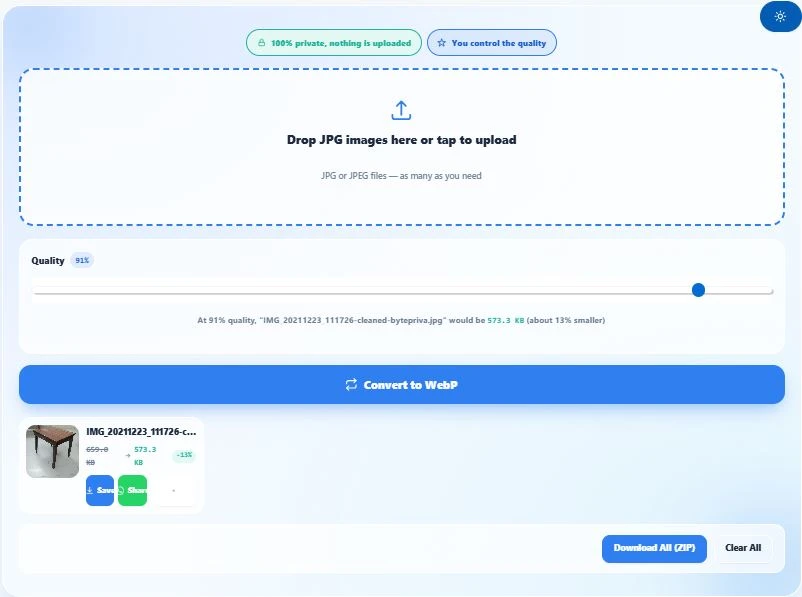
Table of Contents
How to Convert JPG to WebP
- Upload your JPG images — click the upload area or drag and drop one or more JPG/JPEG files directly onto it.
- Adjust the quality slider — as you move it, a live preview shows the estimated file size at that quality level, so you can see the trade-off before converting anything.
- Click "Convert to WebP" — the tool works entirely inside your browser, converting each image at your chosen quality setting.
- Download or share — save each converted WebP file individually, or share it straight to WhatsApp on mobile. If you converted several images, download them all together as one ZIP file.
Why Use This JPG to WebP Converter
Most converters either force a fixed quality setting on you with no explanation, or make you convert first and only discover the resulting file size afterward — meaning you have to convert repeatedly, adjusting blindly, until you're happy with the result. This tool shows you the estimated file size before you convert, live, as you move the quality slider — so you get it right on the first try.
It's built to be a converter, not a compressor with a different name. You decide the quality trade-off yourself: keep it high for near-original quality with modest savings, or lower it for more aggressive compression when file size matters more than detail.
Nothing is uploaded anywhere. The entire conversion — reading your JPG, re-encoding it as WebP, checking the resulting file size — happens inside your own browser using your device's processor. Your photos never touch a server, which also means it keeps working even on a slow or unstable connection.
For anyone converting more than one image, you can drop in as many JPGs as you need, convert them all at your chosen quality in one go, and download everything together as a single ZIP file instead of saving each one individually.
WebP isn't just another format — it was built by Google specifically to make the web faster. According to Google's own published data, WebP lossy images are typically 25-34% smaller than comparable JPEG images at an equivalent quality level, and WebP is now natively supported by over 97% of browsers in active use worldwide, including every major browser and modern iPhone. That's what this converter is built on — a well-established, genuinely faster format, not an experimental one.
Who This JPG to WebP Converter Is Built For
- Website owners and bloggers converting product photos or blog images to WebP for faster page loading, without losing control over the quality-to-size trade-off.
- Developers preparing image assets who need WebP versions of existing JPG files and want to test different quality levels quickly using the live size estimate.
- Anyone converting a batch of photos at once — drop in multiple JPGs, pick one quality setting, and export everything together as a ZIP instead of converting file by file.
- People with limited storage or bandwidth who want smaller image files but don't want to blindly trust an auto-compression setting they can't see or adjust.
Tips for Best Results With This JPG to WebP Converter
- Start around 80% quality. This is generally considered the sweet spot for WebP — visually very close to the original, with meaningfully smaller file size than JPG at a comparable quality.
- Watch the live estimate before converting. If the estimated size looks larger than expected, try lowering the quality slider a bit — the live preview updates as you move it, so you can find the right balance without converting repeatedly.
- Very simple or already-compressed JPGs may not shrink much. If your original JPG was already saved at a low quality, converting it to WebP at a high quality setting can sometimes result in a similar or even larger file — if you see this, lower the quality slider until the estimate shows a real reduction.
- The same quality setting applies to every image in a batch. If you upload several JPGs together, they're all converted at whatever quality the slider is set to — for very different images needing different settings, convert them in separate batches.
FAQs
How do I convert JPG to WebP?
Upload your JPG image, adjust the quality slider to your liking (a live preview shows the estimated file size), and click "Convert to WebP." The conversion happens instantly inside your browser.
Does this tool upload my photos anywhere?
No. The entire conversion runs inside your own browser using your device's built-in image engine. Your photos are never sent to a server, so it works even on a slow connection.
Can I control the quality of the conversion?
Yes — there's a quality slider you adjust yourself, from 1% to 100%. As you move it, a live estimate shows the resulting file size before you even convert, so you can see the trade-off in real time.
Why does the estimated file size sometimes look bigger than the original?
This can happen if your original JPG was already saved at a low quality. Converting it to WebP at a high quality setting can produce a similar or larger file. If you see this, lower the quality slider — the live estimate will update immediately.
Will my image change to a different format like PNG?
No — this converter only outputs WebP. Whatever JPG or JPEG file you upload, you get a WebP version of that same image back.
Can I convert multiple images at once?
Yes. Upload as many JPG files as you need, set your quality, and click Convert to WebP — every image is converted at that same quality setting, and you can download them all together as a ZIP file.
Can I share the converted image directly instead of downloading it?
Yes, there's a Share button that sends the converted WebP image straight to WhatsApp on mobile devices. On desktop, you'll need to download the file first, since browsers can't send files directly into WhatsApp Web.
Is there a limit to how many images I can convert?
No fixed limit — you can upload and convert a large batch of JPGs in one go, and the tool processes them one at a time with a visible progress bar so your browser doesn't freeze or slow down.
Quick Summary
This jpg to webp converter lets you turn JPG images into smaller WebP files while staying in control of quality — adjust the slider, see a live size estimate, then click Convert to WebP. It works entirely inside your browser, so nothing is ever uploaded, and you can convert one image or a large batch at once, downloading everything together as a ZIP when you're done.
Disclaimer
This jpg to webp converter by BytePriva is provided as a free tool to help convert and optimize images for websites, apps, and everyday use. The tool works entirely within your browser and does not upload, store, or have any access to the images you process — conversion happens locally on your own device.
Actual results, including file size reduction and visual quality, depend on the content of the original image and the quality setting you choose. BytePriva makes no warranty regarding suitability for any specific professional, commercial, or technical purpose, and accepts no liability for issues arising from a converted file not meeting a particular platform's or project's requirements.
Always preview and review the converted image before relying on it for an important use case, and adjust the quality slider if the result doesn't meet your needs.