This burst photo picker finds the near-identical photos hiding in your camera roll — the 8 nearly-the-same shots from one burst, the 5 attempts at getting everyone smiling — and automatically picks the sharpest one from each group, so you're not scrolling through duplicates one by one. Upload your photos, and in seconds you'll see them grouped, with the best shot in each group already highlighted. Nothing uploads to a server — every photo is analyzed entirely on your own device.
Drop your burst photos here or click to upload
Select all the near-identical shots you want to pick the best from
Click any photo below to keep or skip it — your choices always override the automatic pick.
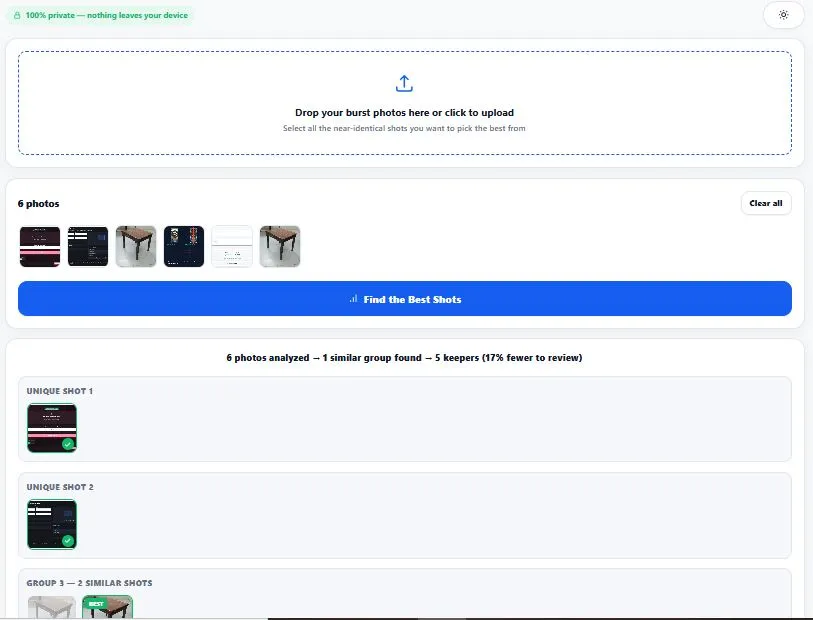
Table of Contents
How This Burst Photo Picker Works (The Technique)
This tool uses two separate, well-established image-analysis techniques — no AI, just verified math running in your browser. First, perceptual hashing (dHash): each photo is shrunk to a tiny 9×8 grid, converted to grayscale, and compared pixel-by-pixel to every other photo. Photos with a small enough difference are grouped as "the same burst." Second, Laplacian variance — the same sharpness-detection method used in professional computer vision (OpenCV) — measures how much edge detail each photo contains; a genuinely sharp photo has strong, well-defined edges, while a blurry one has soft, faded transitions between pixels. Within each group, whichever photo scores highest on this measurement is marked as the sharpest, and automatically kept.
This is the same mathematical operator used across professional computer vision software — for a technical, code-level breakdown of how the Laplacian operator detects edges in an image, see OpenCV's official documentation.
Why Use This Tool
Every feature below is something the tool above actually does, right now, in your browser:
- Automatic grouping, no manual comparison needed — upload your photos and similar/burst shots are grouped together automatically, so you're not flipping back and forth comparing near-identical frames yourself.
- The sharpest photo in each group is pre-selected for you — marked with a "BEST" badge, based on measured edge sharpness, not a guess.
- Every choice is overridable — click any photo, in any group, to keep or skip it. The automatic pick is a starting point, not a final decision.
- A live progress bar while analyzing — see exactly which photo is being processed and how far through the batch you are.
- A clear summary after analysis — shows how many photos you started with, how many similar groups were found, and how many keepers you're left with.
- One-click download of just your keepers — a single kept photo downloads directly; multiple keepers are bundled into a ZIP automatically.
- Everything runs in your browser — your photos are only read locally to analyze them and are never uploaded to any server.
- Light and dark mode — toggle to match your screen preference, saved for your next visit.
Who This Burst Photo Picker Is Built For
This burst photo picker is built for anyone drowning in near-identical shots after a shoot. Parents and everyday phone photographers who fired off 15 shots trying to get one good group photo, and don't want to zoom into each one comparing sharpness. Travel photographers who took the same landmark shot 6 times while waiting for a bird to fly out of frame.
Event and wedding photographers doing a quick first pass before a full professional culling workflow, to cut an obvious pile of duplicates down fast. Anyone clearing up phone storage who wants to keep the one good version of a moment instead of 8 near-identical copies. In every case, the goal is the same — spend less time comparing, more time deciding.
Tips for Best Results
- Upload photos from one shoot or session at a time. This burst photo picker compares every photo against every other photo — mixing in totally unrelated shots (like vacation photos from different days) just adds noise; grouping works best on one batch that's likely to contain duplicates.
- Always glance over the automatic picks before downloading. Sharpness is measured mathematically, not by expression or composition — if the "BEST" pick has someone blinking or looking away, click a different photo in that group to override it.
- Very similar but intentionally different shots may get grouped together. A wide shot and a tighter crop of the same subject can register as "similar" even though they're not truly duplicates — this isn't a bug, just a limit of comparing pixel patterns; simply un-reject any shots you want to keep from a group.
- Larger batches take a little longer, and that's expected. Analyzing 100 photos takes longer than analyzing 10, since every photo is compared against every other photo — the progress bar shows exactly where the analysis stands.
- Photos with almost no detail (like a plain wall or sky) may score as "less sharp" even if they're technically in focus. The sharpness measurement depends on edge detail being present in the frame — this is a known limitation of edge-based sharpness detection, not specific to this tool.
Frequently Asked Questions
How does a burst photo picker know which photo is the sharpest?
It measures edge sharpness using a technique called Laplacian variance — the same principle used in professional computer vision software like OpenCV. A sharp photo has strong, clearly defined edges, while a blurry photo has soft, faded transitions. The photo with the highest measured edge sharpness in each group is automatically marked as the best.
How does this tool know which photos are from the same burst?
It uses a technique called perceptual hashing (specifically, dHash), which shrinks each photo down to a tiny 9×8 grid and compares brightness patterns between photos. Photos with similar enough patterns are grouped together as likely duplicates, even if the file names or exact pixels are different.
Will this delete my rejected photos?
No. This tool never touches your original files or your device's photo library — it only reads photos you upload into the browser tab to analyze them. Rejected photos simply aren't included in the download; nothing is deleted anywhere.
Why were two clearly different photos grouped together?
Perceptual hashing compares overall brightness and pattern similarity, not scene content — two photos with a similar composition, lighting, or framing can register as "similar" even if they show different subjects. Simply click to un-reject any photo that was grouped incorrectly.
Is there a limit to how many photos I can upload?
There's no hard limit, but larger batches take longer to analyze since every photo is compared against every other photo. For best performance and clearer groupings, upload one shoot or session at a time rather than your entire camera roll at once.
Does this work with photos from any camera or phone?
Yes — it works with any JPG, PNG, or WebP photo, regardless of which camera or phone took it. There's no dependency on burst-mode metadata; the grouping is based entirely on comparing the actual image content.
Does this replace professional photo culling software?
No — professional culling tools use full AI models trained on blink detection, facial expression, and composition scoring, built for photographers processing thousands of images. This burst photo picker focuses on one specific, common problem — grouping duplicates and picking the sharpest — for free, in your browser, with no software to install.
Is this burst photo picker free, and does it upload my photos anywhere?
Yes, it's completely free with no sign-up required. Every photo is read and analyzed locally in your browser — nothing is ever uploaded to a server, which is also why there's no limit on how many times you can use it.
Quick Summary
A burst photo picker solves one specific, common problem — scrolling through 8-15 near-identical shots trying to figure out which one is actually the sharpest. This tool does it automatically using two verified techniques: perceptual hashing (dHash) to group similar photos together, and Laplacian variance to measure which photo in each group has the sharpest, most defined edges. Every automatic pick can be overridden with a single click, and only your kept photos get downloaded — as a single file or a ZIP. Whether you're clearing up a phone full of near-duplicates or doing a fast first pass before real editing, the goal is the same: spend less time comparing, more time deciding.
Disclaimer
BytePriva strives for accuracy, but automated results can occasionally be imperfect — please review the automatic picks yourself before deleting or discarding any original photos. This burst photo picker uses verified, well-established techniques (perceptual hashing and Laplacian sharpness measurement), but sharpness scoring and similarity grouping are mathematical estimates, not a guarantee of the best photo for every use case — by using this tool, you agree that you're responsible for reviewing your own selections before relying on them. Your photos are processed entirely in your browser and are never uploaded, stored, or sent anywhere.