This megapixel to resolution calculator converts a target megapixel count into the exact pixel width and height you'd need to hit it, for any aspect ratio. Enter your target MP and pick a ratio — 1:1, 3:2, 16:9, or a custom shape — and the exact dimensions update instantly, using the same math camera manufacturers use in reverse: total pixels equal megapixels × 1,000,000, split proportionally across width and height to match your chosen ratio.
Enter a target megapixel count and an aspect ratio — get the exact pixel dimensions.
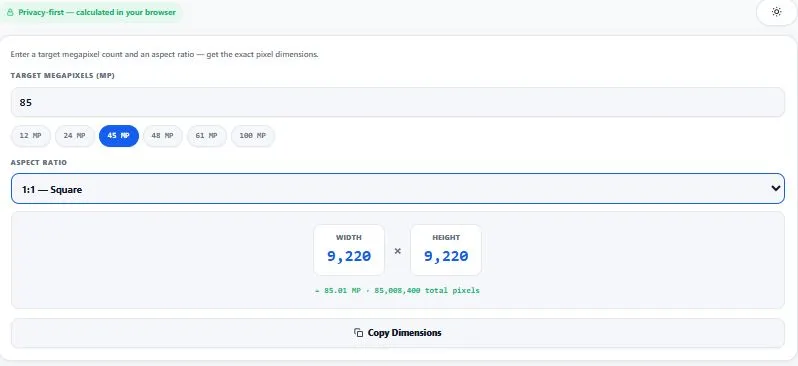
Table of Contents
How This Megapixel to Resolution Calculator Works (The Formula)
Going from a target megapixel count to exact pixel dimensions takes one extra step compared to the forward calculation. First, convert your target MP into total pixels by multiplying by 1,000,000. Then, using your chosen aspect ratio (width ÷ height), split that pixel total proportionally: width = √(total pixels × ratio width ÷ ratio height), and height = √(total pixels × ratio height ÷ ratio width). For a real example: targeting 24 MP at a 3:2 ratio gives 24,000,000 total pixels, and solving both equations produces exactly 6000×4000 — which is the real, standard resolution of a 24-megapixel APS-C camera sensor, confirming the formula is correct.
| Target Megapixels | Resulting Resolution (3:2) | Typical Source |
|---|---|---|
| 12 MP | 4243×2828 | Entry smartphone / older DSLR |
| 20 MP | 5477×3651 | Common mirrorless cameras |
| 24 MP | 6000×4000 | Standard APS-C sensor |
| 45 MP | 8214×5476 | Pro full-frame camera |
| 48 MP | 8485×5657 | Modern flagship smartphone |
| 61 MP | 9558×6372 | High-resolution full-frame camera |
| 100 MP | 12247×8165 | Medium-format sensor |
Results are rounded to whole pixels, so the pixel count may differ slightly from the exact megapixel figure.
The relationship between resolution and megapixels works in both directions — resolution is the specific width and height in pixels, while megapixels is simply that total pixel count expressed in millions. This calculator solves for the missing half of that relationship: given a megapixel target, it works out the exact resolution needed to reach it. For a deeper look at how resolution itself is defined and measured, see this resolution explainer.
Why Use This Calculator
Every feature below is something this megapixel to resolution calculator actually does, right now, in your browser:
- Live results, no button to click — enter a target megapixel count and the exact width and height update instantly.
- Bug-free, verified math — the formula is checked against real camera sensor specs (e.g. 24 MP at 3:2 correctly produces 6000×4000, not a rounding error). Many similar tools online have a known bug where ratios like "16:10" get misread — this doesn't.
- Quick-fill common megapixel targets — one-click chips for 12, 24, 45, 48, 61, and 100 MP, the most common camera and smartphone sensor sizes.
- Standard and custom aspect ratios — pick from 1:1, 4:3, 3:2, 16:9, and 9:16, or enter any custom ratio.
- Exact pixel count shown alongside the result — confirms the resulting dimensions actually equal your target MP, down to two decimal places.
- One-click copy — copy the final width × height straight to your clipboard.
- Everything runs in your browser — no image is involved, and no data is sent to any server; it's pure client-side math.
- Works smoothly on any device — no heavy libraries, just simple formulas, so it's fast even on older phones and slow connections.
- Light and dark mode — toggle to match your screen preference, saved for your next visit.
Who This Calculator Is Built For
This megapixel to resolution calculator is built for anyone who needs to plan a resolution around a target file size or spec, rather than measure an existing image. Photographers researching camera specs compare what resolution a "45MP" or "61MP" body would actually produce at their preferred aspect ratio before buying.
Print and design professionals work backward from a client's minimum megapixel requirement to know the exact pixel dimensions a source file needs to be shot or scanned at. Content creators and editors plan out custom canvas sizes — say, a specific MP target for a print run — without doing the square-root math by hand. Students and photography learners use it to understand how megapixels, aspect ratio, and resolution relate to each other through real, adjustable numbers.
Common Mistakes When Converting Megapixels to Resolution
- Assuming the aspect ratio without checking it. The single biggest source of wrong results isn't the math — it's picking the wrong ratio. A camera shooting 4:3 will give a completely different resolution than one shooting 3:2 for the exact same megapixel target.
- Confusing megapixels with file size. A higher megapixel target increases pixel dimensions, not necessarily file size in MB — file size also depends on compression format and quality settings, which this calculator doesn't factor in (and no megapixel-only tool reasonably can).
- Rounding the megapixel target too early. Entering "roughly 24" instead of an exact figure like 24.3 will still work, but for spec-matching purposes (like meeting a client's exact minimum requirement), use the precise number they gave you rather than a rounded guess.
- Forgetting that width and height can be swapped. A 3:2 landscape result and a 2:3 portrait result use the same numbers in reverse — if your project needs a vertical/portrait shape, flip the ratio (enter "2:3" instead of "3:2") rather than manually swapping the calculator's output.
Tips for Accurate Results
- Pick the aspect ratio your camera or canvas actually uses, not a rough guess. Most DSLR/mirrorless cameras shoot 3:2, most smartphones shoot 4:3 by default (though many support other ratios), and video frames are almost always 16:9. Using the wrong ratio will give correct math but the wrong real-world dimensions.
- Round the result if you need whole, "clean" numbers. The calculator gives the mathematically exact width and height, which occasionally include a fraction of a pixel that gets rounded — the displayed MP confirmation line shows how close the rounded result stays to your original target.
- Remember this gives you a target, not a guarantee of camera output. Camera manufacturers round their advertised MP figures, so a "24MP" camera might output 23.9 or 24.1 MP in reality — use this to understand the relationship, not as an exact spec sheet for a specific device.
- Use whole-number megapixel targets for round results. Entering something like "24.37 MP" will still calculate correctly, but the resulting width and height are less likely to be "clean" numbers than a round target like 24 or 45.
- Cross-check with the forward calculator if you already have an image. If you're verifying an existing photo instead of planning a new resolution, use the Resolution to Megapixel Calculator instead — it works in the opposite direction.
Megapixel to Resolution Reference Across Common Ratios
The table above showed 3:2 results, but this megapixel to resolution calculator works identically for any ratio — the same target MP count produces different width and height combinations depending on the shape you choose. This is useful when you're planning content for a specific platform rather than a specific camera, since square, widescreen, and vertical formats all have very different real-world uses.
| Target MP | 1:1 (Square) | 16:9 (Widescreen) | 9:16 (Vertical) |
|---|---|---|---|
| 12 MP | 3464×3464 | 4620×2600 | 2600×4620 |
| 24 MP | 4899×4899 | 6535×3676 | 3676×6535 |
| 48 MP | 6928×6928 | 9240×5198 | 5198×9240 |
Notice how the 24 MP row produces 6000×4000 at 3:2, but a completely different 4899×4899 at 1:1 — same megapixel target, same underlying math, but the dimensions change entirely based on ratio. This is exactly why a simple megapixel to resolution calculator needs the ratio as an input, not just the MP count on its own; megapixels alone only tell you the total pixel budget, not the shape it needs to be spent on.
Frequently Asked Questions
How do you convert megapixels to resolution?
Multiply your target megapixels by 1,000,000 to get total pixels, then split that total across width and height using your chosen aspect ratio: width equals the square root of (total pixels × ratio width ÷ ratio height), and height equals the square root of (total pixels × ratio height ÷ ratio width). This megapixel to resolution calculator performs both steps automatically.
What resolution is 24 megapixels?
It depends on the aspect ratio. At the common 3:2 photography ratio, 24 MP works out to 6000×4000 pixels — the standard resolution for most APS-C camera sensors. At 1:1 (square), the same 24 MP becomes roughly 4899×4899, and at 16:9 (widescreen) it becomes roughly 6535×3676.
What resolution is 48 megapixels?
At the 3:2 ratio common in smartphone and camera sensors, 48 MP equals approximately 8485×5657 pixels. At 1:1 it's about 6928×6928, and at 16:9 it's about 9240×5198 — the exact numbers always depend on which aspect ratio is used.
Why do I need to pick an aspect ratio to convert megapixels to resolution?
Megapixels only describe a total pixel count, not a shape — the same 24 MP can be spread across many different width-and-height combinations depending on the ratio. Without specifying a ratio, there are infinite valid resolutions for any given megapixel count, so the ratio is required to get one specific, real answer.
Is 100 megapixels overkill for most photography?
For most everyday photography, yes — 12 to 24 MP is enough for large prints, cropping, and standard web or social use. 100 MP sensors (found in some medium-format cameras) are built for specialized commercial, billboard-scale printing, or heavy-crop professional work, where extreme detail retention matters more than file size or storage cost.
How accurate is the resolution this calculator gives me?
The math is exact, but the final width and height are rounded to the nearest whole pixel, since resolutions can't include a fraction of a pixel. The confirmation line under the result shows the actual megapixel count of the rounded dimensions, so you can see there's never more than a tiny, sub-0.01 MP rounding difference from your target.
Can I use a custom aspect ratio instead of the standard presets?
Yes — select "Custom ratio…" from the dropdown and enter any two numbers for width and height (for example, 21:9 for an ultrawide format, or 5:4 for a large-format print). The calculation updates instantly using your custom ratio.
Is this megapixel to resolution calculator free, and does it store any data?
Yes, it's completely free with no sign-up required. There's no image involved in this calculator at all — it's pure client-side math running in your browser, and nothing is sent to or stored on any server.
Quick Summary
A megapixel to resolution calculator works backward from a target megapixel count to the exact pixel width and height needed to hit it, using a chosen aspect ratio to determine the shape. This calculator does that instantly: total pixels equal megapixels × 1,000,000, then width and height are solved proportionally using the ratio, verified against real camera specs (24 MP at 3:2 correctly produces 6000×4000). Whether you're researching camera specs, planning a print target, or just understanding how megapixels and aspect ratio relate, the same core formula applies every time — the ratio decides the shape, the megapixel count decides the size.
Disclaimer
Results are rounded to whole pixels, so the pixel count may differ slightly from the exact megapixel figure.
BytePriva strives for accuracy, but calculations can occasionally contain errors — please double-check important results yourself before relying on them for professional, commercial, or print work. The math above (converting megapixels to pixel dimensions using a chosen aspect ratio) is standard and has been manually verified against real camera sensor specs, but by using this tool, you agree that you're responsible for confirming your own numbers before final use — BytePriva and its team cannot be held liable for any loss or issue arising from reliance on these results. No image is involved in this calculator; it runs entirely as client-side math with no data sent to or stored on any server.