This resolution to megapixel calculator turns an image's width and height in pixels into an exact megapixel (MP) count. Type the dimensions, tap one of 6 quick-fill presets (1080p, 4K UHD, 12MP phone, 24MP APS-C, 45MP full-frame, 8K UHD), or upload an image and let the tool read its size for you. Along with the MP figure you get the total pixel count and a closest-match list that shows how far your image is from common camera and screen resolutions.
Enter pixel width & height, or upload an image to auto-fill them.
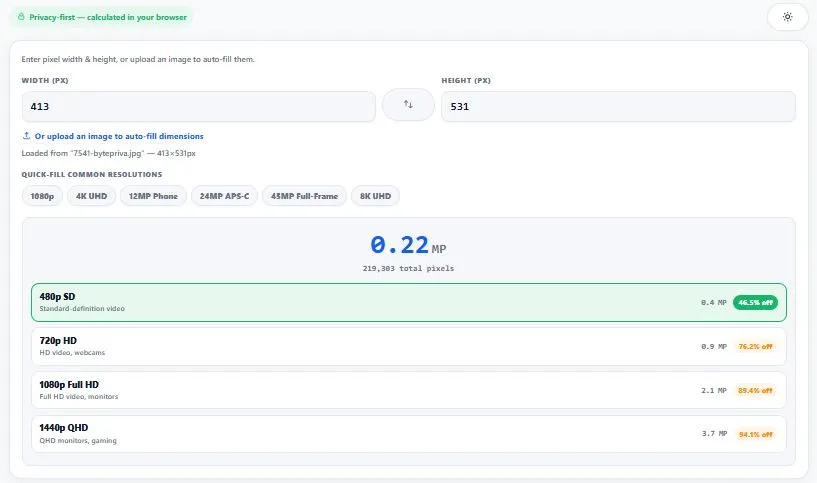
Table of Contents
Megapixels for Common Resolutions
Use this table to sanity-check a result. Every row is simply width × height ÷ 1,000,000.
| Resolution | Total Pixels | Megapixels |
|---|---|---|
| 1280 × 720 (720p HD) | 921,600 | 0.92 MP |
| 1920 × 1080 (1080p Full HD) | 2,073,600 | 2.07 MP |
| 2560 × 1440 (1440p QHD) | 3,686,400 | 3.69 MP |
| 3840 × 2160 (4K UHD) | 8,294,400 | 8.29 MP |
| 4032 × 3024 (typical phone) | 12,192,768 | 12.19 MP |
| 6000 × 4000 (24MP APS-C) | 24,000,000 | 24.00 MP |
| 7680 × 4320 (8K UHD) | 33,177,600 | 33.18 MP |
A 4K video frame is only 8.29 MP, which is why a photo from almost any modern camera has more detail than a single frame of 4K video.
How Many Megapixels Do You Need to Print?
Print shops usually aim for about 300 pixels per inch (PPI) for sharp photo prints. Multiply the print size by 300 to get the pixel size, then use the calculator to see the megapixels.
| Print Size | Pixels Needed at 300 PPI | Megapixels |
|---|---|---|
| 4 × 6 in | 1800 × 1200 | 2.16 MP |
| 5 × 7 in | 2100 × 1500 | 3.15 MP |
| 8 × 10 in | 3000 × 2400 | 7.20 MP |
| 11 × 14 in | 4200 × 3300 | 13.86 MP |
| 16 × 20 in | 6000 × 4800 | 28.80 MP |
| 20 × 30 in | 9000 × 6000 | 54.00 MP |
Large prints are usually viewed from farther away, so many people accept about 150 PPI for posters, which needs a quarter of the megapixels (a 16 × 20 in print then needs about 7.2 MP).
The Formula, With a Real Example
A megapixel is exactly one million pixels. Multiply width by height, then divide by 1,000,000. A camera that outputs 5472 × 3648 pixels has 5472 × 3648 = 19,961,856 pixels, which is 19.96 MP. The tool shows this exact figure, while a spec sheet would round it to "20MP".
How to Read the Closest-Match List
Below the result, the calculator compares your image with the four nearest common resolutions and shows the percentage difference for each. For a 6000 × 4000 image, the 24MP APS-C reference is an exact match, while the 8K UHD reference (33.2 MP) shows 27.7% off, meaning your image has about that much less resolution than 8K. It is a quick way to tell whether a "24MP" camera really delivers 24 MP, or 23.9 or 24.1.
Frequently Asked Questions
How do you calculate megapixels from resolution?
Multiply the width in pixels by the height in pixels, then divide by 1,000,000. For example, a 4000×3000 image has 4000 × 3000 = 12,000,000 pixels, which equals 12 megapixels. This calculator does that math automatically the moment you enter your dimensions.
Does more megapixels always mean better image quality?
Not necessarily. Megapixels measure resolution — the amount of detail an image can hold — but overall quality also depends on the sensor size, lens quality, lighting conditions, focus, and compression. A well-made 12MP photo can look sharper than a poorly shot 48MP one.
How many megapixels do I need for printing?
It depends on the print size and viewing distance, but as a general reference point, an 8×10 inch print at standard photo-quality density needs roughly 7-8 megapixels, while a 16×20 inch print needs closer to 24-29 megapixels. Enter your image's dimensions above to see its exact megapixel count before deciding.
What's the difference between megapixels and resolution?
Resolution refers to the specific width and height in pixels (like 4000×3000), while megapixels is the total pixel count from multiplying those two numbers together, expressed in millions. Resolution describes the shape and exact dimensions; megapixels summarizes the total amount of detail in a single figure.
Is this resolution to megapixel calculator free, and does it upload my images anywhere?
Yes, it's completely free with no sign-up required. When you upload an image to auto-fill the dimensions, the file is only read locally in your browser to measure its width and height — it is never uploaded to any server.
Quick Summary
Enter width and height, use a preset, or upload an image, and this resolution to megapixel calculator gives the exact MP count, the total pixel count, and a comparison with common camera and screen resolutions.
Disclaimer
The megapixel math (width × height ÷ 1,000,000) is standard, but please double-check important numbers before using them for professional or print work. Uploaded images are read only in your browser and are never sent anywhere.