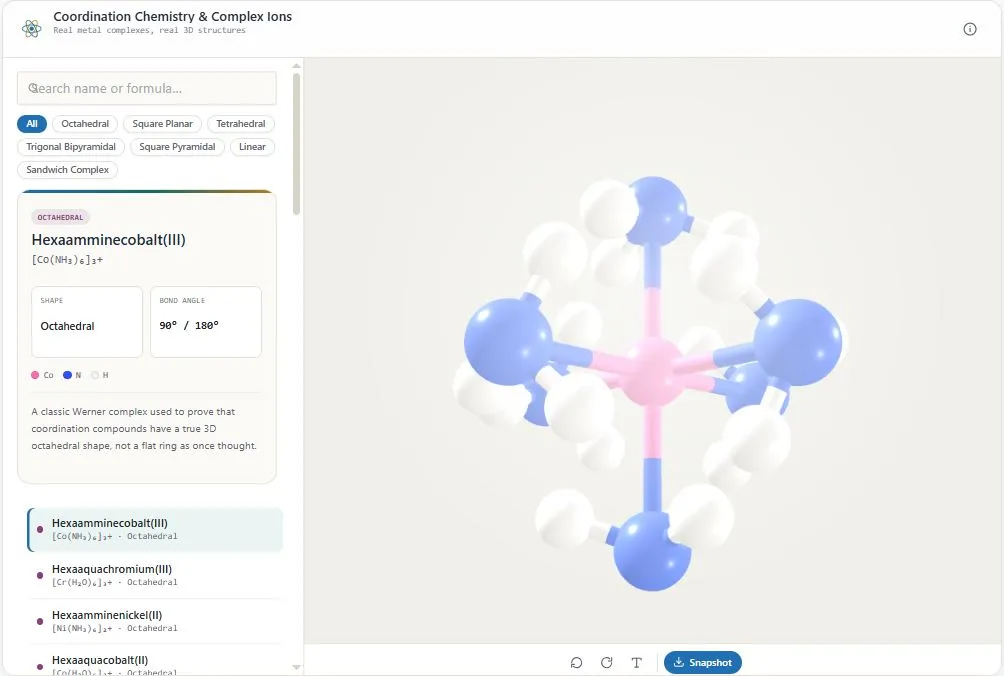
This coordination chemistry 3D viewer lets you rotate real metal complexes — from cisplatin and ferrocene to hemoglobin's iron-porphyrin core — without installing Java, Chime, or any other plugin. Most existing tools for this topic date back to the Java-applet era and simply don't run in a modern browser, which makes something as basic as checking a square planar or octahedral complex far more frustrating than it should be.
This tool skips all of that: every structure loads instantly as real WebGL 3D, built from accurate coordination geometry rather than a flat 2D drawing. Search or filter by geometry — octahedral, square planar, tetrahedral, trigonal bipyramidal, and more — to compare related complexes side by side, toggle atom labels, and rotate freely to see exactly how ligands are arranged around the central metal. No installation, no plugin, and no sign-up required.
Coordination Chemistry & Complex Ions
Real metal complexes, real 3D structures
Loading viewer…
About this tool
Disclaimer: This tool is strictly for educational visualization. It does not replace professional lab safety guidelines, medical advice, or nutritional guidance. Always consult certified instructors or qualified professionals before handling real chemicals or making health-related decisions. bytepriva.com assumes no liability for real-world experimentation or use of this information.
Note: This is a browser-based 3D visualization. Rendering can vary slightly across devices, browsers, and graphics hardware, so treat the on-screen model as a teaching aid rather than a lab-verified reference — please have a qualified chemistry educator confirm structural details before relying on them.
Table of Contents
How This Coordination Chemistry 3D Viewer Works
To use this coordination chemistry 3D viewer, follow these four steps:
- Search or browse by geometry. Type a complex's name into the search box, or filter by shape family — Octahedral, Square Planar, Tetrahedral, Trigonal Bipyramidal, and more — to browse related complexes together.
- Select a complex. Click any result to load its accurate 3D structure, along with its coordination geometry and a short description of its real-world significance.
- Rotate and explore. Drag to rotate the model from any angle, scroll or pinch to zoom, and toggle atom labels to identify each element directly on the structure.
- Reset, auto-rotate, or save. Use the toolbar below the model to reset the camera, turn on auto-rotate for a hands-free view, or download a snapshot of the current angle.
Everything runs 100% in your browser — no Java, no plugins, and no sign-up required.
Why Use This Coordination Chemistry 3D Viewer
Most tools for visualizing coordination complexes date back to the Java-applet era — Jmol, Chime, and similar plugins that simply don't run in a modern browser anymore. This coordination chemistry 3D viewer works instantly with zero plugins: every complex renders as real, interactive 3D using standard WebGL, the same technology built into every modern browser.
Coordination geometry isn't just theory — it directly determines how a complex behaves, which is exactly what makes structure and isomerism such a core topic in inorganic chemistry. Cisplatin and transplatin have the exact same formula, yet only the cis isomer fights cancer; this tool lets you rotate both side by side and see the geometric difference for yourself instead of just reading about it.
It's also built for speed: no account, no installation, and nothing to wait for. Search or filter by geometry, rotate any metal complex freely, toggle atom labels to check each element, and download a snapshot when you need one for notes or an assignment — all directly in your browser.
Who This Coordination Chemistry 3D Viewer Is Built For
- Inorganic chemistry students — see real octahedral, square planar, and tetrahedral complexes in 3D instead of trying to picture them from a flat textbook diagram.
- Students studying isomerism — rotate cisplatin and transplatin side by side to see exactly why geometry, not just formula, determines a complex's behavior.
- Pharmacy and pre-med students — explore the real 3D structure behind well-known drugs like cisplatin without needing a chemistry-specific software install.
- Teachers and tutors — pull up a real, rotatable model during a lesson instead of relying on a Java applet that may not even load anymore.
- Anyone curious about metal complexes — no chemistry background required to search a complex and see what it actually looks like in 3D.
Tips for Getting the Most Out of This Tool
- Use the geometry filters to compare complexes — click a family like "Octahedral" or "Square Planar" to see every related complex together, which makes it easier to spot shared structural patterns.
- Compare isomer pairs directly — look up cisplatin and transplatin (or the cis/trans cobalt complexes) back to back to see how the same formula produces two very different geometries.
- Turn on atom labels for unfamiliar elements — the label toggle in the toolbar identifies each atom directly on the model, useful for less common metals and ligands.
- A few large ligand systems are shown simplified — heme and chlorophyll's porphyrin rings are shown as their core coordination sphere rather than the full macrocycle, and this is noted directly in the description.
- Use snapshot for notes or assignments — the snapshot button captures the model at its current angle, handy for pasting into study notes or a lab report.
Frequently Asked Questions
Is this coordination chemistry 3D viewer free to use?
Yes. There's no sign-up, no installation, and no limit on how many complexes you can view — it's completely free.
Do I need Java or any plugin to use this?
No. Unlike many older coordination chemistry viewers, this tool uses standard WebGL 3D built into every modern browser — no Java, Chime, or any other plugin required.
What geometries are covered?
The tool covers octahedral, square planar, tetrahedral, trigonal bipyramidal, square pyramidal, and linear complexes, plus a few special cases like sandwich compounds.
Can I see the difference between cisplatin and transplatin?
Yes. Both are included, so you can search for each and rotate them side by side to see exactly how their ligand arrangement differs despite having the same formula.
Are the 3D structures accurate, or simplified?
Structures are built to reflect real coordination geometry and bond angles. A couple of large ligand systems, like the porphyrin rings in heme and chlorophyll, are shown as a simplified core rather than the full macrocycle, and this is noted directly in the description.
Does this tool work on mobile and tablets?
Yes. You can drag to rotate and pinch to zoom on touch devices, and the molecule list is accessible from a slide-up panel on smaller screens.
Can I save an image of the model?
Yes. The Snapshot button in the toolbar downloads an image of the model at its current angle, useful for notes or assignments.
Do I need any special software to use this?
No. It runs entirely in your web browser using standard web technology — no downloads or plugins required.
Quick Summary
This free coordination chemistry 3D viewer lets you rotate real metal complexes — cisplatin, ferrocene, hemoglobin's heme core, and more — with no Java, no plugin, and no sign-up. Unlike older Jmol- or Chime-based tools, everything loads instantly using standard WebGL 3D. Filter by geometry, compare isomer pairs like cisplatin and transplatin side by side, toggle atom labels, and use auto-rotate or snapshot to study any metal complex from every angle — entirely free, right in your browser.
Disclaimer
This coordination chemistry 3D viewer is provided for educational and informational purposes only. It is a visualization aid meant to help illustrate coordination geometry and is not a substitute for an inorganic chemistry textbook, laboratory manual, certified course material, or guidance from a qualified instructor.
While structures and bond angles are based on published reference data and checked for accuracy, rendering can vary slightly across browsers, devices, and graphics hardware, and no automated tool can be guaranteed error-free. Some complexes, including cisplatin, are referenced here purely for their structural and educational significance and not as medical guidance. This tool must not be used as the sole basis for laboratory work, medical decisions, academic submissions, or any professional or clinical application. Always verify critical information independently with a qualified professional or authoritative source before relying on it.
This tool is provided "as is," free of charge, with no warranty of any kind, express or implied, including but not limited to accuracy, completeness, or fitness for a particular purpose. bytepriva.com and its owners accept no liability for any loss, damage, injury, or other consequence arising directly or indirectly from the use, misuse, or inability to use this tool, to the fullest extent permitted by law.