A password generator is a free online tool that creates strong, random passwords or memorable passphrases directly in your browser. Choose between a character-based random password or a word-based passphrase, customize the length and character types, and generate one or several at once — with nothing ever sent to a server.
Generated Passwords
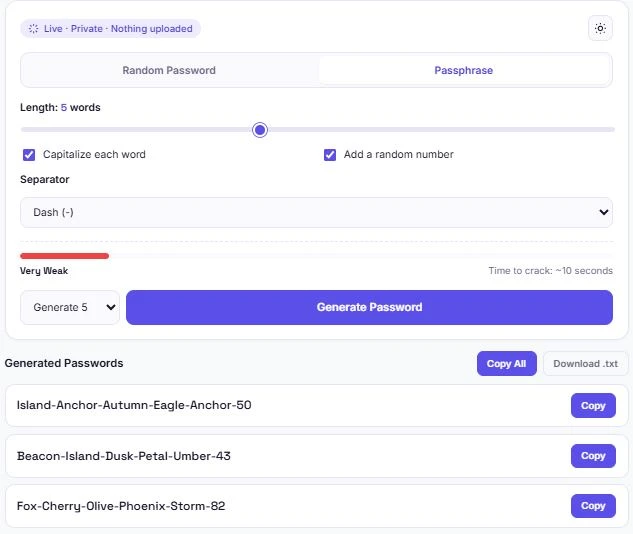
Table of Contents
How to Use This Password Generator
Creating a password takes just a few clicks. Choose a mode, adjust the settings, and hit generate.
- Pick Random Password or Passphrase using the tabs at the top
- For Random Password — set the length with the slider, and choose which character types to include (uppercase, lowercase, numbers, symbols)
- For Passphrase — set how many words you want, choose a separator, and decide whether to capitalize each word or add a number
- Check the strength meter to see the estimated time to crack before you generate
- Choose how many to generate — 1, 5, 10, or 20 at once
- Click "Generate Password", then copy individual results, copy all of them, or download the list as a .txt file
Random Password vs. Passphrase: Which Should You Use?
This tool offers two different approaches, and each one fits a different situation.
Random passwords are a string of random characters — letters, numbers, and symbols with no pattern or meaning. They're extremely hard to guess and ideal for accounts you'll store in a password manager and never need to type manually, like banking logins or work accounts.
Passphrases string together random, unrelated words instead. They're longer but easier to remember and type by hand, which makes them a better fit for things like your device's unlock passphrase, a Wi-Fi password you'll need to type on multiple devices, or your password manager's own master password.
Both approaches, when generated randomly and made long enough, can be extremely resistant to cracking — the right choice depends on whether you need to type it yourself or you're storing it in a password manager.
How Password Strength Is Calculated
The strength meter on this tool is based on entropy — a measure of how many possible combinations an attacker would need to try before guessing your password correctly. More character types, a longer length, or more words in a passphrase all increase entropy, which increases the estimated time to crack.
The "time to crack" estimate assumes an attacker capable of testing 10 billion guesses per second — a realistic assumption for a fast offline attack using modern hardware. This is a widely used benchmark in password security research, including the framework behind Have I Been Pwned, a well-known service that tracks data breaches and lets you check whether your email or passwords have been exposed. This estimate is a mathematical approximation, not a guarantee — actual crack times depend on the specific attack method and hardware used.
Common Password Mistakes This Tool Helps You Avoid
Most weak passwords fail for a handful of predictable reasons. Here's what this tool is built to avoid by default:
| Common Mistake | How This Tool Avoids It |
|---|---|
| Reusing the same password everywhere | Bulk generation makes it easy to create a unique password for every account in one go |
| Using short passwords | Length slider defaults to 16 characters, well above the common 8-character minimum |
| Using predictable patterns (like "Password123") | True randomness via your browser's cryptographic random number generator, not guessable patterns |
| Mixing up similar-looking characters (l, 1, I, O, 0) | Optional "Exclude similar characters" toggle removes the ambiguity |
| Passwords too hard to type or remember | Passphrase mode offers a longer but easier-to-type alternative |
None of these fixes require extra effort on your part — they're built into the default settings, so a generated password is reasonably strong even before you touch a single option.
Why Client-Side Generation Matters
Many password generators run on a server — meaning your generated password technically passes through a company's infrastructure before it reaches your screen, even if it's not stored afterward. This tool works differently: every password is generated entirely inside your browser using JavaScript and your device's built-in cryptographic random number generator, so nothing is ever transmitted anywhere.
This matters because a password generator is, by definition, handling sensitive material the moment it's created. The safest password generator is one where the password never has a reason to leave your device in the first place — not one that promises to delete it afterward.
Where to Use Generated Passwords
Both random passwords and passphrases from this tool work anywhere a password is required, but a few situations are worth calling out specifically:
- Password managers — the strongest setup is generating a random password here for each new account, then saving it in a password manager so you never have to type or remember it
- Wi-Fi networks — a passphrase works well since it needs to be typed on multiple devices, including ones without a password manager installed
- Device passcodes — a shorter passphrase strikes a good balance between security and something you can type quickly, multiple times a day
- Shared or team accounts — bulk generation lets you create several unique passwords at once when setting up multiple accounts
- Account recovery codes — random passwords with symbols work well here since these are typically stored, not memorized
Security Habits Worth Pairing With a Strong Password
A strong password is the foundation, but it works best alongside a few other habits that most security-conscious sites recommend:
Use a unique password for every account. Reusing a password means that if one service is breached, every account sharing that password is at risk. Bulk generation makes it fast to create a fresh password for each new signup instead of falling back on an old one.
Turn on two-factor authentication (2FA) where it's offered. Even an excellent password can be compromised through phishing or a data breach elsewhere. 2FA adds a second layer — usually a code from an app or a text message — so a leaked password alone isn't enough to get in.
Store passwords in a password manager rather than memorizing or reusing them. Once a password is long and random enough to be genuinely secure, it's also too complex to reliably remember — a password manager solves that without pushing you back toward shorter, weaker passwords.
Change a password immediately if a service reports a breach. If a site you use announces a security incident, generating a new password right away closes the window an attacker has to use a leaked one.
None of these replace a strong password — they work alongside it, closing gaps that password strength alone can't cover.
Frequently Asked Questions
Is this password generator free to use?
Yes. There's no sign-up, no limit on how many passwords you can generate, and no premium tier. Both modes and all settings are free.
Does my generated password get sent anywhere?
No. Every password is generated entirely inside your browser using JavaScript and your device's cryptographic random number generator. Nothing is transmitted to a server or stored anywhere.
What makes this different from using Math.random() in JavaScript?
This tool uses the Web Crypto API's cryptographically secure random number generator instead of Math.random(). Math.random() is not designed for security purposes and can, in some cases, be predictable — the Web Crypto API is specifically built for generating unpredictable values like passwords and encryption keys.
Should I use a random password or a passphrase?
Random passwords are best for accounts stored in a password manager since you won't need to type them. Passphrases are easier to remember and type by hand, making them a better fit for things like Wi-Fi passwords or device passcodes.
How accurate is the "time to crack" estimate?
It's a mathematical approximation based on entropy and an assumed guessing speed of 10 billion attempts per second, which is a realistic benchmark for a fast offline attack. Actual crack times can vary depending on the specific attack method and hardware involved.
Why would I exclude similar-looking characters?
Characters like lowercase l, uppercase I, and the number 1 can look identical in some fonts. Excluding them makes a password easier to type accurately by hand, at a small cost to overall randomness.
Can I generate multiple passwords at once?
Yes. Choose 5, 10, or 20 from the count selector before generating, then copy them individually, copy all at once, or download the full list as a .txt file.
Will this work on my phone?
Yes. The layout adjusts for smaller screens, and all generation happens the same way on mobile browsers as it does on desktop.
Quick Summary
This password generator creates strong random passwords or memorable passphrases entirely in your browser, using your device's cryptographically secure random number generator rather than a predictable one. As a password generator, it covers both common approaches — random character strings and word-based passphrases — with a live strength meter, bulk generation of up to 20 passwords at once, and options to copy or download your results. Because this password generator runs entirely client-side, nothing you generate is ever transmitted or stored anywhere.
Disclaimer
This password generator is provided as a free utility to help create strong, random passwords and passphrases. While it uses cryptographically secure randomness and follows widely recommended password practices, no password generator can guarantee protection against every possible security threat, including phishing, malware, or breaches of third-party services where a password is used.
BytePriva and its owner(s) make no guarantees regarding the security of any account where a generated password is used, and shall not be held liable for any loss, unauthorized access, or other consequence arising from its use. You remain responsible for storing generated passwords securely, such as in a reputable password manager, and for following your own organization's or platform's password requirements.
This tool is safe to use — there is nothing to install, no account required, and no data is uploaded or stored. This disclaimer simply clarifies that final responsibility for how generated passwords are stored and used rests with you.